GB
  
You are currently viewing the United Kingdom version of the site.
Would you like to switch to your local site?
4 MIN READ TIME

Sharing with iCloud

Discover the many ways you can share and collaborate on files
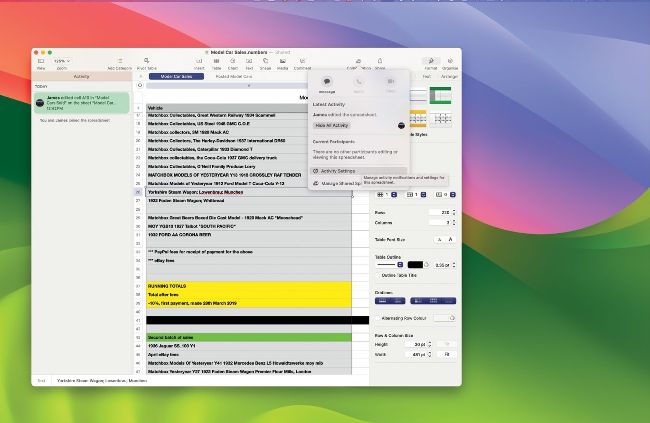
Collaboration has never been so easy.

iCloud+ Family Sharing

If you subscribe to iCloud+, as opposed to only using the free 5GB you get with your Apple ID, you can share storage with your family. After setting up Family Sharing, you can then invite family members to join your shared iCloud+ plan, so the extra capacity to which you’ve subscribed can be used by everyone in your family group.

THERE ARE SEVERAL ways in which you can share files and collaborate using iCloud. You can even share a folder, so others can add to and delete its contents.

In Apple’s iWork apps —Pages, Numbers and Keynote —as long as a file is in iCloud Drive you can send it to another person or collaborate on it. With a group of people working on a file together (up to 100 people can work on a shared document), edits and changes made by one person are synced with the entire group. You can share a document from an open file; click on the Share icon, use the menu to set whether you send a copy of the file or invite others to collaborate on it, and then choose how you send the file or invitation. If the file isn’t in iCloud Drive, you’re invited to move it there. You can also Ctrl–click on a file or folder icon in the iCloud Drive folder and choose Share from the contextual menu. Again, you choose to send or collaborate on it, and then send the file/invitations out.

Unlock this article and much more with
You can enjoy:
Enjoy this edition in full
Instant access to 600+ titles
Thousands of back issues
No contract or commitment
Try for 99p
SUBSCRIBE NOW
30 day trial, then just £9.99 / month. Cancel anytime. New subscribers only.


Learn more
Pocketmags Plus
Pocketmags Plus

This article is from...


View Issues
Mac|Life
July 2024
VIEW IN STORE

Other Articles in this Issue


START
AI FOR THE REST OF US
THE OPENING KEYNOTE of this year’s Worldwide Developers
THE TEAM
Andrew Cottle Art Editor Andy’s mission to improve
Introducing Apple Intelligence
New AI features, mostly on–device, coming to iPhone, iPad, and Mac
> iOS & iPadOS updates
Free updates for supported devices this fall
> macOS Sequoia
ALL THE ENHANCEMENTS mentioned are also coming to
News in brief
A bite of the Apple
Should Apple make a touchscreen Mac?
The iPad is popular. Will a touchscreen Mac be the next step?
> THE SHIFT
MATT BOLTON thinks it might finally be time for Apple to offer its own search engine, even if we wouldn’t trust it at first
LETTER OF THE MONTH
I have for years been asking Apple to
FEATURES
iCloud secrets
You can do a lot with Apple’s cloud computing service. We take an in–depth look at everything it has to offer
What is iCloud?
More than just a storage solution, discover what you can do with Apple’s iCloud
iCloud Photos
It’s easy to keep your pics stored and synced across multiple devices
Master Safari, Mail & Messages
Using iCloud with these Apple apps keeps data in sync
Make the most of iCloud.com
With the iCloud web portal, you can access your apps and files on any web browser
Go further with iCloud Drive
You might be surprised by what you can do with iCloud Drive…
GIVE IT YOUR BEST SHOT
Take amazing photos on your iPhone — we show you how
Gaming on the mac
Apple silicon and the Vision Pro mean that Apple is finally getting serious about playing games
iPad Pro 13–inch (2024)
Incredible power meets an amazing display
Apple Pencil Pro
Latest iPad stylus adds welcome new features
CREATE
Make and use aliases on Mac
Create handy shortcuts to your favorite files, folders and apps
Improve your images with AI
How to use AI tools to make photo fixes and creative adjustments
Boost your display brightness
Let Vivid help you see the light on your HDR–compatible Mac
Clean up your Mac with Hazel
Bring order to chaos with this amazing rules–based Mac utility
Make healthier choices
Use your iPhone to scan barcodes for useful shopping advice
Create collaborative playlists
Sharing is caring — and sharing playlists is a pleasure on Apple Music
Get creative with Canva
Create vibrant artwork, docs, posters, and more with this arty app
Tailor your Apple News feed
Get the news you want right there on your iPhone
OLED displays
The OLED display in the new iPad Pro is a great leap forward
ASK
ASK
TECH SUPPORT & TECHSPLANATIONS
Mac Software
Resolving riddles and restrictions with what you want to run on your Mac
macOS
Shine a spotlight on the solutions to your most irritating Mac problems
REVIEWS
iPad Air 11–inch (2024)
Now with Apple’s M2 on board and more storage
Topaz Gigapixel AI 7
Upscale low–res images into high–quality prints
. Razer Seiren V3 Chroma
Will you heed the Seiren’s call?
GameSir Nova Lite
A solid controller for iPhone and iPad
Best of the best
Can’t find the hardware or app you’re looking for in our reviews section? Then check in here — we’ve highlighted the best in every major category, as voted for by us
MAC LIFE
EDITORIAL EDITOR Nick Odantzis PRODUCTION EDITOR Rachel Terzian
Chat
X
Pocketmags Support