GB
  
You are currently viewing the United Kingdom version of the site.
Would you like to switch to your local site?
10 MIN READ TIME

BETTER LIVING THROUGH SMARTER TECHNOLOGY

HOW TO GET SMART IN THE GARDEN

The smart home has well and truly escaped the bounds of its traditional four walls and is taking over your yard

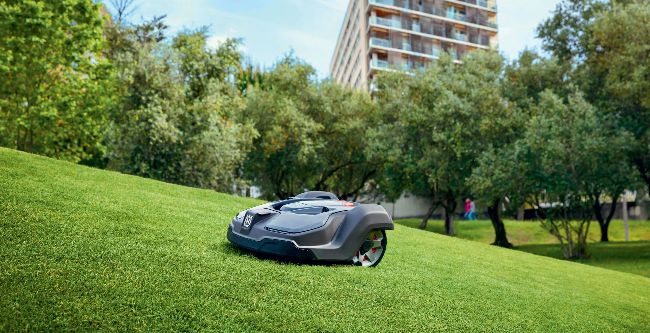
Husqvarna’s higher–end grass– munching bots can easily manage a fairly significant slope.

Those of us lucky  enough to have gardens have become intimately attached to them in this past year. The yard has become more than just a patch of grass, it’s a viable room in its own right, with all the modern conveniences we’ve come to expect.

It should come as no surprise that the burgeoning smart home is expanding outward into this new room at pace, ready to offer you smarter garden management, better connectivity, and a host of new kit to tie into your existing routines. If you’re committed to your outdoor space you can even find full–on entertainment rigs ready and raring to annoy your neighbors as you put your feet up on the patio.

GO, GO, ROBO MOW

> Plan a party

Meater+

$99, meater.com

We keep coming back to the smart Meater thermometer here because it’s the best way to get perfectly cooked BBQ food. That said, it does take away the fun of being grill–vigilant, tongs in hand, at all times.

JBL Charge 5

$TBC, jbl.com

JBL’s successor to the Charge 4 will be landing right as we go to press — but if it’s anything like its predecessor you’re in for a weatherproof audio treat. Loud, bassy, perfectly portable, with a battery that lasts.

Nebula Capsule II

$579.99, seenebula.com

Why not beam a movie onto your wall? The Capsule II is battery powered, portable, and capable of focusing a 720p image up to 100–inches across. It’s not super–bright, though, so wait until the sun goes down.

Smart mowers may be the big headline grabbers of the smart garden world, but don’t be so hasty to presume that a robo–mower is a “drop on your lawn and go” solution. There are a lot of factors fighting against automated grass management, not least of which is your lawn itself. Let’s consider the way a Roomba (other vacuum bots are available) navigates inside your home to work out why: they can barely deal with scaling the edge of a rug, can’t even consider stairs, and wouldn’t be too happy with an undulating surface. Vacuum bots use cameras, lasers, and bump sensors to pick out the edges of a room and map it — that is all comparatively easy compared to what a robot is likely to face in your garden. Lawns vary massively, light levels constantly change, and finding the difference between a path, border, and stretch of grass requires advanced smarts, or at least a good memory.

Unlock this article and much more with
You can enjoy:
Enjoy this edition in full
Instant access to 600+ titles
Thousands of back issues
No contract or commitment
Try for 99p
SUBSCRIBE NOW
30 day trial, then just £9.99 / month. Cancel anytime. New subscribers only.


Learn more
Pocketmags Plus
Pocketmags Plus

This article is from...


View Issues
Mac|Life
June 2021
VIEW IN STORE

Other Articles in this Issue


START
A BOLD NEW DIRECTION
The all–new iMac is finally here! After months
LETTER OF THE MONTH
Thank you for the write up in your
All–new iMac is here!
Slim, stylish, next–gen iMac with Apple silicon
iPhone 6 (2014)
The eighth–generation iPhone was applauded for its improved
CRAVE
THE GEAR WE’RE LUSTING AFTER
Feature
85 BIG SUR SECRETS
Hidden tips, tricks, and shortcuts revealed!
Finder and System Preferences
Finder may look a little unfamiliar but you can tweak it to your liking
Gestures and shortcuts
There aren’t any new system–wide keyboard shortcuts or
HOW TO Customize your desktop
e 1 CHANGE PICTURE Big Sur comes with
How to use Photos extensions
Extensions in Photos allows you to access many
Photos
Photos now allows you to edit videos, add new effects, and much more
What about iMovie?
Now that Photos allows you to edit videos,
HOW TO Create a shared photo album
1 CREATE THE ALBUM In the sidebar
Safari, Mail, and Messages
Safari has new customization and privacy features
HOW TO Send a message with Photos, Effects, or GIFs
1FIND A GIF TO SEND Click the new
Maps
Start planning a trip on your Mac and then continue on your mobile device
Music, Apple TV, Podcasts, & Books
It was evolution rather than revolution for these entertainment apps in Big Sur
Other Big Sur tips and tricks
There are even more ways to get the most from Big Sur
BOOST YOUR ONLINE SECURITY
Beat malware, keep hackers at bay, and ensure your online activities stay private and out of the hands of snoopers and ad agencies
SECURITY BASICS
Combat malware and strengthen passwords
SURF SAFELY
Make sure the websites you visit are kept at arm’s length
SECURE MESSAGES AND MAIL
Encrypt your email and chat to keep conversations private
REVIEWS
TOUGH TESTING, TRUSTED RATINGS
Sawyer Blatz, HERE AT MAC|LIFE we believe you
Airthings House Kit
Breathe easy with this air–quality monitor
Notability
Share and sync with your iPhone and iPad
TextBuddy
A textcellent utility
Rip Them Off
In this game, greed is good
Razer Kiyo Pro
A flawed gem of a camera for Mac users
Gemini 2
Still purging duplicates after all these years
Attentat 1942
Life under Nazi occupation made real
ZipDrive
Your computers, now available from everywhere
Commander One 3.0
A dual–pane Finder alternative ready for Big Sur
TRUE WIRELESS NOISE–CANCELLING HEADPHONES
Upgrade your iPhone, iPad, or Mac audio and rid your surroundings of unwanted noise
Tough testing, trusted ratings
APPLE AIRPODS PRO
Balanced audio, effective noise cancelling, easy– to–use, and an unparalleled transparency mode
APP LIFE
Nudget: Spending Tracker
An easy way to monitor your money
Scanner Pro: PDF Scanner App
This excellent mobile scanner is now free
GoodTask 6.4
Track everything about yourself
Dungeon of the Endless: Apogee
A promising game thwarted by tough luck
Photo Culling
Delete this app, not photos
DEVONThink To Go 3.0
The organizer for everything
6 apps to take the pain out of parenting
Make raising your kid child’s play with these tools
Best of the best
Can’t find the hardware or app you’re looking for in our reviews section? Then check in here — we’ve highlighted the best in every major category, as voted for by us
CREATE
ASK
TECH SUPPORT & TECHSPLANATIONS
Notification Center in Big Sur
Master widgets and notifications to keep yourself organized on your Mac
Refined edits in Luminar AI
Move on from one–click templates and manually adjust picture properties
Burn a DVD in Big Sur
If you still miss iDVD, don’t worry — iMovie and Finder have your back
Print out Contacts labels
How to quickly print addresses onto labels for greetings cards and more
Get image files organized
How to manage your photos with ACDSee Photo Studio For Mac 7
Be mindful on your Mac
The mental health chatbot that can help you feel better
Get started with Signal
Keep your messages free from prying eyes with extra privacy features
Offload your iOS files
Use USB sticks and memory cards to move files from your iPhone or iPad
Use Sleep Mode in iOS 14
Get better sleep with help from your device
Music–recognition software
We discover how apps like Shazam work their magic
RAM
The special relationship between the Mac and Microsoft Word
Charlotte Henry on how Microsoft’s Word became a core part of the Mac
Chat
X
Pocketmags Support