You are currently viewing the United Kingdom version of the site.
Would you like to switch to your local site?
8 MIN READ TIME

Mac Studio

Apple’s most powerful desktop Mac is brilliant for creative pros, but it won’t be for everyone
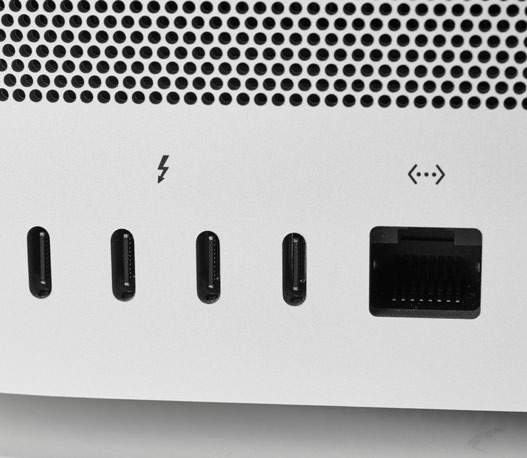
The Mac Studio is festooned with ports, including four Thunderbolt 4 ports on the rear as well as 10Gb Ethernet.
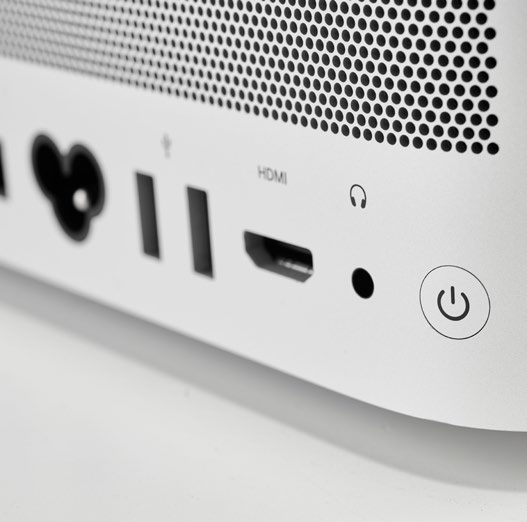
You also get two USB–A ports and an HDMI port, as well as a 3.5mm headphone jack.

Ever since Apple introduced its first Apple silicon Mac in 2020, its direction of travel has been crystal clear. First to arrive were the M1–powered MacBook Air, Mac mini, and 13–inch MacBook Pro in 2020, followed by the gorgeous 24–inch iMac in April last year. Last October, Apple moved things on again with the new 14–inch and 16–inch MacBook Pro offering up new members of the M1 family, the M1 Pro and M1 Max. Now there’s this, the new Mac Studio — aMac mini on steroids, armed with a choice of either an M1 Max or the new M1 Ultra, making it the most powerful desktop Mac ever made — or at least until the new Apple silicon–sporting Mac Pro arrives sometime in the coming months.

Thanks to the power of Apple silicon, even an M1–powered Mac mini or MacBook Air is powerful enough for most people, so it should come as no surprise to find that the Mac Studio isn’t really aimed at us — instead Apple’s target market is the creative pros who edit 8K videos, render graphics–heavy scenes and produce multitrack audio streams all day long.

And the new Mac Studio is priced accordingly. $1,999 buys you a Mac Studio equipped with an M1 Max chip with a 10–core CPU, 24–core GPU and 16–core Neural Engine), 32GB of unified memory and 512GB of solid–state drive (SSD) storage. Spending $3,999 takes you into M1 Ultra territory, complete with a 20–core CPU, 48–core GPU and 32–core Neural Engine, 64GB of unified memory, and a 1TB SSD. The model on test here shows just how far Apple can push even that. Priced at $6,199 (via the Mac Studio’s Configure To Order options), it comes with a 20–core CPU, 64–core GPU, 32– core Neural Engine M1 Ultra, plus 128GB of unified memory and 2TB of SSD storage. Increasing the storage to 4TB will cost you another $600, while adding 8TB costs $1,800.

Unlock this article and much more with
You can enjoy:
Enjoy this edition in full
Instant access to 600+ titles
Thousands of back issues
No contract or commitment
Try for 99p
SUBSCRIBE NOW
30 day trial, then just £9.99 / month. Cancel anytime. New subscribers only.


Learn more
Pocketmags Plus
Pocketmags Plus

This article is from...


View Issues
Mac|Life
June 2022
VIEW IN STORE

Other Articles in this Issue


START
THINGS ARE WARMING UP
Summer is finally here! (For those of you
> THE SHIFT
MATT BOLTON is worried that Apple’s stance on app store changes have meant that it’s become a follower, not a leader
LETTER OF THE MONTH
I found the DAC article in the April
TV+ finally hits a home run
Apple’s streaming service on the rise as Netflix and CNN+ stall
iMovie updated
Video creation made even easier for newbies
M2 Macs coming?
WHEN IT INTRODUCED its latest chip, the M1
News in brief
A bite of the Apple
CRAVE
THE GEAR WE’RE LUSTING AFTER
Music & TV masterclass
MUSIC & TV
Sharing your sounds, fixing mangled metadata and transforming your TV experience couldn’t be easier
Gear for the great outdoors
GEAR FOR THE GREAT OUTDOORS
The perfect tech to bring on your travels, whatever the weather
IN THE GARDEN
Tech that will thrive outdoors come rain or shine
OUT ON THE ROAD
Top travel tech accessories for the laptop lifestyle
ON VACATION
Make more of your explorations with these apps and gadgets
REVIEW
TOUGH TESTING, TRUSTED RATINGS
REVIEWS
Studio Display
>>> Gear Up The Studio Display only has
AQARA CAMERA HUB G2H PRO
An affordable, 1080p security camera with HomeKit support
HYPERDRIVE 6–in–1 USB–C Media Hub
Connectivity for USB–C iPads
PowerPic mod
Unique wireless charging stand with some quirks
The best protective cases for Apple Watch S7
These watch/strap combinations will keep that pretty face scratch free
Keychron M1 Mouse
A lightweight mouse with plenty of options
OWC miniStack STX
Add up to 26TB of storage to your Mac Mini
THE BEST APPS TO BE MORE PRODUCTIVE
Need to get better organized? These task management tools will help you get more done
THINGS 3
It checks all the boxes for syncing and integrating with macOS, and allows you to focus on important tasks
Luminar Neo
AI–powered image enhancement
eM Client 9.0
Switch up your email routine
Total War: Medieval II
Once more into the breach, dear iPad
Obscura 3
A pro camera app with slick controls
Schooly
Take control of your timetable
Unpacking
Life told through simple objects
Six apps to track your finances
Demystify your money with these frugal apps
Best of the best
Can’t find the hardware or app you’re looking for in our reviews section? Then check in here — we’ve highlighted the best in every major category, as voted for by us
Beginner’s Guides: Master Printing
Beginner’s Guides Master Printing
Setting up a printer is a whole lot more straightforward these days. Here’s how…
ASK
ASK
> Safe install of macOS 10.14
CREATE
CREATE
Master Universal Control
Rename multiple files
The Finder in macOS allows you to rename files in batches. Here’s how…
Work fast with Hot Corners
Hot Corners in macOS can make your everyday tasks quicker
Publish your own ebook
Want to publish to Apple Books? All you need is Pages (and a book)
Measure almost anything
It may be unheralded, but the humble Measure app can be very useful
Discover Apple News
Apple’s News app provides access to hundreds of publications that can be tailored to suit you
Better bokeh on iPhone
How to add a flattering background blur to your portraits
Send messages on apple Watch
Staying in touch has never been easier, even when you’re out and about
Go dark with Noir
Add a dark mode to every website in Safari without lifting a finger
Mixed reality and Apple Glasses
It will be Apple’s biggest launch in years. What’s behind the Apple headset?
Chat
X
Pocketmags Support