EXPERT ADVICE
TECH SUPPORT & TECHSPLANATIONS
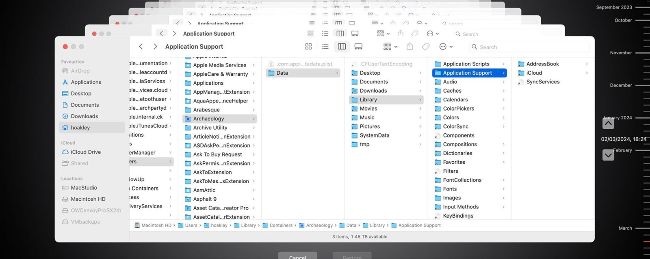
You should be able to restore shared databases from Time Machine backups — check your Home Library/Containers folder.
> How to restore iCloud shared databases
I have a key app that syncs its encrypted database using iCloud. If I needed to, could my Time Machine backups restore that database?
In most cases, shared databases in iCloud should be backed up by Time Machine if it makes backups of your Home folder, and you haven’t put the Library folder within that in the list of excluded locations.
Shared databases like this shouldn’t be included in your iCloud Drive. But the local copy of the database they save to iCloud using iCloudKit, a different service from file sharing in iCloud, should be located in a folder inside your user’s Library, normally inside a suitably named folder in Containers there. That app’s documentation may identify its location.
Even when you set iCloud Drive to Optimize Mac Storage, so files can be evicted and not held locally, shared databases remain accessible on your Mac. The app uses that for its transactions, that are then synced to the copy of their database in iCloud.
The easiest way to restore shared databases, though, is simply for them to be synced down from iCloud, requiring no effort on your part, or access to hidden folders. For some of the more common databases such as those of Apple’s bundled apps, that’s usually the most reliable.

Our resident genius Howard Oakley solves your Mac and iOS problems
Is “storage debt” dangerous?
NOW THAT YOU can rent up to 12TB of storage in iCloud+, some Macs are running into “storage debt”. That can only occur when they have Optimize Mac Storage turned on in iCloud settings, and many of the files in iCloud Drive have been evicted from that Mac’s local storage. When the total size of those evicted files exceeds free storage space in your Home folder, there’s no longer the free space to accommodate the entire contents of iCloud Drive.
Like other forms of debt, that isn’t necessarily bad, but it does indeed come with some significant side effects. If your files are only stored in iCloud, then Time Machine can’t back those files up, nor can Spotlight search them. Not only that, but you’re now a prisoner of Optimize Mac Storage, can’t turn it off, and you’re committed to paying for sufficient storage quota.