GB
  
You are currently viewing the United Kingdom version of the site.
Would you like to switch to your local site?
13 MIN READ TIME

ASK

TECH SUPPORT & TECHSPLANATIONS

Email Mac|Life at ask@maclife.com

Hot topics right now

Make sure you check out these important support articles on Apple’s website to better understand the latest features.

FIND OUT MORE ABOUT THE RETINA DISPLAY

To find out which Mac computers are equipped with a retina display, what their native resolution should be, and how to optimize your retina display, head over to bit.ly/ml172ask1.

GIVE YOUR KIDS MORE PURCHASING FREEDOM

If you want your children to be able to make purchases on an iPhone, iPad or Mac - whether it’s a new app, book, song, or something else - without your say so, Ask to Buy makes the process completely painless. Find out more at bit.ly/ml172ask2.

BEST SETTINGS FOR WI-FI ROUTERS

Apple has listed recommended settings for Wi-Fi routers and access points, and you can view these at bit.ly/ml172ask3.

> Backing up Photos libraries to Dropbox

I back my MacBook up to Dropbox, but some things don’t work well there, like Photos libraries. How can I fix those?

To make a faithful backup, as Time Machine and other backup apps do, the disk that you’re storing your backups on needs to support all the features used in the original files. Few cloud services provide those, and Dropbox has limitations which make it unsuitable for storage of Photos libraries which can break their backups.

Photos libraries are really folders containing images, thumbnails, databases, and more. There are known problems which may arise in syncing changes in images and databases which can at best cause strange effects, and at worst can make a restored library unusable.

Another common problem with cloud storage is that it doesn’t support metadata such as extended attributes, used by many Mac files. Even iCloud limits which metadata it handles. One way round this is to use iCloud Photo Library, if you can afford sufficient storage space, opting to Download Originals to the Mac in Photos preferences. Ensure you also keep a full local backup using Time Machine, Carbon Copy Cloner, or an app like ChronoSync. Third-party cloud services are great for sharing files, and for off-site storage of important documents, but normally aren’t a reliable way to back up more complex structures like libraries.
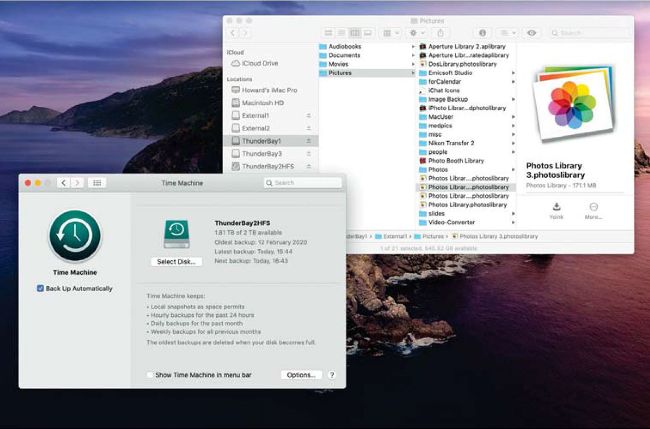
Back up your Photos libraries using Time Machine, or an app such as ChronoSync which makes an identical copy to local storage.

Get official documentation at support.apple.com | Get help with hardware atsupport.apple.com/repair

> Working with sensitive documents

Unlock this article and much more with
You can enjoy:
Enjoy this edition in full
Instant access to 600+ titles
Thousands of back issues
No contract or commitment
Try for 99p
SUBSCRIBE NOW
30 day trial, then just £9.99 / month. Cancel anytime. New subscribers only.


Learn more
Pocketmags Plus
Pocketmags Plus

This article is from...


View Issues
Mac|Life
October 2020
VIEW IN STORE

Other Articles in this Issue


In This Issue
DIGITAL IMPROVEMENTS
Do you read Mac|Life on your iPad? If so, you
FEATURE
THE ULTIMATE APPLE MEDIA GUIDE
WHETHER YOU SUBSCRIBE to Apple Music or keep it old-
100 APPLE HACKS & SHORTCUTS
Control Center and tap on the icon in the top-left
START
Apple Design Awards winners 2020
THERE ARE SO many apps and games available on the
> THE SHIFT
APPLE IS AN international company, but it’s also one of
LETTER OF THE MONTH
I’m writing to report an issue that I am experiencing
REVIEWS
REVIEWS
HERE AT MAC|LIFE we believe you should only buy the
Clario
Security suites are a dime a dozen, but even allowing
GoodLinks
Made for Mac, iPhone, iPad, iPod touch Needs macOS 10.15
Mountain Duck 4.0
Mountain Duck would like to be your one-tool-fits-all for accessing
INSIDE
Inside has no heroes. You have no superpowers, you can’t
eufyCam 2 Pro
$349.99 (Two cameras and HomeBase, exclusive to bestbuy.com) From Anker,
Speedify 10
Made for Mac, iPhone, iPad, iPod touch Needs OS X
Hitcase OneClip Camera Lens Kit Bundle
If you want to up your iPhone photography game, this
InvisibleShield UV Sanitizer
If you’re worried about the kind of bacteria your phone,
Painter 2021
Corel’s graphics applications were among the first to become available
APP LIFE
REC - Pro Video Camera
Made for iPhone, iPad, iPod touch Needs iOS 13 or
Punkt: One- Sentence Journal
Made for iPhone, iPad, iPod touch Needs iOS 13.0 or
Outgoings - Track Expenses
Made for iPhone, iPad, iPod touch Needs iOS 13.4 or
Remote, Keyboard & Mouse
Made for iPhone, iPad, iPod touch Needs iOS 11.0 or
Spike - Email, Chat, Notes
Made for iPhone, iPad, iPod touch Needs iOS 10.0 or
Grammarly Keyboard
Made for iPad, iPhone, iPod touch Needs iOS 11.2 or
Slay The Spire
Made for iPhone, iPad, iPod touch Needs iOS 9.0 or
6 apps to take creative photos
It’s easy to take attractive photos with your iPhone thanks
Best of the best
HOME LIFE
> HOW TO MAKE A… SMARTER ASSISTANT
Every smart assistant, E like every computer platform, is different
CREATE
Make your battery better
Where to find your battery’s condition status and how to
Create the perfect portrait with Luminar 4
In the Looks menu, you will find preset Portrait treatments
Fantastical calendar sets
FANTASTICAL HAS AN excellent weapon in its arsenal: calendar sets
Customize Control Center
CONTROL CENTER IS one of the most useful but perhaps
Learn more with Readwise
READING EBOOKS CAN be thought-provoking, inspiring, and educational, prompting us
Take note in Music Memos
IF YOU’RE MUSICALLY minded, you’ve probably used Voice Memos to
Haptic Touch
All about Haptic Touch for iPhone and how it differs
Mac clones
IN THE MID-1990S, Apple was struggling. CEO Michael Spindler’s one
Chat
X
Pocketmags Support