GB
  
You are currently viewing the United Kingdom version of the site.
Would you like to switch to your local site?
13 MIN READ TIME

ASK

TECH SUPPORT & TECHSPLANATIONS

Email Mac|Life at ask@maclife.com

Hot topics right now

Make sure you check out these important support articles on Apple’s website to better understand the latest features.

PROBLEMS WITH EXTERNAL DISPLAYS?

If you’re having video problems with an external display that’s connected to your Mac - if it’s blank, fuzzy/blurry, or there are other annoying issues with it - then this support article should be useful to you as it lists the various steps to help get your screen working: bit.ly/ml171ask1.

CHANGE YOUR MAC PRO’S SSD MODULES

Got a Mac Pro (2019)? Well, you’re pretty lucky then, and you also might be wondering how to upgrade your internal SSD modules, whether it’s to replace a faulty unit, or to upgrade to a bigger capacity SSD module (modules available here: https://bit.ly/ml_prossd). If so, go to this support page to find out how to install or replace the SSD modules yourself: bit.ly/ml171ask2.

> How can I list my Applications in more useful groups?

When I list my Applications by groups in a Finder window, then select the Application Category option, most are shown under Other - even Apple’s Home and News apps. How can I show them in meaningful categories?

This uses categories which Apple has set according to those used in its App Store. If most of your apps have been obtained from there, it should work quite well, although like the store its categories are unevenly spread. It has 19 sub-categories of Games, but others are more arbitrary.

Unfortunately, there’s no easy way to add or change these app categories, since they’re set by macOS. In theory, you can add or change the category for those apps which aren’t bundled in macOS (as those are protected by SIP). The category for each app is set in the LSApplicationCategoryType value in its Info.plist file, inside the app.

However, that file is protected by the app’s signature, so changing it breaks the signature, and Catalina in particular will then refuse to open that app. So don’t bother trying to change an app’s category if you want to use it. There are alternatives using metadata which you can change, but they only work in Finder’s Find windows and not with Groups, and involve adding extended attributes.
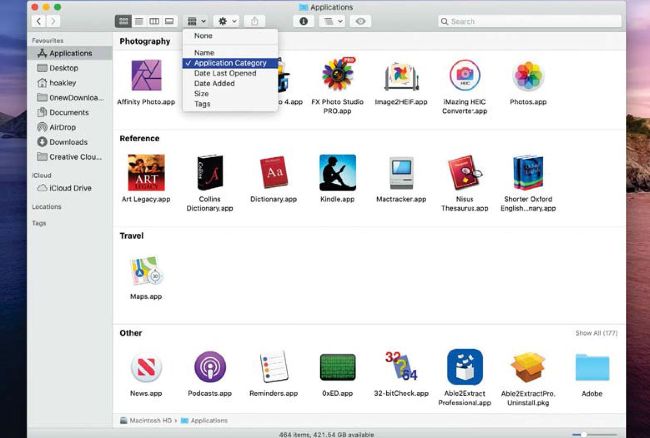
The Finder’s Application Categories are fixed, and match the App Store, leaving too many in the Other category.

Get official documentation at support.apple.com | Get help with hardware atsupport.apple.com/repair

Unlock this article and much more with
You can enjoy:
Enjoy this edition in full
Instant access to 600+ titles
Thousands of back issues
No contract or commitment
Try for 99p
SUBSCRIBE NOW
30 day trial, then just £9.99 / month. Cancel anytime. New subscribers only.


Learn more
Pocketmags Plus
Pocketmags Plus

This article is from...


View Issues
Mac|Life
September 2020
VIEW IN STORE

Other Articles in this Issue


In This Issue
A BIG UPGRADE FOR MACOS?
This month’s cover star is macOS Big Sur, and boy
FEATURE
Hands-on: iOS14 & iPadOS 14
By the time you read this, public betas of all
THE BEST GEAR FOR YOUR HOME OFFICE
FOR MANY OF us, the last few months have involved
START
SPOTLIGHT
At $499, the Mac mini was the “most affordable Mac
THE SHIFT
AH, THE WONDERFUL possibility space of the unknown. When you
LETTER OF THE MONTH
I’m reading the June issue right now, and noticed the
Welcome to macOS BIGSUR
WHEN APPLE SHOWCASED Wits successor to macOS 10.15 Catalina at
REVIEWS
TOUGH TESTING, TRUSTED RATINGS
HERE AT MAC|LIFE we believe you should only buy the
Logitech MX For Mac
Features Bluetooth, USB adaptor, USB-C charging Needs macOS 10.13, iPadOS
Allegory 1.2.8
Allegory was one of the first apps to take advantage
DEVONthink 3.5
DEVONthink is a universal inbox for every kind of information,
Razer Opus
Features THX certified, ANC, quick attention mode, auto-pause/auto-play, up to
Belkin Thunderbolt 3 Dock Pro
Features SD reader, Gigabit Ethernet, 4x USB 3.0, USB 3.1,
HyperDrive DUO 7-in-2 USB-C Hub
Apple’s recent laptops use USB-C ports for power and data
eufyCam 2C
Features 1080p video recording, IP67 weatherproof, motion zones, AI detection,
Moshi IonGo 5K Duo
Moshi’s compact battery pack has a built-in Lightning cable and
Ekster Laptop Sleeve
Ekster’s slim sleeve can hold MacBooks up to 13 inches,
Sonos Arc
Features Eleven drivers (eight woofers, three tweeters), HDMI eARC, Ethernet,
VirtuaVerse
VirtuaVerse is an homage to both the past and future
ecobee SmartCamera
Features 1080p video, night vision, two-way audio, person detection, cloud
APP LIFE
Noto - Elegant Note
Made for iPad, iPhone, iPod touch Needs iOS 13 or
Adobe Photoshop Camera
Made for iPhone, iPad, iPod touch Needs iOS 12.0 or
Oh Bother
Made for iPhone, iPad, iPod touch Needs iOS 13.0 or
Tripsy: Travel Planner
Made for iPhone, iPad, iPod touch Needs iOS 13.0 and
Moodistory Mood Tracker, Diary
Made for iPhone, iPad, iPod touch Needs iOS 11.0 and
Filmr - Video Editor & Filter
Made for iPad, iPhone, iPod Touch Needs iOS 11.0 or
Camera+ 2
Made for iPhone, iPad, iPod touch Needs iOS 12.0 or
6 apps to enjoy the outdoors
Being outdoors is something of a contentious issue right now,
Best of the best
HOME LIFE
SYSTEMS EXPLAINED
Connectivity divides us, drawing a line C between those things
CREATE
Enhance images in Luminar 4
How to use AI, presets and manual controls to improve
Plan a journey in Fantastical
A Fantastical subscription, macOS 10.13 or later, iOS 13 or
Keep your Mac cool
IT DOESN’T MATTER whether you’re running the latest Mac mini
Manage media libraries
WHEN YOU USE the Music or TV apps, all of
Infinite music to your DJ box
DJAY PRO IS an extraordinarily useful app for DJs at
Do more with Photoshop
WHILE BROWSING THROUGH your iPad’s Camera Roll, you’ll get lots
Content caching
What content caching is and how to use it across
PowerPC transition
ONE OF THE advantages of the Macintosh, from its launch
Chat
X
Pocketmags Support