ASK
TECH SUPPORT & TECHSPLANATIONS
> Save downloading multiple updates
How can I avoid downloading the same macOS updates for each of my Macs that are running Big Sur?
Anyone with several Macs or devices can set up a Content Caching Server on a Mac, which eliminates multiple downloads. This feature used to be in Mac OS X Server, and moved into the regular version of High Sierra. To be most effective, use a Mac which is left running all or much of the time, with a good internet connection and sufficient free space, which can be on an external disk.
Although the service has advanced options, for most small networks it’s simple to set up. Having identified where these updates are going to be stored, open the Sharing pane and select the Content Caching item in the list at the left. Decide whether you want it to cache only shared content including updates, or to add iCloud content as well. Click on the Options button to set the Cache Location using the Edit button, and adjust the maximum size to what you can afford.
Settings also let you share that Mac’s internet connection, a separate decision which isn’t needed for Content Caching. When you next start up or restart your other Macs and devices, they will automatically connect to this service and your server will only download one copy of the updates and other content.
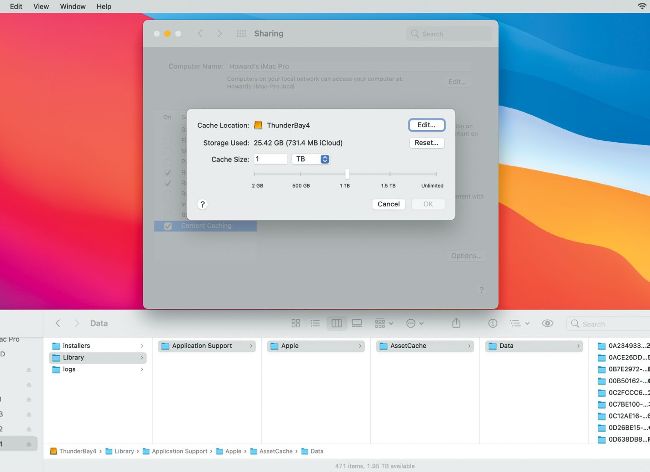
The macOS Content Caching service can store updates and other content on an external disk, set in its Options.
Hot topics right now
Make sure you check out these important support articles on Apple’s website to better understand the latest features.
WHAT’S NEW IN MACOS BIG SUR?
Big Sur is now at version 11.2.1, and you can find out what’s been changed or fixed in every update until then, such as improved Bluetooth reliability and support for AirPods Max:
bit.ly/ml179ask1.
CALIBRATE YOUR PRO DISPLAY XDR
If you want to fine–tune the capabilities of your Apple Pro Display XDR, Apple shows you how to improve the calibration, or recalibrate it, if need be:
bit.ly/ml179ask2.
AIRPODS NOT WORKING AS EXPECTED?
When your AirPods aren’t working in either the left or right side, first make sure they’re charging properly. If so, you might need to reset them to get things back to normal:
bit.ly/ml179ask3.
> Lost printer options
Since I updated my iPad to iPadOS 14.1, it hasn’t been able to print properly. For example, there’s no option now to print documents in black and white instead of color. Is there a workaround to resolve this issue?