New in Photoshop Elements 2022
YOU’LL NEED THIS
PHOTOSHOP ELEMENTS 2022
http://www.adobe.com/ photoshop-elements
Some photos Imagination
ADOBE UPDATES PHOTOSHOP ELEMENTS, its beginner-friendly image-editing app, every year, but we’re starting to wish it didn’t. The problem is not that it’s an excellent program, but the urge to upgrade to the latest version is strong and the new features rarely justify the price.
It’s fine if you only upgrade every time you buy a new PC, but annually? Elements isn’t priced as a subscription, unlike its big brother Photoshop CC, which gets a constant flow of patches and upgrades. Instead, you pay once and use the software for as long as your PC supports it.
The 2022 version of the app piles on the automation, with clever transformations powered by Adobe’s Sensei cloud tech. There’s a thrust in the direction of moving images too, with mobile overlays that can add fun to social media posts. There’s photo warping, edits to perfect your pet pictures, clever background extensions, new slideshow templates, and more.
–IAN EVENDEN
© JOHANN, MATHEUS BERTELLI, NICOLA GIORDANO, ALYSSA SIEB, UPLIFTSTORES.
1 PHOTO WARPING
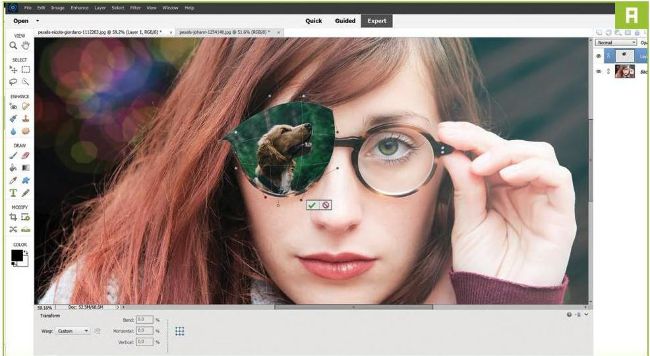
Image warping is now more strongly built into Elements. If you want to make an image fit to the contours of another, open it on a new layer, then press Ctrl +T to enter Free Transform and resize it to fit. Then click the new icon on the bottom bar that looks a bit like the windshield of a car, or a bent window with a curved line underneath it. This toggles you into Warp mode, and the corner handles on the image you’re transforming will now bend it in on itself, and eventually fold it back over itself if you pull them far enough [Image A]. There’s a pop-up menu called Warp at the bottom of the interface, which allows you to choose and customize pre-set warp shapes. It’s a bit of a difficult tool to get to grips with, and proper preparation and sizing of the image you want to warp is crucial, but for those times you want to fit an image around a curve, it’s extremely useful.