BALLS TO THE WALL
THE ULTIMATE GAMING PC
Strap in, as our RTX 4080 Super build has finally landed, says Zak Storey
It can be argued that Nvidia’s 40 series Super cards have been incredibly disruptive since their launch. We’ve focused these last two issues on the 70 and 70 Ti Super, and the value that they represent, pairing them with suitable processors, and apt systems built around ensuring they provide the best possible value out of the lot.
Interestingly, the RTX 4080 Super, although initially launching as a big value option with a $200 RRP drop, has become expensive, and because of that, we decided to push the limit and see exactly what we can achieve if we threw everything into a build with it in. We picked up the Asus ROG Strix Gaming OC variant, with its massive triple-fan white cooler, and set to work building a spec list that would pair well with the GPU.
This build features one of the latest and greatest Core i9s from Intel, 4TB of
PCIe 5.0 storage, a 1200W PSU, a stunning Z790 motherboard from NZXT, and perhaps more interestingly, a full-tower, 90-degree shifted chassis, allowing us to take advantage of thermal convection with a chimney style design. This build is incredibly exciting, and a bit of a first for this journalist in terms of working with a chassis like this. So with that out of the way, let’s dive in and find out exactly what makes this build tick.
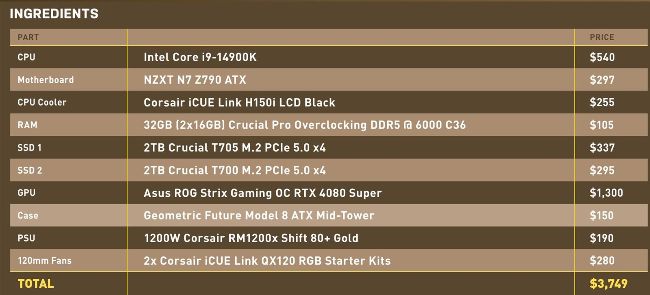
PRICES CORRECT AT THE TIME OF PUBLICATION
HARDWARE HAVOC
CPU
INTEL CORE i9-14900K
Intel’s Core i9-14900K might be one of the hottest chips around (seriously, we’ve not actually seen this thing not run at 100C under full load), but it’s one of the fastest. With eight performance cores, 16 threads, 16 efficient cores, and 36MB of smartcache, this insane little number will quite happily crank itself up to 6 GHz, depending on workloads, and rip-roar through any task you throw at it.
It unequivocally dominates the gaming scene right now, and although it isn’t exactly the best value option out there, if you’re after the ultimate performance on a mainstream platform, then the 14900K is the chip to beat. $540, www.intel.com
Motherboard
NZXT N7 Z790X
It might be on the ‘cheaper’ end of the Z790 spectrum, but this motherboard hits the right notes. With support for Intel 14th and 13th gen chips, it also packs some epic connectivity. You’ve got support for PCIe 5.0 graphics cards, along with two PCIe 4.0 M.2 SSDs, DDR5 support up to 7200 MHz, and some tasty rear I/O, including seven USB ports, a USB C, HDMI, 2.5G Ethernet, 5.1 Audio Out plus Optical audio, WiFi 6E, and a clear CMOS button. On top of that, it has a 16+1+2 power phase setup in a sleek, motherboard design, complete with full board brushed aluminum armor. You can also get the N7 in black or white to match your build. $297, www.nzxt.com
BUILT& TESTED
Step-By-Step Guide
PG. 22
RAM
32GB (2X16GB) CRUCIAL PRO OVERCLOCKING DDR5 @ 6000 C36
Our memory pick for this build actually came as an accidental shipment alongside the drives we’re going to be using this time around, and that’s Crucial’s Pro Overclocking DDR5. This is an incredibly discreet kit of 32GB 6000 MHz memory, complete with C36 latency, giving it a 12 ns realworld latency. In other words, it’s pretty slick, particularly at that price.
Similar to our last build, there are no frills—just pure, pristine, black heatsinks finished with a crisp logo. Intel chips don’t massively benefit from faster memory speeds, but it’s still a nice bonus to have, particularly for video rendering, where frequency and capacity work incredibly well together. $109, www.crucial.com
SSD 1
2TB CRUCIAL T705 M.2 PCIE 5.0 SSD
Our SSD of choice for our OS is Crucial’s T705 M.2 PCIe 5.0 SSD. This blisteringly fast 5.0 drive clocks in with sequentials topping out the 5.0 bandwidth at a stunning 14.5 GB/s. It’s not the cheapest drive out there, and at $337 it certainly does take its toll on the old bank account, but if massive file transfers are your thing, then the T705 is the perfect drive for you. $337, www.crucial.com
ALWAYS CHECK THE FINE PRINT
We’re never ashamed to admit when we’re wrong, or when we make a mistake here at Maximum PC, and sadly, we were caught off guard in this build with a tiny detail that’s somewhat hammered our SSD performance. By default, the NZXT N7 Z790 motherboard does ‘technically’ support PCIe 5.0 M.2 SSDs as a boot drive. It’s listed in the advertising for it, and in the specs tables. However, when you read the finer print, it turns out that PCIe 5.0 drives are in fact only supported in the topmost PCIe slot, ie. not the M.2 slot, the x16 GPU slot… yeah. Less than helpful, that NZXT.
In our test results (and we’ll go into a little more detail on this later), you’ll see that maximum sequentials are around half what we’d expect, as unsurprisingly, they’re running in a PCIe 4.0 board. We knew we’d be getting that with the T700, as it was chosen more for its Random 4K performance for gaming rather than sequential file transfers, but it’s a well-earned reminder that you should always check the fine print.
SSD 2
2TB CRUCIAL T700 M.2 PCIE 5.0 SSD
Our second SSD is another PCIe 5.0 drive, but with a caveat. We initially picked this drive, knowing that our sequential performance would be capped at 7.5GB/s or so, as it would be sitting in a PCIe 4.0 M.2 slot, the major difference being that the random 4K performance (not hindered by bandwidth limitations) would be higher, and that is a major performance indicator for a game’s load time. Both of these drives also future-proof us significantly once we jump up to Z890 and Intel’s 15th gen in the future, or AMD’s X770. $295, www.crucial.com
Case
GEOMETRIC FUTURE MODEL 8 ATX MID-TOWER
A bit of a wild-card choice for the case this month. We’ve gone with the Geometric Future Dharma chassis. Launching in mid 2022, this is a highly intriguing case. The company, only founded in 2020, has come a long way in a very short amount of time.
What makes the Model 8 unique, however, is its internal layout. Featuring a very similar design to that of most modern towers, the internals have been rotated 90 degrees. What that means is that your motherboard I/O, GPU ports, and everything else are actually routed out of the top of the chassis itself. Admittedly, this is a bit of a hassle, but what it does do, with enough floormounted fans, is give us access to some incredible cooling potential.