RYZEN 9000 UNLEASHED
Zak Storey puts AMD’s latest chips and motherboards to the test
STEP-BY-STEP GUIDE
BUILD THIS PC!
PG. 22
https://content.jwplatform.com/videos/sI7k4tVf-u2lN49He.mp4
Please type this URL into your browser if the link is broken
WE WERE THERE, dear reader, seven years ago, when Ryzen first landed center stage. We remember it well. A subdued press event hidden away under a hotel in San Francisco. Everything was under lock and key. NDAs were signed and lips sealed as the world’s tech press shuffled into a presentation hall. Heck, we couldn’t even tell folk we were getting a flight to the darn place, they were that secretive about it. Still, we all gathered at the event, then Lisa Su emerged from the shadows, and with her came a powerful CPU, one that could dominate all, and pave the way back to red-tinged processing greatness.
Ryzen’s first-generation processors had landed, masterminded and designed from the ground up by Jim Keller and a crack team of silicon experts and engineers. Its very launch reimagined what a CPU could be— even should be. It was the first time we’d seen a truly modular CPU design. Chips that could be scaled up or down, intertwined with the beautifully impressive infinity fabric to deliver performance and value unlike any we’d seen prior. Intel had to scramble, and if we’re honest, it’s still scrambling today. No bad thing.
That was many years ago, and at long last, the 9000 series has finally graced us with its presence in a Maximum PC build. It’s hard to believe that it’s been 394 weeks since we could first even talk about its progenitor chip—394 weeks filled with ups, downs, world events, and generation after generation of processor, all of it leading up to this one moment. It’s remarkable, really. In that short time, AMD’s Ryzen architecture has continued to advance and develop. Transistor size has shrunk, the inclusion of iGPUs, smarter resource allocation, and intriguing new 3D cache design concepts have pushed these chips ever higher on their way to greatness. And at last, we’re finally here.
So, the build? At its heart lies the AMD Ryzen 9 9900X paired with Asus’s latest and greatest X870E Strix Gaming motherboard. A new chipset, a new chip, and some stellar hardware picks. We’ll be honest, this is unabashedly all about the CPU this time around. It’s a well-balanced build, but we’re here for one thing and one thing alone: to see if AMD’s latest generation is another great launch or a flash in the pan. Let’s get to the parts, shall we?
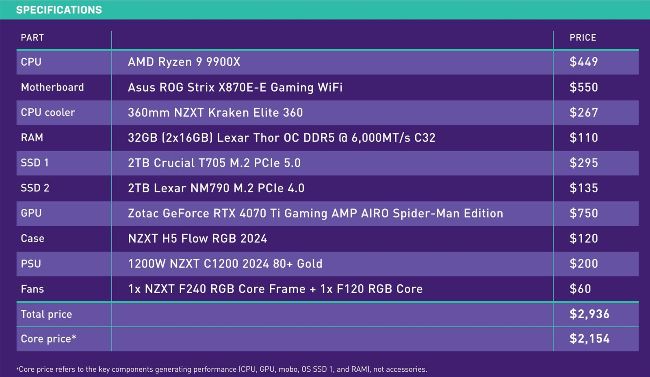
PRICES CORRECT AT THE TIME OF PUBLISHING
MOTHERBOARD
Asus ROG Strix X870E-E Gaming WiFi
We know we say this a lot, but the I/O complement on this is utterly insane.
But let’s start with the obvious: it looks gorgeous. The array of heatsinks, pipes, blocks, and suave lighting involved in this is simply awesome. But it’s more than just skin deep. The X870E-E (weird name—we won’t judge), supports up to three PCIe 5.0 M.2 SSDs, each with its own massive dedicated heatsink, with the primary drive featuring a built-in heatpipe. Then there’s the DIMM slots, supporting dual-channel memory up to 8,400MT/s, plus an 18+2+2 VRM setup to keep whatever 7th, 8th, or 9th series chip you’re using well juiced up.
But jump around the back, and oh boy—there are eight 10GB USB Type-A ports, two 40GB USB Type-C ports (with DisplayPort connectivity), one USB-C with 10Gb/s support, one USB-C rated at 20GB with wattage watching on it, plus a 5G Ethernet port, Wi-Fi 7 as standard, not to mention mic in, line out, and
SPDIF out as well. Oh, and HDMI 2.1, plus your usual clear and reset BIOS buttons.
www.asus.com
CPU
AMD Ryzen 9 9900X
Ninety dollars. That’s how much extra you have to pay for AMD’s latest 900X chip compared to its last-gen equivalent, although that did debut at nearly $500.
Still, this is no slouch in the performance department either.
It still packs in that 12-core, 24-thread configuration utilizing two CCDs and one I/O die, and also still features 64MB of total cache. Boost clock similarly remains the same at 5.6GHz max. Although that might not sound that impressive, AMD’s managed to pull this off while dropping the TDP from 170W to 120W in the process.
Other items of note? Well, it’s dropped from 5nm to 4nm transistors, courtesy of TSMC’s N4 FinFET fab process
(we’ve seen this already on AMD’s 8000 series processors), there’s been a slight bump in DDR5 memory support, with it pinging up to 5,600MT/s in dual-channel mode, and the L1 cache has been increased from 64KB to 80KB (with 48KB dedicated to data storage, rather than 32KB on the previous iteration). On the
surface, there’s not a lot of change. PCIe 5.0 lanes are the same, and even the iGPU has the same 2x RDNA2 CUs.
www.amd.com
STEP-BY-STEP GUIDE
BUILD THIS PC!
PG. 22
RAM
32GB (2x 16GB) Lexar Thor OC DDR5 @ 6,000MT/s C32
The memory pick for this system is a tricky one. We’re keen to try something meaner in these builds going forward, to see what difference higher-spec memory might make, but for the time being, 6,000MT/s kits seem to be the perfect fit.
With that in mind, and because so much of the emphasis of this build is on the CPU and the motherboard, we’ve decided to opt for something of a low-key choice in the form of Lexar’s Thor OC DDR5
kit. It actually provides one of the tightest frequency and lowest CAS latency combos out there right now, and because of that, it doesn’t particularly sacrifice much in any one area. All right, it might not have the glitz and glamor punch of some of the RGB kits out there, but it’ll do what we need it to do here today, and that’s what’s important.