U bekijkt momenteel de Netherlands versie van de site.
Wilt u overschakelen naar uw lokale site?
10 MIN LEESTIJD

Get Started With Adobe Illustrator

YOU’LL NEED THIS

ADOBE ILLUSTRATOR CC 2020

To view compatibility visit: https://helpx.adobe. com/illustrator/systemrequirements.html.

WE’VE RECENTLY FEATURED quite a few Photoshop tutorials, so we thought we’d switch it up a little and give its sister software a bit of love. Illustrator is an equally powerful tool in the Adobe ecosystem. At first glance, all the apps in the Adobe suite look pretty similar. Apart from the names and color schemes, you could easily be forgiven for getting them confused. This, though, is a good play from Adobe; with similar interfaces, it makes switching between the apps a bit easier. We will get on to Illustrator’s UI in more detail a little later.

Essentially, the main difference between Photoshop and Illustrator is that Photoshop uses pixels and is raster-based, whereas Illustrator uses vector-based rastering. In simpler terms, vector rastering creates points to make smoother lines. This makes it perfect for creating logos and graphic design work that can be scaled up without pixelation. If you need to create typography work, Illustrator is perfect for that very reason. Nobody wants pixelated text unless you’re going for a retro 8-bit look. If you are, then use Photoshop—you’ll get it whether you want it or not. Anyway, in this tutorial we’re taking a first look at Illustrator, explaining how to navigate around and get started with this excellent tool.

A

© ADOBE

1 CREATE A NEW DOCUMENT

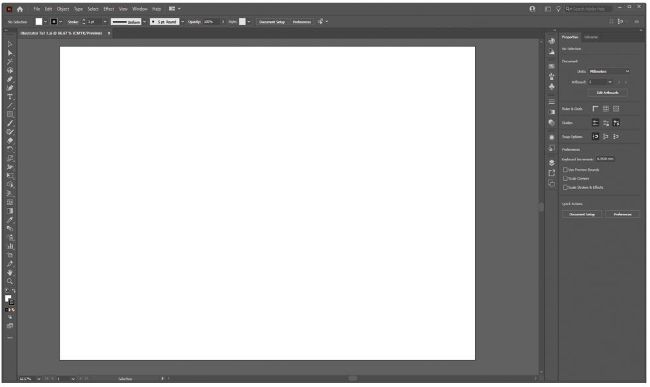
As we mentioned, Illustrator shares a similar interface with Photoshop, and if you’ve been following our Photoshop tutorials, this should hopefully be a familiar place for you now. The tools aren’t identical and certain things are named differently, but the format of the software is the same. When starting up the app, you are greeted by the opening screen, where you can see previous projects and have the option to open or create a new file. For today’s tutorial, we are just going to open up a blank A3-sized document. Click the “Create new” button. A window opens and along the top are options for various formats. Head to the “Print” tab and select “A3”—we have chosen a landscape orientation [Image A].

Ontgrendel dit artikel en nog veel meer met
Je kunt genieten:
Geniet volledig van deze editie
Direct toegang tot 600+ titels
Duizenden oude edities
Geen contract of verplichting
ABONNEER NU
30 dagen proberen, dan gewoon €11,99 / maand. Op elk moment opzeggen. Alleen nieuwe abonnees.


Meer informatie
Pocketmags Plus
Pocketmags Plus

Dit artikel komt uit...


View Issues
Maximum PC
September 2021
IN DE WINKEL BEKIJKEN

Andere artikelen in dit nummer


editorial
BACKING UP THE FUTURE
I AM FASCINATED WITH AI. It’s one of
QUICKSTART
THE NEWS
Can You Run Win 11?
GPU PRICES FALLING
MINING BAN STABILIZES MARKET
WINDOWS’ PRINT NIGHTMARE
Patch required after bug details appear online
Tech Triumphs and Tragedies
A monthly snapshot of what’s good and bad in tech
Kaseya
WORLDWIDE RANSOMWARE ATTACK
WINDOWS IN THE CLOUD
New subscription service launches
Intel Kills Lakefield
INTEL ISSUES PRODUCT CHANGE notifications regularly, listing chips
Ring Gets Encryption
Ring has added end-to-end encryption to its smart
WD Drives Delete Everything
A vulnerability in the firmware on Western Digital’s
China’s Crypto Crackdown
IT TOOK LONGER THAN MANY OF US EXPECTED, but the beginning of the end for the latest surge in cr yptocurrency prices seems to have finally arrived. Predicting this stuff is about as accurate as predicting the weather 28 days in advance, and who knows? By the time you read this, maybe something else will have happened and prices will be heading back up. But realistically, China’s crackdown on mining and cr yptocurrency use in general looks to have radically altered the cr yptolandscape. Sorr y, no more made-up cr yptowords, I promise
Windows 11: We’ll Just Have to Live With It
HAVING SPENT SOME TIME running tests (and watching YouTube) in MaximumPC’sunderground lab, we have come to the following conclusions about Windows 11: It is from Microsoft. It is an operating system. And we’re all going to have to get used to it, because it’s the future
LETTERS
DOCTOR
THIS MONTH THE DOCTOR TACKLES
THE MINI MAESTRO PC
When it’s not about gaming, what can you get on a budget?
BUILDING THE MINI MAESTRO
A MEAN MINI FIGHTING MACHINE
THE ULTIMATE BACKUP GUIDE
How safe is your data? Nick Peers reveals how to set up a foolproof backup plan
THE MACHINE LEARNING REVOLUTION
According to the hype, ar tificial intelligence will soon be capable of any thing. Jeremy Laird examines the true nature of machine learning
GAMES OF THE DECADE
The last 10 years have really pushed gaming to new frontiers; Ian Evenden highlights the most impor tant games of the 2010s
LETTERS
WE TACKLE TOUGH READER QUESTIONS ON
THE BUILDS
THIS MONTH’S STREET PRICES
R&D
HOW TO STEP-BY-STEP GUIDES TO IMPROVING YOUR PC
TIP OF THE MONTH © WETRANSFER, MSI, RASPBERRY
A SMALL HURDLE
I presumed after my first PC build that
Prepare Your PC for Windows 11
YOU’LL NEED THIS A PC WITH THE CORRECT
Build a DIY Raspberry Pi NAS
YOU’LL NEED THIS A RASPBERRY PI Fourth generation
Play Old DOS Games on Raspberry Pi
YOU’LL NEED THIS RASPBERRY PI 4/400 Plus a
BUILD IT
Bigger is Better
LAB NOTES
Do-It-Yourself Wall-Mounted PC
IN THE LAB
Nvidia GeForce RTX 3070 Ti
8GB of GDDR6X isn’t enough
MSI Pulse GL66 11UDK
Entry-level ray tracing on a budget
Alienware M15 R5
Close encounters of the Ryzen kind
LG UltraGear Ergo 27GN880-B
An ergo-armed work-play curiosity
Corsair 7000D Airflow
More cooling! More cooling!
SK Hynix Gold P31 1TB
Give your PC some affordable TLC
Whirlwind FX Atom
Atomic power clicking up a storm
Corsair Virtuoso RGB Wireless XT
Star of the show
Dungeons & Dragons: Dark Alliance
Fantasy hack-and-slash that lacks one major feature
Acronis vs. Macrium
Which drive-imaging app offers better protection?
Chat
X
Pocketmags ondersteuning