U bekijkt momenteel de Netherlands versie van de site.
Wilt u overschakelen naar uw lokale site?
25 MIN LEESTIJD

Affinity

AFFINITY

THE COMPLETE GUIDE TO THE FREE CREATIVE SUITE

EDIT PHOTOS, CREATE CLEAN VECTOR IMAGES AND PUT TOGETHER PROFESSIONAL MULTI-PAGE DOCUMENTS: NIK RAWLINSON INTRODUCES THE AMAZING POWERS OF THE NEW FREE AFFINITY APP

@PCPRO FACEBOOK.COM/PCPRO

For the past decade we’ve been recommending Affinity Photo as an affordable, buy-once alternative to Adobe Photoshop, with companion apps Affinity Publisher and Affinity Designer making persuasive rivals to InDesign and Illustrator. Last year, though, Serif – the original developer and publisher of Affinity apps – was bought out by online design giant Canva, raising concerns about Affinity’s future.

Happily, Canva hasn’t killed off Affinity. In fact, it’s just unveiled the best version of Affinity ever – a brand-new integrated app that brings together all the powerful features of its three predecessors, and adds in a whole lot more. What’s more, where the complete Affinity suite used to cost around £90, the new app is completely free for both personal and commercial use (aside from a few AI add-ons, which we’ll discuss later in this feature). You can download it right now, for Windows or macOS, from affinity.studio.

The all-in-one approach makes a lot of sense. Serif had already been heading in that direction with a feature called Studio Link, which let you use tools from Affinity Photo to edit images while working inside the Publisher app, but now the whole suite works together for a completely seamless workflow. It’s an impressive achievement that removes countless points of friction, and arguably makes Affinity a more productive and intuitive way to work with images and pages than Adobe Creative Cloud.

Inevitably, questions have arisen about whether the software will remain free, or whether the publisher will start to tighten the screws once the tools gain widespread popularity. But the suite’s new owner insists that’s not on the cards. “Canva is a rapidly growing company with over 28 million paying customers and $3.5 billion in annualised revenue,” said Canva co-founder Cameron Adams announcing the update. “That sustainable foundation enables us to keep investing in both our free Canva experience and the next generation of creative tools, including offering Affinity completely free.”
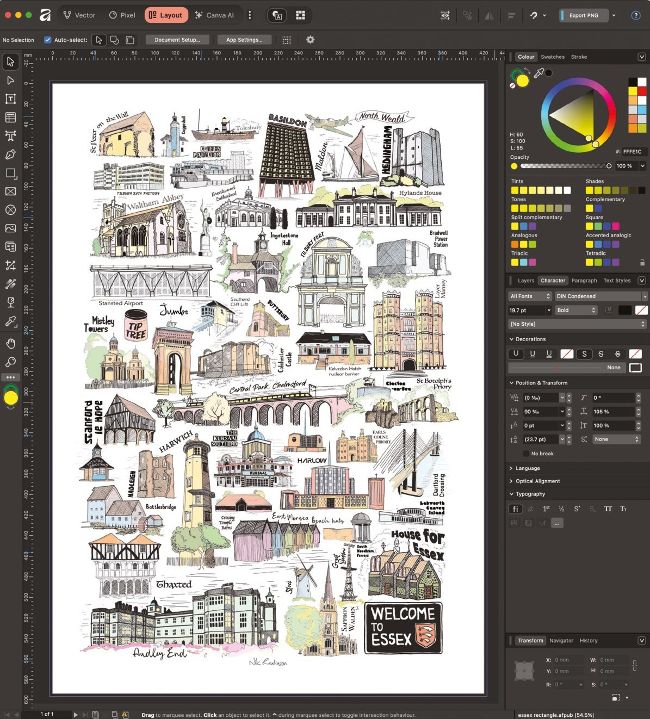
Editing a complex project is much easier when you can freely switch between vector, pixel and layout editing

You can also read our interview with the CEO of Affinity, Ash Hewson, in last month’s magazine (see issue 376, p12), who was similarly reassuring. “We’re 100% committed, and we’ve been really, really clear that this is an absolutely long-term commitment that Affinity is going to be free forever,” he said. “And we’ve also been very clear that does include all future core app updates.”

What’s certain is that if you want a free, fully featured app for editing images, creating new vector graphics or putting together print publications then Affinity is the obvious choice. On the pages that follow you’ll find guides to performing some simple tasks in the Pixel, Vector and Layout views – and below we’ll take a closer look at what Affinity can do for you, starting with the suite-wide features that will apply equally whichever module you’re using.

LOOK AND FEEL

If you’ve used the old Affinity apps, you won’t have a problem finding your way around the new software. Affinity’s interface is bolder, with chunky monochrome icons on a dark background, but largely familiar. It’s subjective, but we think the new design is an improvement – even after ten years of use, we still used to find ourselves hunting for the gradient fill icon in Affinity Photo, but no longer.

If you don’t get on with the default interface it can be tweaked, with individual sliders for the artboard grey level, UI illumination, text contrast and more. You can enlarge the text if you find yourself squinting, and you can even set how long a tooltip waits before it pops up.

There’s plenty of help on offer if you get stuck: hover over a tool and you’ll see a pop-up showing its name, its keyboard shortcut (if there is one) and a description of what it does. Click this to open a more extensive window explaining how to use the feature in greater depth.

If you’re still stumped, you can ask Ritson, a new AI assistant that can answer your questions and make intelligent use of context. If you’re not a fan of AI, that’s no problem – Ritson only pops up when you actively invoke it, so it won’t ever butt in with unwanted comments about your work. In fact, in its current state it can’t “see” what you’re working on, and is limited to answering questions about using the software, so you don’t need to worry about privacy.

Ontgrendel dit artikel en nog veel meer met
Je kunt genieten:
Geniet volledig van deze editie
Direct toegang tot 600+ titels
Duizenden oude edities
Geen contract of verplichting
ABONNEER NU
30 dagen proberen, dan gewoon €11,99 / maand. Op elk moment opzeggen. Alleen nieuwe abonnees.


Meer informatie
Pocketmags Plus
Pocketmags Plus

Dit artikel komt uit...


View Issues
PC Pro
February 2026
IN DE WINKEL BEKIJKEN

Andere artikelen in dit nummer


REGULARS
Could 2026 be the year when tech finally tackles its problems?
@PCPRO FACEBOOK.COM/PCPRO A s someone who is
CONTRIBUTORS
Iain Thomson Having spent almost two decades at
The A-List
Next month
ON SALE Thursday 5 February SUBSCRIBE.PCPRO.CO.UK Labs ChatGPT
When the Wi-Fi’s down, who you gonna call? Jon Honeyball!
S ometimes technology brings us the perfect solution
BRIEFING
The VPN hunt is on
Background and analysis on all the important news stories
Geekom launches its first laptop
Taiwanese mini PC builder releases first portable computer
6 things to watch for in 2026
What to expect from the year ahead in the tech industry
Bag a software bargain
Don’t pay full price for software when we can offer you huge reductions on genuine products
VIEWPOINTS
Live long and prosper?
There are lessons for the transhumanist movement to learn from science fiction, but look to Frankenstein and Ex Machina rather than Star Trek
The ICO clearly isn’t fit for purpose
Experts have called for an inquiry into the Information Commissioner’s Office – and they couldn’t be more right
Regulate before it’s too late
Rather than rely on market forces, we might all be better off letting companies grow so big that governments are forced to step in
Readers’ comments
Your views and feedback from email and the web
Readers’ poll
Imagine a world where one tech company ruled supreme. Who would you want it to be and why?
FEATURES
10 GREAT AI TOOLS FOR 2026
FROM EDITING VIDEOS LIKE WORD DOCUMENTS TO CREATING YOUR OWN BROWSER GAMES, BARRY COLLINS HIGHLIGHTS TEN BRILLIANT AI TOOLS YOU’LL WANT TO EXPLOIT IN THE YEAR AHEAD
WHAT THE HELL HAPPENED TO THE INTERNET?
THE INTERNET HAS BEEN DRAGGED DOWN BY ENSHITTIFICATION, ACCORDING TO CORY DOCTOROW. IAIN THOMSON SITS DOWN WITH HIM TO DISCUSS WHAT WENT WRONG – AND HOW WE FIGHT BACK.
DO YOU STILL NEED BACKUP IN 2026?
With modern cloud services and solid-state storage, you might think traditional backup methods are obsolete, but Darien Graham-Smith urges you not to risk your data
REVIEWS THIS MONTH
Dell Pro Max Tower T2 Desktop
The biggest, best, most exciting products in technology – reviewed and rated
How we test
Laptops and PCs We run a selection of
Medion Erazer Hunter X30
A basic chassis for the price, but you can’t argue with the quality of the hardware within or the price
CyberPowerPC Ultra R5RX
Easy on the eyes and the ears, this is a great choice for 1440p gaming with not a wasted pound in sight
MSI Cubi Z AI 8M
A solid and unassuming mini PC that’s particularly well suited to offices thanks to MSI’s UK-based support
Beelink SER9 Pro (Ryzen 7 H 255)
The novel AMD Ryzen 7 H 255 processor delivers strong all-round performance in a well-built system
HP OmniBook X Flip 14
HP continues to flip the rules on what to expect for around a grand, making this our top choice for 14in convertibles
HP OmniBook X Flip 16
HP pairs a gorgeous OLED touchscreen with a smart 2-in-1 design – the result is a superb everyday laptop
Your bonus software
We scour the globe to negotiate the best software deals for our readers, from extended licences to full programs you don’t need to pay a penny for. Here’s this month’s lineup
BenQ PV3200U
Great colour coverage, integrated 2.1 speakers and a handy puck, but beware of this monitor’s limitations
BenQ ScreenBar Halo 2
This bright and brilliant screen bar will light up your world in ways you may not even have thought of
Soamco Monitor Light Bar
No frills, but it does deliver on all its promises
Motorola Edge 70
A disappointing successor to the Edge 60 and 60 Pro, with no obvious reason for a huge price hike
SUPERCHARGE YOUR STORAGE WITH A GEN5 M.2 SSD
Whether you want to upgrade your laptop or your desktop PC, one of these eight PCIe Gen5 SSDs will do the job perfectly
Acer Predator GM9000
A fast and efficient drive that aims for affordability over outright speed, but it’s undercut by rivals here
Corsair MP700 Pro SE
This second edition Gen5 SSD offers top performance with interesting cooling options, but at a price
Kingston Fury Renegade G5
A faithful follow-up to the popular Fury Renegade, with higher performance and power efficiency
Crucial T705 with heatsink
A superb-value choice for desktop PCs, but choose a less power-hungry M.2 SSD for laptops
Kioxia Exceria Plus G4
By no means the fastest, but a solid alternative to high-end rivals due to its competitive price
Lexar NM1090 Pro
A niche but well-priced high-end drive with good all-around performance but no stand-out features
Best of the PCIe Gen4 SSDs
If your laptop or desktop PC doesn’t support PCI-Express 5.0 there’s little point in buying a Gen5 SSD – so choose one of the best PCIe Gen4 SSDs instead
Samsung 9100 Pro
Available and tested in 8TB, this is the best choice for those after a top-capacity PCIe Gen5 SSD
WD Black SN8100
The pinnacle of SSD design, bringing great performance and power efficiency in one slim package
PRINTERS FOR PROS
THERE HAS BEEN A SLEW OF NEW PRINTERS RELEASED READY FOR 2026, BUT WHICH OF THESE DOZEN WILL BEST SUIT YOUR DEMANDING NEEDS?
How to choose a printer that won’t let you down
Buying a printer should be viewed as a multi-year investment, so it makes sense to thoroughly understand your options before you buy
How we test
Our rigorous testing procedure helps separate the wheat from the chaff
Brother DCP-T780DW
Brother’s first attempt at a refillable inkjet for the UK market, and it’s very nearly a killer debut
Canon i-Sensys MF664Cdw
A few foibles, but the MF664Cdw offers a decent balance of specification, price and performance
Canon Pixma TS6550i
The TS6550i ought to sit in the sweet spot for Canon’s new Pixma range, but huge running costs let it down
Epson EcoTank ET-4956
Epson’s EcoTank ET-4956 combines everything the home office needs into a compact, affordable MFP
Brother DCP-L1660W
It’s a shame that the DCP-L1660W isn’t a better printer, because it’s cheap and its scanner is very good
Brother MFC-J4550DW
This extremely quick inkjet multifunction is something of a bargain now that its price has fallen
Canon Pixma TS4150i
An impressive inkjet MFP in many ways, but running costs are extortionate unless you subscribe to a print plan
Canon Pixma TS7550i
The TS7550i produces strong results and has an attractive initial price, but the running costs kill
Epson EcoTank ET-2950
The EcoTank ET-2950 is a perfectly decent refillable MFP, but you can get more for your money
HP LaserJet Pro 4002dn
Fast and professional it may be, but the LaserJet Pro 4002dn isn’t especially cheap to run
Kyocera Ecosys PA2101cx
Kyocera’s PA2101cx isn’t especially cheap to run, but if you aren’t in a hurry it will deliver strong results
Xerox C320
Xerox’s C320 colour laser offers reasonable speeds and running costs, but it doesn’t excel in this crowd
View from the Labs
With little innovation in printers, it’s a game of spot the difference between this year’s Labs and the last – but is that such a bad thing?
TP-Link Omada EAP787
A good-value business Wi-Fi 7 AP that delivers fine performance and plenty of management choices
Ubiquiti Networks UniFi U7 Pro XG
This classy tri-band business Wi-Fi 7 AP delivers the perfect blend of features, performance and value
Zyxel NWA50BE
Modest performance, but this dual-band Wi-Fi 7 AP delivers great business-class features at a low price
DrayTek VigorSwitch P2542x
A good-value gigabit PoE+ switch with a high port density, a big power budget and heaps of features
Jabra PanaCast 40 VBS
This smart VC combo offers on-demand Microsoft Teams Rooms and BYOD modes, plus great image quality
THE NETWORK
Upgrade your business to Wi-Fi 7
Practical buying and strategic advice for IT managers and decision makers
EnGenius ECW520
Not the best value, but this tri-band Wi-Fi 7 AP delivers good performance and smart cloud management
Cybersecurity for remote workers
Small businesses can’t afford to skimp on security for remote workers. Davey Winder plans out your risk mitigation checklist
Privacy by design
Protecting personal information can’t be an afterthought. Steve Cassidy explores how to put data privacy first
REAL WORLD COMPUTING
“Will this be another half-arsed Microsoft initiative that putters out after a few years?”
Expert advice from our panel of professionals
“We were left shell-shocked. Somehow, we’d fixed a machine, for cash, without destroying it”
As a new year dawns, we wonder why flashing a BIOS remains so stressful, ask what Ridge it’s really running and stare at a £500 PSU that doesn’t fit
“An AI may be technically responsible for causing harm, such as financial loss or injury”
Have you considered how the use of AI affects your contracts and legal obligations? Probably not, but fortunately Olivia is here to help
“Ransomware remains a major threat to business; denying that is akin to a nose/face spite thing”
Ransomware attacks are up and cyber insurance is up. Maybe it’s time to start taking the threat seriously, huh?
“Progress lies not with the trusted brands but through innovators in the gaming sector”
In the land where everyone is in a bind, those with the smallest devices will be king – or, why mini systems make such great diagnostic devices
RETRO
Football Manager A game of two halves
It’s Football Manager versus Football Manager , new against old, as David Crookes explains
FUTURES
How Mozilla hopes to stop the ENSHITTIFICATION of the internet
AI is already disrupting the web as we know it, but that could offer an opportunity to build a better way of working, argue speakers at this year’s Mozilla Festival. Nicole Kobie reports from Barcelona
Chat
X
Pocketmags ondersteuning