US
16 MIN READ TIME

LINUX HARDWARE

The hardware that made Linux great

After the 8-bit computing boom of the ’80s, enthusiasts moved to more capable 16-bit systems, able to run Linux. Mike Bedford investigates.

Part Three!

Missed an issue? Back issues page 62!

OUR EXPERT

Mike Bedford migrated from an 8-bit Tangerine Microtan to a 286-based PC, so he missed out on the later home computers. However, he’s well versed in the processors that powered them.
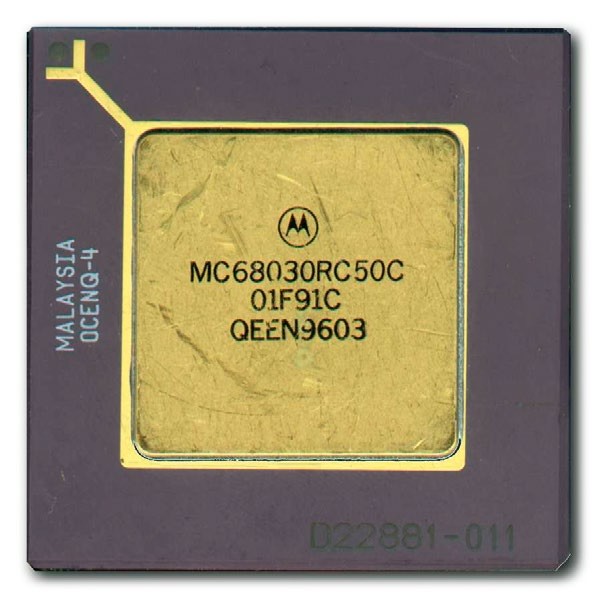
The Motorola 68000 series brought 16/32-bit computing to the home and, with the introduction of the 68030, Linux became a possibility.

The early 1980s marked a sea change in the world of computers. Thanks to the likes of the BBC Micro and the ZX Spectrum, the dream of owning and programming a computer turned into a possibility. And that possibility became a reality for millions. The vast majority of these home computers were based on 6502 or Z80 processors. Even if Linux had been around at the time, though, it wouldn’t have found its way on to these machines because of their 8-bit processors, minimal memory capacity, and lack of a hard disk. As the decade drew to a close, though, new machines were targeting the computer enthusiast. These machines had what it took to support Linux, and that operating system would soon become available.

Here we look at how Linux migrated to the home, starting in the early ’90s, and at the second generation of home computers that facilitated that move. In the main, we’re looking at machines that were empowered by the Motorola 68000 family processors. However, these weren’t the only computers used in the home that were able to run Linux. We’re mixing our terminology here, though, so let’s explain.

Our main theme in this article is home computers in their heyday, but that’s not necessarily the same as computers that are used in the home. A home computer is one that was designed, first and foremost, for use in the home by enthusiasts. And while some of them were used for serious applications such as word processing, they were, in the main, intended to help technically-minded people learn about computers. These machines first appeared in the ’70s but were hugely expensive. They became affordable in the ’80s, and largely died out in the ’90s. Towards the end of this period, PCs started to be used in the home and, for some users, they filled the same niche as home computers. They were designed mainly to address the business market, though, so we’re not going to discuss them here. However, we did look at Linux on x86 processors, by far the most common chip to have been used in PCs, in the first part of this series.
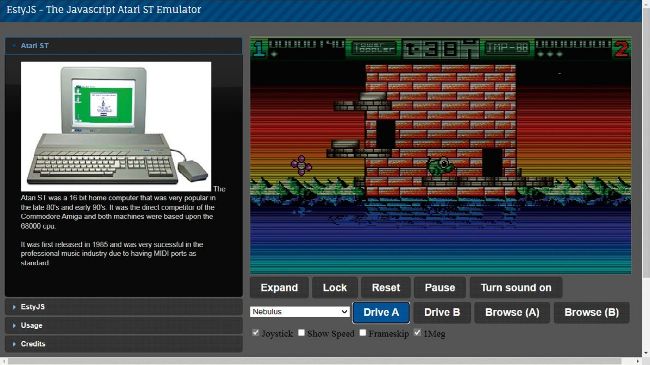
There are several Amiga and Atari ST emulators online, like this one at http://estyjs.azurewebsites.net,although most are games orientated.

Introducing the Motorola 68000

The story of Intel’s progression from 4-bit through to 32-bit and eventually 64-bit processors is well known. In fact, we examined the timeline in the first part of this series to see where the 80386 fitted in, that being the processor that gave birth to Linux. But in those early days, there was another semiconductor manufacturer that was following a somewhat similar path. And we’re not talking about AMD, because it mainly adhered to the x86 approach, as pioneered by Intel. Instead, the company we have in mind didn’t follow Intel’s lead, but developed its own ISA. That company was Motorola. Today we associate that name with mobile phones, but back in the ’70s, ’80s and ’90s, it was a major manufacturer of microprocessors. In particular, alongside Intel, Motorola was one the two main supporters of the CISC (Complicated Instruction Set) philosophy. This, of course, differentiated Motorola and Intel from the advocates of the RISC (Reduced Instruction Set) approach, which we delved into last month.

Unlock this article and much more with
You can enjoy:
Enjoy this edition in full
Instant access to 600+ titles
Thousands of back issues
No contract or commitment
Try for 99c
SUBSCRIBE NOW
30 day trial, then just $9.99 / month. Cancel anytime. New subscribers only.


Learn more
Pocketmags Plus
Pocketmags Plus

This article is from...


View Issues
Linux Format
June 2025
VIEW IN STORE

Other Articles in this Issue


LINUX FORMAT
LINUX FORMAT
The #1 open source mag Future Publishing Limited,
WELCOME
MEET THE TEAM
We’re trying out the new features of Ubuntu 25.04. If you could have any feature implemented on Ubuntu, what would your dream be?
Spring ahead
It’s that time of year when the flowers
REGULARS AT A GLANCE
AI operations are hurting open source projects
AI crawlers are overwhelming open source platforms, escalating costs, and forcing drastic measures like country-wide blocks.
Blender wins the Oscars
Blender 4.4 debuts, with a focus on stability, better codec support and Oscar-winning acclaim.
PWA support for Firefox?
Taskbar Tabs arrive as an experimental feature.
UNIQUELY LINGUISTIC
Italo Vignoli is one of the founders of
EMBEDDED IN NICE
Mark Filion is senior marketing manager at Collabora.
Linus hates “turd” code
Linus Torvalds slams messy “turd” files and demands cleaner Linux builds.
The Nope Deck
HP dismisses handheld plans after an interview with its gaming SVP.
Open source funding fight
The OTF is suing the USAGM for jeopardising open source projects.
Distro watch
What’s behind the free software sofa?
VALKEY TURNS ONE
Lori Lorusso is head of community at Percona.
MAN VS MACHINE
Jon Masters is a kernel hacker who’s been
Kernel Watch
Jon Masters summarises the latest happenings in the Linux kernel, so that you don’t have to.
Answers
Got a burning question about open source or the kernel? Whatever your level, email it to answers@linuxformat.com
Mailserver
WRITE TO US Do you have a
Thunderbird
Version: 136 Web: www.thunderbird.net Thunderbird is Mozilla’s
Clapper Media Player
Besides offline media, Clapper can also stream online
Bottles
Version: 51.20 Web: https://usebottles.com B ottles offers
Exercise Timer
Version: 1.8.1 Web: https://github.com/mfep/exercise-timer E xercise Timer
KPhotoAlbum
Version: 6.0.1 Web: www.kphotoalbum.org B illed as
ProtonVPN
Version: 4.9.4 Web: https://protonvpn.com P rotonVPN is
Fastfetch
Version: 2.38.0 Web: https://github.com/fastfetch-cli/fastfetch F astfetch is
Blinken
Version: 24.12.3 Web: https://apps.kde.org/blinken/ B linken is
KsirK
Version: 24.12.3 Web: A nother digital version of
Refine
Version: 0.5.2 Web: https://tesk.page/refine/ R efine is
Qpdf Tools
Version: 3.1.2 Web: https://github.com/silash35/qpdftools Qpdf Tools
25 YEAR ANNIVERSARY!
It feels a lot longer than that… Send us on our merry way with a celebration of all things open source.
REVIEWS
Ryzen 9 9950X3D
Paul Alcorn loves the new 16-core monster from AMD!
Debian 12.10
Nate Drake explores the latest stable point release for Bookworm. Does the OS still live up to its reputation for stability?
Garuda Linux 250308
Nate Drake dives into this Arch-based distro, named after a divine bird. Is it a soaring eagle or just a lame duck?
Ubuntu 25.04
Huffing and puffing, Nate Drake takes a look at the interim 25.04 release and wonders how things could get much better.
Two Point Museum
Management is thrilled to hear it can get money for old content it has lying around. Mollie Taylor thinks that is too late even for LXF.
ROUNDUP
Secure browsers
Always the cautious type, Michael Reed goes on the hunt for a browser that offers enhanced security without compromising on fun and features.
Installation and setup
The first stage is obtaining a copy of the software and installing it.
Settings and customisation
The first port of call: making sure the software works how you want.
User interface
Nice environments are productive.
Extensions
Add features and make things work the way you want them to.
Security and privacy
Keeping yourself anonymous and safe online.
Tracking and fingerprinting
Make sure only entities you approve of can see what you’re doing.
As a daily driver
How well does it work as a normal browser for day-to-day use?
The verdict Secure browsers
W e’ve made Brave our top pick as
UBUNTU BLASTS OFF
UBUNTU BLASTS OFF
The new 25.04 version of Ubuntu is here, and it’s geared towards dual-boot setups. Nick Peers explains how to run it alongside Windows.
Get the install media
Find out more about Ubuntu, plus discover how to create your bootable Ubuntu install disk to help blast you off!
Super quick-start guide
You don’t even need to install Ubuntu to try its delights!
Preparing Windows PCs
Before diving in and installing Ubuntu alongside Windows, take the time to make sure your PC is ready to accommodate a dual-boot system.
Dual boot with Windows
Your system is backed up, prepped and ready to go. Let’s get Ubuntu installed alongside Windows.
Take the desktop tour
Familiarise yourself with Ubuntu 25.04 and discover how to regain control over the boot menu.
Pi USER
Custom OS build system debuts
One size does not fit all, especially for embedded systems in industrial situations.
Twister OS 3.0.2
Les Pounder hasn’t seen Twister, or the sequel, Twisters, but he has played Half-Life, live on air using a Raspberry Pi and Twister OS.
Modulo 5 Basic
Is it a Pi? Is it a Pine? No, it’s Les Pounder waving the latest Pineboards expansion around. Stop it Les, put it down!
Frost-free fruit with a Pi Pico
Les Pounder grows strawberries in his garden, but now he has planted a Raspberry Pi Pico, hoping for a fresh crop of raspberries.
IN DEPTH
Inside the DNA of AMD
A new generation of AMD GPUs is here. Amateur genealogist Jarred Walton picks apart the family heritage of RDNA 4.
TUTORIALS
Eddy encryption tool
Keeping files safe from prying eyes doesn’t need to be a Herculean trial. Shashank Sharma knows of a utility that makes it a breeze.
Write and publish your own music scores
Nick Peers shows you how to use the latest version of MuseScore to transform your musical ideas into full-blown compositions.
Generate ODF slides and spreadsheets
Marco Fioretti explains how to create the same office files you can make with LibreOffice – but without LibreOffice.
Create custom health tracking graphs
Everyone loves making custom graphs from their weird health glitches – Michael Reed explains how he does it!
Upgrade it: Get more from your mouse
Look after your digits and treat them with a hand-picked mouse selected by Saeed Wazir and Neil Mohr.
Logitech MX Master 3S
Best wireless mouse for most.
Logitech Lift
Best wireless ergonomic mouse
Lenovo Go Wireless Vertical Mouse
Best budget vertical mouse.
Razer Pro Click Mini
Best premium productivity mouse.
Microsoft Modern Mobile Mouse
The best small mouse.
Microsoft Arc Mouse
Best travel-sized ergonomic mouse.
Logitech Ergo M575 Mouse
The best trackball mouse option around.
SteelSeries Rival 3
The best budget gaming mouse.
HACKING ACADEMY
NOT-SO-FREE PUBLIC WI-FI
Nate Drake is a technology journalist specialising in
Ubuntu suffers namespace breach
Unprivileged escalation with user namespaces now patched.
Kernel update enhances IPv6 and key security
The key security and networking improvements are vital for sysadmins.
GL.iNet Beryl AX (GL-MT3000) Wi-Fi 6 Travel Router
Our resident nomad Nate Drake hooks up one of GL.iNet’s tinier offerings to stay connected in uncharted territory.
Evil twins & honeypots
Nate Drake demonstrates how easy it is to set up rogue wireless networks to trick users into connecting. Penetration testers beware!
CODING ACADEMY
Create a web-based reward system
Matt Holder wonders how difficult it would be to replace a card-andstamp-based reward system with something a little more modern.
Create a Simple DirectMedia Layer app
David Bolton shows how to set up SDL2 with Rust and demonstrates it with a fun 400-line program to pick a person at random.
Chat
X
Pocketmags Support