ZFS
Next-gen filesystem management
ZFS is a lot more than a filesystem. Neil Bothwick tells all about this advanced volume manager and Swiss Army Knife of filesystems.

Credit: www.freenas.org/zfs
OUR EXPERT
Neil Bothwick has been using and writing about Linux since before the first “This is the year of Linux on the Desktop”. His life is so full of excitement that he finds filesystems fascinating!.
QUICK TIP
While we haven’t shown it here, most of the commands should be run as root or prefixed with sudo. The only exceptions are commands that only retrieve information, such as zpool status or zfs list.
L
ife used to be so much simpler. A typical desktop computer had one small – and expensive – hard drive with no more than four partitions using standard filesystems like ext2/3. Okay, so half the hardware out there wasn’t supported by Linux, but that just simplified things even further.
Now we have huge hard disks, often more than one of them, and lots of data strewn across them. Simple partition schemes have been replaced with RAID arrays, volume management and multiple filesystem types. Then we start worrying about privacy and start throwing encryption into the mix, and that’s without considering backups. Thanks to the way in which Linux uses block devices, these multiple technologies can be layered on top of one another fairly easily, so we have filesystems on top of LVM volumes on top of LUKS-encrypted devices on top of a RAID array of several hard disks… and it all works well. It can be a bit of a management headache though, with each layer using a different set of software to manage it.
Enter the latest generation filesystems that handle most of this with one software suite. Both ZFS and btrfs provide much of what has already been mentioned, although btrfs doesn’t handle encryption. ZFS was created by Sun and some years ago it released the source code, opening the way for ports to Linux and other OSes. The Linux port was called Zfsonlinux, but the various porting projects have pooled resources as OpenZFS. OpenZFS 2.0 was released recently and this does support encryption, so we now have an all-in-one solution. How does it work and is it right for you?
Diving in
First, we need to install the ZFS software. This comes in two parts: the kernel modules and the userland tools. On an Ubuntu-ish distro you would do the following:
$ sudo apt install zfs-dkms zfsutils-linux
Yes, you need to install the kernel modules separately, see the licencing boxout (opposite) for more information on the reasons behind this. There are two basic components to a ZFS system. A pool is one or more physical storage devices aggregated into a storage unit. A dataset is what an individual filesystems are called in ZFS – the equivalent of volumes in LVM or subvolumes in btrfs. Datasets are created within pools.
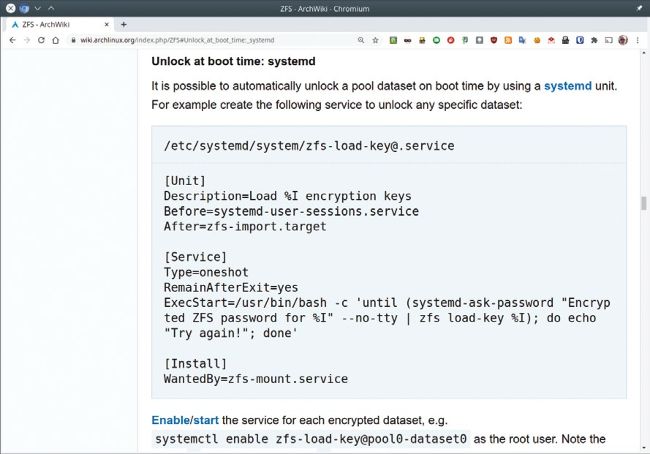
This systemd service file will prompt for your passphrase and load the keys for your encrypted datasets so they can be mounted at boot.
Pools are created and managed with the zpool command. At its simplest we can create a pool from a single disk partition with