Everything else
FEATURE macOS Sonoma
There’s lots more that’s new in macOS Sonoma...
Having covered the main new features of macOS Sonoma, let’s take a look at what else it offers. For example, if you set up Siri to react to a spoken instruction, on Apple silicon Macs that instruction can now simply be ‘Siri’, not ‘Hey Siri’. A useful change, especially if you’ve got so into the habit of saying ‘Hey Siri’ that you say, ‘Hey Alexa’ when waking an Amazon device.

To change the wake instruction for Apple’s personal digital assistant, first open the System Settings app from the Apple menu in the top-left corner of your screen. In the left-hand sidebar, click on Siri & Spotlight. Then, in the right-hand window, make sure the Ask Siri switch at the top is on. Below this switch is a pull-down menu (the default position of which is ‘Off’) that lets you turn on the wake words, so you can summon Siri with your voice as well as by clicking on the Siri icon in the top bar. From this menu, choose ‘Siri or Hey Siri’ if you want either to wake the digital assistant, or ‘Hey Siri’ if you prefer to do things the old way.
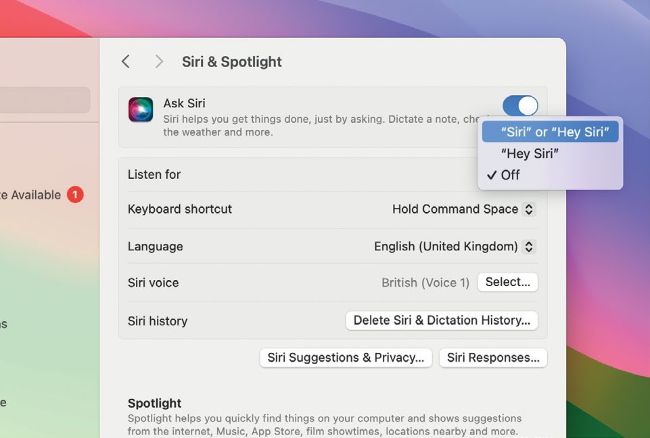
In Sonoma, you can wake the digital assistant with ‘Hey, Siri’ as before, or just ‘Siri’.

By doubling the Bluetooth sampling rate, Game Mode greatly reduces latency when using a PlayStation or Xbox controller with your Mac.
Game Mode & Porting Toolkit
> Often when it comes to video games, the Mac promises much but delivers little. Every new operating system seems to have new features to make the Mac a more attractive platform for games publishers, but the expected take-up never appears. With Sonoma, we have Game Mode to look forward to. This gives your games priority on the CPU and GPU, reducing resources used for background tasks. We’re told this dramatically reduces latency with wireless accessories like AirPods and Bluetooth controllers. Game Mode works with any Mac game, so expect titles you currently own to enjoy a boost.