GENIUS TIP
EDITED BY HOWARD OAKLEY
EXPERT ADVICE
Our resident genius solves your Mac and iOS problems
Contact us
Email your queries and your questions to genius@macformat.com
Software Update insecurity
Just as we don’t all want to drive
automatic vehicles, some of us prefer to download and install updates when we choose, rather than leaving it to the Software Update pane to decide. There are hidden dangers in that; going fully manual with all the pane’s settings disabled can fail to detect updates to macOS’s built-in malware protection, leaving your Mac at risk.
Unless you check for and install those using other means, such as the softwareupdate command or the free app SilentKnight, every Mac should run with the last item, and install security responses and system files (or similar) enabled in Software Update. That still gives you control over whether and when macOS updates are downloaded and installed, and should stop your Mac being left with out-of-date security protection.
Share certificates across Macs
Q Howcan I share security certificates in my iCloud Keychain?
by OLLIE HAVILAND
A You don’t appear to be able to share secrets of your own choosing, apart from internet and other passwords, using the keychain shared in iCloud. That isn’t because of any limitation in the keychain, but the fact that you can’t add your own keys or certificates to the keychain that’s shared.
Macs have two types of keychain: the login keychain, that’s normally used to store our own certificates and secure notes uses an ancient format, is stored in our Home Library’s Keychains folder, and can’t be shared in iCloud. The Keychain Access app has full access to its contents, making it simple to add certificates and other secrets.
The iCloud Keychain uses a different format with access controls for better security, but Keychain Access can only see its passwords, not the rest of its contents, preventing us from adding our certificates so they can be accessed by other Macs and devices sharing that keychain.
Apple intends moving away from the old file-based keychains like login, and using ‘data protection’ replacements like the keychain shared in iCloud. For the time being, the only way to use those certificates on multiple Macs is to add them to the login keychain on each.
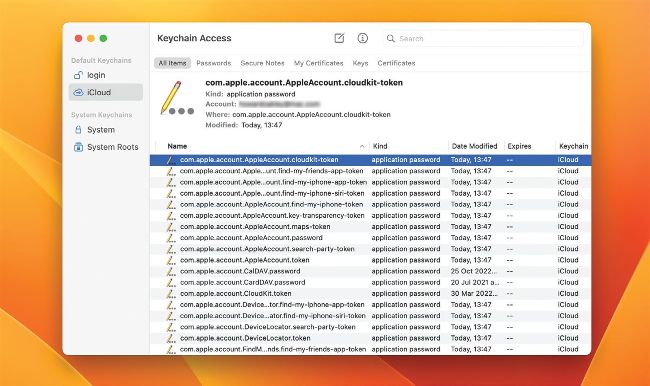
Keychain Access only sees passwords in the keychain shared in iCloud, and can’t add other secrets like certificates.