DOCTOR
THIS MONTH THE DOCTOR TACKLES...
> Fix toner err
> Android backu
>
Retro tidy up
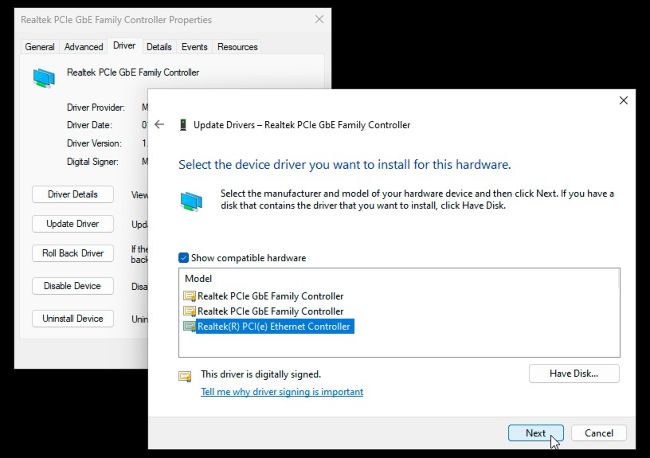
Switch to a network driver compatible with Safe mode.
© MICROSOFT
Safe mode networking
I want to perform a full security scan in Safe mode to be sure that there isn’t something nasty buried in my system (nothing shows up in normal mode, but I’m not convinced). I want to boot into Safe mode with networking so I can update all my scanners, but while I did this with no problems a few years ago, I’m now unable to access the internet after rebooting into Safe mode via msconfig using the ‘Safe boot’ check box with Network selected.
I checked my network adapter (Realtek PCIe GbE Family Controller) in Device Manager, and it has thrown up the following error: “The driver was not loaded because the system is booting into Safe mode.” I’ve never seen this error before, and updating the driver has had no effect. Is this a sign of possible infection?
—Bruno Casas
THE DOCTOR RESPONDS: No, it’s not. What’s happening is that some of the very latest network drivers haven’t been written to accommodate Safe mode, so won’t work even when you choose networking when booting into Safe mode. Thankfully, there is a solution you can apply from within Safe mode—choose a different, albeit older, driver. Navigate to the Driver tab of your adapter under Device Manager and click ‘Update Driver’ as before, but this time choose ‘Browse my computer for drivers’, followed by ‘Let me pick from a list of available drivers on my computer’.