Music streamer | £899 | View offers bit.ly/Node_Icon
Bluesound Node Icon
Bluesound aims high – and succeeds
KEY FEATURES

HDMI eARC

2 x 6.3mm headphone ports

Max file resolution: 24-bit/192kHz PCM; DSD256
Bluesound has had a run of very competent, well featured and well-priced compact music streamers, but it has been a while since one really stood out as a class leader when it comes to outright sound quality. That all changes with the Node Icon.
Where the mid-range Node (2024) model conceded to the greater musicality of the Cambridge Audio MXN10, and the budget Node Nano couldn’t topple the wallet-friendly WiiM Pro Plus from its throne, the Bluesound Node Icon stands head and shoulders above its siblings in design, features and, most importantly, performance.
At £899, this is the priciest of the current Node range of streamers. Its main competition is the five-star Cambridge Audio CXN100 – which retails for the same price.
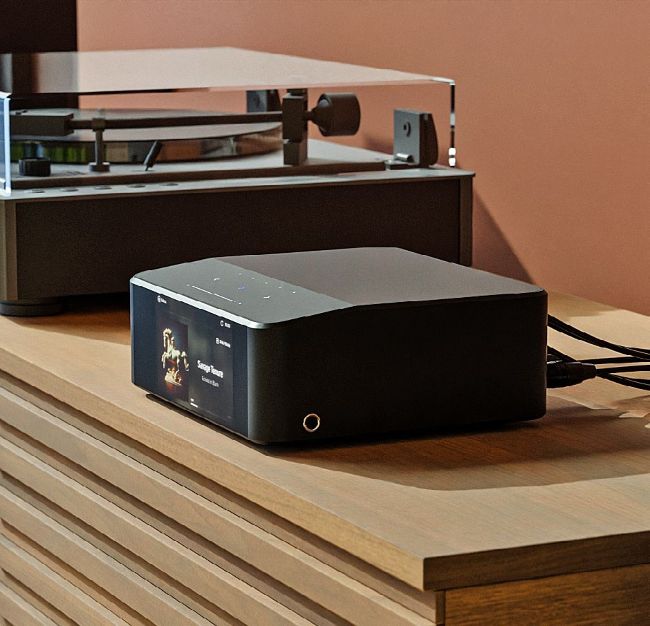
Though taller and boxier than its siblings, the Icon is still a compact unit
The three members of the Node family have distinct profiles, but instead of the slimline, ‘modem’-like designs of most Nodes, the Icon is a taller, boxier affair. It’s still a fairly compact unit, taking up roughly the same footprint as the smaller Node (2024) and Cambridge Audio MXN10, but is twice the height of its junior sibling.
Its build quality is of a considerably higher quality, too – the anodised aluminium metal casing and shiny glass top feel sturdy and substantial.
Altogether, it’s a classier and more premium-feeling unit, but is still discreet enough to hide away in your listening room if that is your preference.
Display of strength
What stands out is the five-inch full-colour display that dominates the front panel. It’s the first Bluesound streamer to sport a screen, and it is sharp, clear and appealing. It displays album artwork, track and source information when music is playing. A clock face is shown when the unit is on standby or, unusually, when the music is paused.
This is a quirk of the unit’s system that can’t be changed. Bluesound states that the clock display automatically slides in to prevent issues such as image burn-in on the screen, to reduce interface clutter when the unit is inactive, and simply to provide useful information – ie the time – when it’s in idle mode. We do sometimes wish the ‘Now playing’ screen stayed on for a little longer, but it’s a pretty small niggle in the grand scheme of things. Bluesound’s reasoning is sensible, and we get used to this quirk in the course of our testing period.