AU
  
You are currently viewing the Australia version of the site.
Would you like to switch to your local site?
18 MIN READ TIME

Learn how to program the 50 pence chip

For the ultimate in low-cost embedded applications, the PIC microcontroller takes some beating. Mike Bedford shows you how to program it.

OUR EXPERT

Mike Bedford discovered PICs many years ago and felt an immediate affinity since they provided an ideal way of working on hardware and software together.

With the entry-level boards in Raspberry Pi family costing less than £5, we’re fully conversant with the low cost of computing power. Yet if you’ve not encountered them before, the price of chips in the PIC microcontroller range from Microchip Technology might still be surprising. The fact is that an entry-level PIC chip can be bought for about 40p, and this drops to as little as 25p in high volumes.

Needless to say, these chips don’t offer a lot of processing power - in fact many of them wouldn’t even be able to support an operating system. Yet in many embedded applications - that’s where the processor works invisibly in the background - the requirement for number crunching is minimal, and an operating system is unnecessary. What’s more, as we’re about to see, those cheap chips contain a lot of circuitry like memory that you might expect to be external to the processor.

Here we introduce you to PIC microcontroller chips and show you how to program them using the MPLAB Xpress IDE and a Curiosity development board. Although real-world applications of PIC devices involve using just the chip which you’d incorporate into your own circuit board, using a ready-made board for learning to develop code offers a simple, ready-to-go solution at low-cost.

A key thing to bear in mind about PIC chips is that they’re microcontrollers, not microprocessors. This means that they’re effectively microprocessors with the addition of on-chip RAM, flash storage, non-volatile program memory, and input/ output circuitry for interfacing to real-world devices. For this reason they can be used in embedded applications with a minimum of external circuitry.

Daddy or chips?

According to manufacturer Microchip Technology, there are several official families of PIC, but to cut a long story short, eight-, 16- and 32-bit architectures are available. Within each of these broad categories, specific products differ mostly in the amount of each type of on-chip memory and the number and type of I/O pins.

Some top-end chips, which are intended for signal processing applications, have the addition of DSP instructions. However, at the other end of the spectrum are chips that are aimed at applications where low cost and a small size are the most important considerations. For example, the PIC10F200-I/OT is an eight-bit microcontroller that runs at a clock speed of 4MHz. It has 256 bytes of program memory, 16 bytes of RAM, and four digital I/O pins. The chip is tiny, having just six or eight pins and, depending on the package type, measures as little as 2.8x2.9mm.
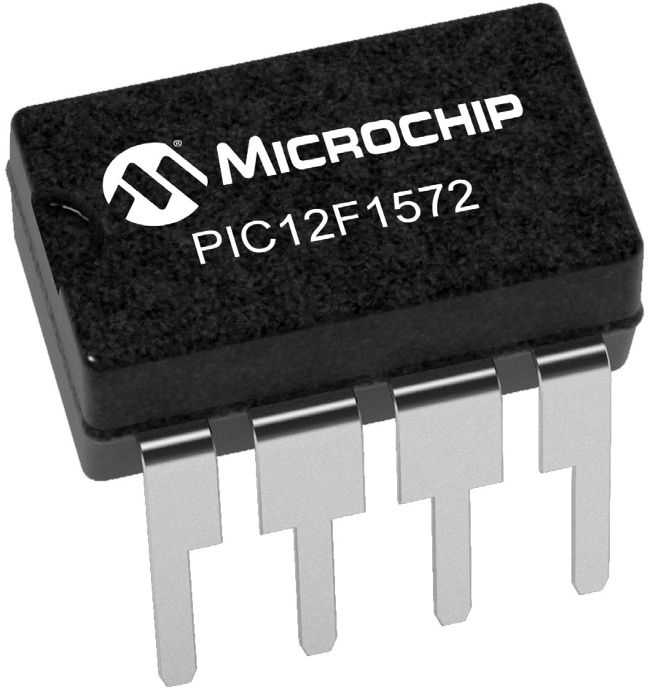
You might be more used to processors having hundreds of connections or more, but this tiny eight-pin PIC chip is a processor with on-chip memory and I/O.
Credit: Microchip media relations

Development kit

Unlock this article and much more with
You can enjoy:
Enjoy this edition in full
Instant access to 600+ titles
Thousands of back issues
No contract or commitment
Try for $1.48
SUBSCRIBE NOW
30 day trial, then just $14.99 / month. Cancel anytime. New subscribers only.


Learn more
Pocketmags Plus
Pocketmags Plus

This article is from...


View Issues
Linux Format
Summer 2020
VIEW IN STORE

Other Articles in this Issue


In This Issue
Soft Mints, no Snap
“Won’t people think it’s 20 years old?” management asked when
REVIEWS
Robolinux 11
RoboLinux is a project that we’ve been meaning to look
Calculate Linux 20.6
Back in Elizabethan times, “calculating” used to be a crime,
Besiege
Besiege is notionally a game about engineering medieval siege weapons
Waveshare Game HAT
We heard you like playing games from yesteryear, so how
ROUNDUP
Integrated Development Environments
Mats Tage Axelsson is happiest when writing how to make
MINT 20
Summer is well upon us and what better way to
INTERVIEW
MAINFRAME MAGE
John Mertic is director of program management for the Linux
OPEN SOURCE UNDERGROUND
Those of you who want to exercise your mind and
Pi USER
UBUNTU Pi
The official Canonical-supported desktop flavour of Ubuntu for the Pi
OpenVX lands on Raspberry Pi
This Raspberry Pi thing is all getting very serious. Clearly,
Magnify via Pi
The High Quality Camera for the Pi has been available
Aging Vulkans
We’ve reported that the Pi 4 will be gaining an
CODING ACADEMY
Revisit the arcade classic Pong in Python
Calvin Robinson is a subject matter expert at the National
REGULARS AT A GLANCE
A new generation of Linux-only PCs
Something unusual is happening in the world of computing: companies
Maintain the maintainers
The Linux Foundation has had its annual shindig at Open
Microsoft Linux Defender
Microsoft is hoping to boost its security protection for Android
BETTER CALL MATT
Matt Yonkovit is Percona’s chief experience officer and a member
SKY HIGH
Keith Edmunds is Tiger Computing Ltd’s MD, which provides support
NEWSDESK
Google is getting a taste of the education market and
Distro watch
A 64-bit live system designed for USB flash drives and
VIRTUAL PLUMBING
2020 has been, and continues to be, a redefining year
LINUX ON APPLE’S ARM
Jon Masters has been involved with Linux for over 22
Kernel Watch
Linus Torvalds has announced the release of Linux 5.8. He’s
ONGOING DEVELOPMENT
Peter Oskolkov posted patches titled Introduce FUTEX_SWAP, which attempts to
Your free downloads
To replace our regular covermounted DVD we’re offering five top
Answers
In looking at the new printers from HP and Epson,
Mailserver
Your “Unpeeling the Onion Browser” article (LXF264, June issue) was
Intel Core i9-10900K
We’re long past the days of monolithic chip designs. Now
Audacity
Shortly after Mike Bedford’s excellent hands-on Audacity tutorial in LXF264,
Ksnip
Three years ago, we said that Ksnip was a promising
PDF Quirk
Modern Linux desktops are mostly a pleasure to use, yet
Apostrophe
There are at least a dozen various text editors for
Pidgin
The usual path for Linux and Windows users that need
QEMU
Virtualisation software is a dream come true for distro-hoppers, because
Bauh
We’re living in a world where traditional package managers (such
Blobby 2
Blobby Volley 2 is a great head-to-head beach volleyball game
JFDuke3D
There are many theories why Duke Nukem 3D has become
Parachute
The cornerstone of desktop productivity is being able to work
Wihotspot
How do you share a Wi-Fi connection in Linux? Well,
TUTORIALS
Record video using motion detection
Jonni Bidwell is fairly contrary. His garden grows with silver
Find your files in Broot
Shashank Sharma is a trial lawyer Delhi. He’s been participating
Multi-user task and project management
Nick Peers has spent most of the past few months
Configure Proton for enhanced gaming
John Knight When he’s not running away from Australian snakes
Develop video games with the Godot engine
Calvin Robinson is a subject matter expert at the National
Chat
X
Pocketmags Support