COVER FEATURE
DITCH YOUR CABLES in 2025
Don’t suffer another year of tangled wires and connector confusion. Robert Irvine reveals the best ways to go wireless on your PC, phone, TV and other devices
WHAT YOU CAN DO
• Charge your phone’s battery without using a cable
• Share files instantly between your PC and phone
• Add missing Bluetooth and Wi-Fi to an old PC
• Control your PC with a wireless mouse and keyboard
• Stream audio to Bluetooth speakers or headphones
• Watch live TV channels without an aerial cable
The more electronic devices we buy, the more cables we accumulate, which can cause confusion and even arguments. Is that a male or female connector? Does this need a USB-C or microUSB charger? Who’s pinched the HDMI cable from the TV?
Not only that, but a surfeit of trailing cords, loose leads and tangled wires makes your home look messy and potentially dangerous – as anyone who’s ever tripped over an Ethernet cable will tell you. Bunches of cables left unattended also have a mysterious tendency to become knotted and intertwined.
The start of a new year is the perfect time to address and fix your cable-related problems. By switching from wired connections to wireless alternatives, you’ll gain more flexibility and control over how you use your devices, suffer fewer technical headaches and make your home look much tidier.
In this feature, we explain the easiest and cheapest ways to ditch unnecessary cables in 2025. You probably already use wireless technology such as Wi-Fi and Bluetooth, so here we reveal how to make most of it – for everything from charging your gadgets to transferring large files and streaming audio and video. We also recommend the best new wireless devices to replace your old wired hardware and permanently untether yourself from your PC, phone and TV.
DITCH YOUR PHONE & TABLET CHARGERS
Most homes have at least one phone or tablet charger that’s permanently plugged into a wall socket, with its cable either dangling freely or draped across nearby furniture. Although this lets you quickly connect your device when it needs charging, it also looks untidy and can even be a safety hazard (see www.snipca. com/52994).
A much neater, safer and more convenient solution is to switch to wireless charging. This lets you place your phone or tablet on a base station (usually a stand or pad), or attach a magnetic puck, to charge it without connecting a cable. It also prevents wear and tear to the device, because you don’t need to insert or remove anything (including the protective case), and you can pick it up and put it back down as you need it.
Although the wireless chargers themselves require a power cable, they reduce the number of phone-charging cables strewn around your home, and guests can use them too. Just bear in mind that wireless charging is slower than using a wired wall charger.
Many new phones, some tablets and even smartwatches now offer wireless charging through the industry standard, Qi (pronounced Chee). This is supported by the Wireless Power Consortium (WPC, www.snipca.com/52977), which has nearly 400 members, including Apple, Google, Motorola, OnePlus and Samsung.
If you’re unsure whether a device you own or intend to buy is Qi-certified for wireless charging, search for its manufacturer and name in the WPC’s Product Database (www.snipca.com/52972, see screenshot below). Popular examples include: all iPhones since the iPhone 8 in 2017; all Google Pixel phones since 2018; Samsung Galaxy S6 phones or later; and Amazon’s Fire HD 8 Plus tablet. Don’t worry if your device isn’t listed – we’ll explain a workaround shortly.
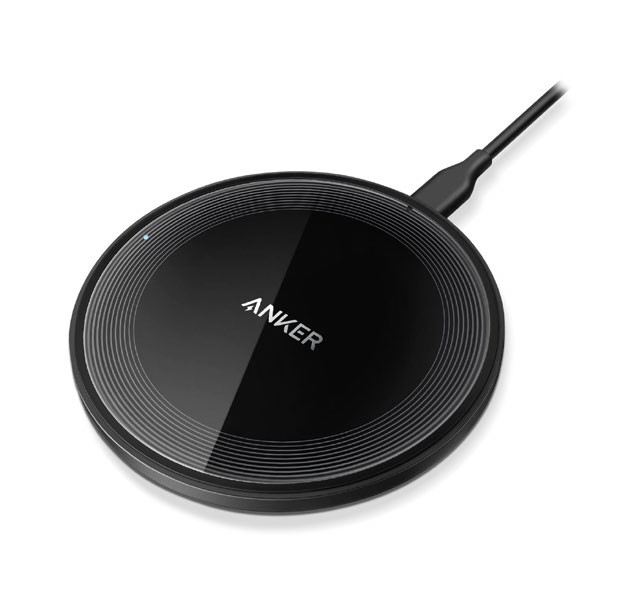
The Anker 315 can charge any Qi-enabled device
Which wireless charger should you buy?
Anker 315 Wireless Charger £17
from www.snipca.com/52984Anker makes lots of great wireless chargers, including its new MagGo Power Bank (see our review on page 28), but for simplicity and value it’s hard to beat the 315 (pictured above). About the same size as a drinks coaster, this wireless-charging pad can power up any Qi-certified phone you place at its centre, with up to 10W of charge. The only catch is it doesn’t come with a power adapter, so you’ll need to borrow a compatible one from another gadget.