Answers
Got a burning question about open source or the kernel? Whatever your level, email it to lxf.answers@futurenet.com

Neil Bothwick gives your Tux a total tune up to keep it ticking along.
Q Small screen VM
I’ve been running Ubuntu and Linux Mint happily in
VirtualBox
for years. A couple of weeks ago, I purchased a PowerSpec G902 gaming PC. I haven’t been able to run Ubuntu 20.04 LTS full screen within Hyper-V. The choice of 2560x1440 screen resolution is never an option. I’m at my wits’ end. I don’t know if it has anything to do with the fact that this PC has a dedicated GPU (Nvidia GeForce RTX 3080), not an APU?
Henry Adams
A This may simply be a case of not allocating enough video memory to handle this size of display. Go into the Display section of the settings and make sure the Graphics Controller is set to VMSVGA, then crank up the Video Memory setting to at least 64MB, although playing safe with 128MB while trying to get it to work would be better. In addition, disable 3D acceleration – at least while getting things to work – because this has been known to cause problems.
If that doesn’t work, you may need to set up the mode within the guest OS using xrandr, which is the command line program that manages displays. First use cvt to generate a suitable modeline:
$ cvt 2560 1440
This will give something like:
# 2560x1440 59.96 Hz (CVT 3.69M9) hsync: 89.52 kHz; pclk: 312.25 MHz Modeline “2560x1440_60.00” 312.25 2560 2752 3024 3488 1440 1443 1448 1493 -hsync +vsync
Plug your modeline data into xrandr:
$ xrandr --newmode “2560x1440_60.00” 312.25 2560 2752 3024 3488 1440 1443 1448 1493 -hsync +vsync $ xrandr --addmode VGA-1 “2560x1440_60.00” $ xrandr --output VGA-1 --mode 2560x1440_60.00
The mode in the second and third lines is the first item in your Modeline output. You may need to change VGA-1 to whatever your display is identified as, you can see this in the output from the command:
$ xrandr --query
Once you have this working by running the commands manually, put them in a short shell script and add it to the desktop’s autostart list.
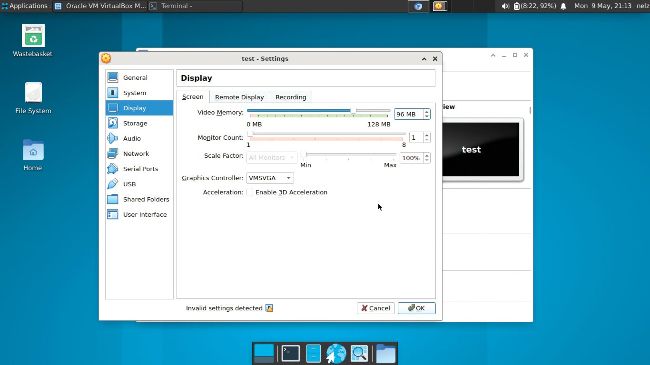
Large screens require plenty of video memory, so make sure that you allocate enough resources to a virtual machine if you want a high-resolution display such as 2560x1440.
Q Stealth files
I have a root partition that
gparted
reports is 228GB with 1.5GB free. Using the
Disk Usage
tool in Linux Mint 20.3, the files total only 118.8GB, which I believe to be the true size.