CA
  
You are currently viewing the Canada version of the site.
Would you like to switch to your local site?
17 MIN READ TIME

EMUL ATION

Emulate the first portable computer

Rounding off our emulation series, Mike Bedfords revives the first portable computer that ran the bizarre APL language.

Credit: https://norbertkehrer.github.io

OUR EXPERT

Mike Bedford certainly has no nostalgia for an era when portable PCs cost upwards of $50,000, but he admits to having a fascination with APL..

W e’ll warn you that identifying the first portable computer is a battlefield. Indeed the Osborne 1, which was launched in 1981, is often given that title. Some people refer to the Osborne 1 as the first commercially successful portable computer, but the term “commercially successful” is even more vague than “portable”.

The Osborne 1 didn’t predate the IBM 5100, though. That first saw the light of day in 1975, while its successor, the IBM 5110, launched in 1978. However, to be pedantic, neither of those was IBM’s first portable computer, the true identity of which was the IBM SCAMP, which first appeared in 1973. What’s more, given our interest in APL, the SCAMP ran APL, something that will be obvious when we point out that its name stood for Special Computer APL Machine Portable. The explanation for the apparent contradiction of two IBM machines both claiming to be the first portable computer, is that the SCAMP was only ever a prototype or, in other words, IBM never sold SCAMPs.

So, now we’ve made that as clear as mud, let’s take a look at what you got when you paid between $8,975 and $19,975 (equivalent spending power of $47,962 to $106,745 today) for an IBM 5100. The state-of-the-art microprocessor back in 1975 was the 2MHz, eight-bit Intel 8080 that executed around 0.3MIPS. This wasn’t adequate for the 5100, we assume, so IBM used one of its own designs called PALM. Standing for “Put All Logic in Microcode”, it wasn’t a microprocessor, but a circuit board containing 13 gate array devices and a handful of other components. It ran at 1.9MHz, but it’s not clear how many MIPS it managed to clock up.
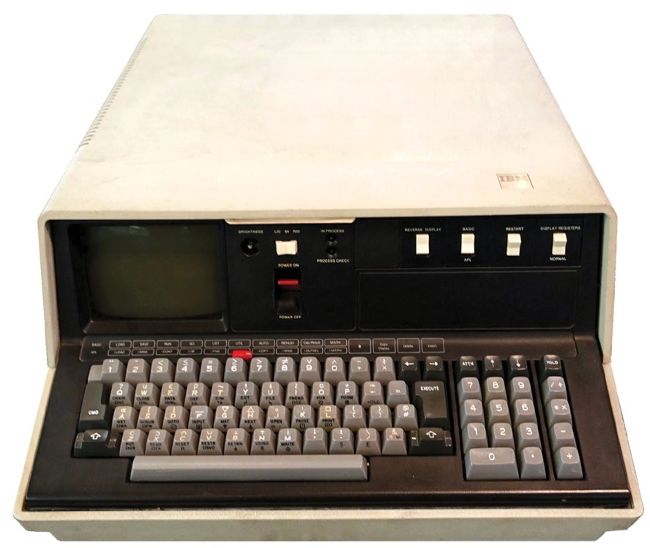
The IBM 5100 was, perhaps, the first portable computer, but the slightly later 5110, shown here, was very similar.
CREDIT: Daderot, CC0 1.0, public domain, Wikimedia https://bit.ly/lxf291ibm
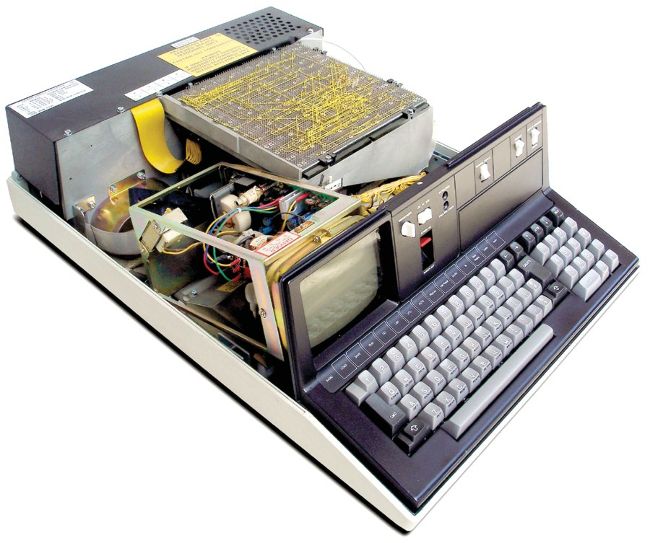
This view of the insides of the IBM 5110 reveals why, despite being called portable, it was barely so.

Although PALM could directly address only 64KB of memory, this was increased in the IBM 5100 by bank switching. This way it boasted up to 64KB of ROM (Read Only Memory) which stored the APL and/or BASIC interpreters, and up to 64KB of RAM.

Most personal computers that predated the IBM 5100 – and most of those that followed – comprised two or more boxes. At the very least, there’d be a monitor and a case containing the processor board and keyboard. Alternatively, while many of the home computers of the early 80s came as a single box, you had to connect them to a TV and a cassette recorder.

Unlock this article and much more with
You can enjoy:
Enjoy this edition in full
Instant access to 600+ titles
Thousands of back issues
No contract or commitment
Try for $1.39
SUBSCRIBE NOW
30 day trial, then just $13.99 / month. Cancel anytime. New subscribers only.


Learn more
Pocketmags Plus
Pocketmags Plus

This article is from...


View Issues
Linux Format
August 2022
VIEW IN STORE

Other Articles in this Issue


WELCOME
First step…
It seems that Tux can safely visit Hell,
REGULARS AT A GLANCE
Ubuntu Snaps under fire
The release of Ubuntu 22.04 has prompted more people to complain about the usefulness of Snaps.
Framework Laptop receives 12th gen processor upgrade
Popular modular laptops with Linux support now available with 12th gen Intel processors.
Turkish district reaps Linux rewards
Local government saves $1m by going open source.
DECISIONS, DECISIONS
Matt Yonkovit is the head of open source
BE A GIT
Keith Edmunds is MD of Tiger Computing Ltd,
Convergence lives on with Gnome Shell
The dream of a Linux desktop for mobile devices isn’t dead in the water.
Mesa 22.1 brings better ray tracing
Open-source graphics driver stack receives a big update.
Thunderbird donations increase
Revenue of the email client rose by 21 per cent in 2021.
Distro watch
What’s down the side of the free software sofa?
SPOTLIGHT ON MESON
Xavier Claessens is a senior software engineer at
MULTIMESS
Jon Masters is a kernel hacker who’s been
Kernel Watch
Jon Masters summarises the latest happenings in the Linux kernel, so that you don’t have to.
Answers
Got a burning question about open source or the kernel? Whatever your level, email it to lxf.answers@futurenet.com
Mailserver
WRITE TO US Do you have a burning
Kooha
Version: 2.0.1 Web: https://github.com/seadve/kooha
AppImage Pool
Version: 5.0.0 Web: https://github.com/prateekmedia/appimagepool
Blanket
Version: 0.6.0 Web: https://github .com/rafaelmardojai/blanket
Universal Media Server
Version: 10.21.0.1 Web: www.universalmediaserver.com
Beaker Browser
Version: 1.1.0 Web: https://beakerbrowser.com
superProductivity
Version: 7.11.5 Web: https://super-productivity.com
Safe Eyes
Version: 2.1.3 Web: https://slgobinath . github.io/SafeEyes
Mudlet
Version: 4.16.0 Web: www.mudlet.org
StackAndConquer
Version: 0.10.0 Web: https://github.com/ElTh0r0/stackandconquer
Bottles
Version: 2022.5.14-trento-3 Web: https://usebottles.com
Filmulator
Version: 0.11.1 Web: https://filmulator.org
REVIEWS
GoDaddy
Purchase and bid on domains with the daddy of services and Stefan Ionescu.
OpenSUSE 15.4
If someone were to compile the definitive list of the mysteries of life, Mayank Sharma would ask them to include openSUSE at number 42.
Tails 5.1
This distro is one of those things that Mayank Sharma would rather have and not need, than need and not have.
OpenMediaVault 6
Old wine in a new bottle is such a cliché, but that’s exactly how Mayank Sharma likes his software to grow and evolve.
OnlyOffice 7.1
Usually Mayank Sharma will run everything that’ll fit inside a browser, but today he’ll try something he’s petrified to launch even as a native program.
The Stanley Parable: Ultra Deluxe
Management doesn’t like self-referential things. It just reminds them they’re a simple strapline-based comedy construct of Christopher Livingston.
ROUNDUP
Raspberry Pi distros
The top-end Raspberry Pis can be used to build a formidable desktop. Michael Reed finds there’s a fair bit of choice when it comes to Linux distros
Fast virtual machines
Fast Virtual Machines
Jonni Bidwell transcends meat space, ventures virtuously into the valleys of the virtual and returns laden with actual knowledge.
Pi USER
Turing 2 Pi raises $1 million in a day
The Pi-based cluster computing Kickstarter project smashes its own targets for full funding.
Waveshare CM4-NANO
Les Pounder looks at Waveshare’s Compute Module 4 carrier board that offers Raspberry Pi 4 performance in a near Zero-sized package.
Create a custom LCD menu system
Les Pounder loves to get hands-on with a good button, and if doing so can save him time and looks great, then it’s a win-win situation!
Replacing rc.local and using Systemd
Sean Conway is struggling with change – specifically, what system administration knowledge to keep and what to throw away.
IN DEPTH
World Web 3
Battle lines are being drawn up as technologies for a Web 3.0 are primed and loaded, Mats Tage Axelsson helps you prepare for a user-owned world.
IN DEPTHTUTORIALS
Multi-boot USB drives
Shashank Sharma can’t parallel park, but he knows how to just copy and paste live distributions into a USB drive to boot ‘em up.
TUTORIALS
How to take better screengrabs in Ubuntu
Nick Peers reveals how easy it is to take screengrabs and annotate them using a combination of Ubuntu’s built-in tools and third-party utilities.
Make beautiful algorithmic music
Create royalty-free music automatically, or try your hand at producing music by coding. Mike Bedford explores both composition options…
Back up and copy entire hard drives
Michael Reed shows you how to tame Clonezilla, a powerful piece of software that can help copy and restore hard disk partitions.
Keep your passwords secret and safe
David Rutland has learned from past mistakes, and endeavours to keep all of his logins, usernames and passwords firmly under lock and key.
Configure a crossplatform KVM system
Use Barrier to replace a physical KVM switch and enable a keyboard and mouse to be shared between multiple devices. Matt Holder explains all.
SEEING THE LIGHT
Three humble developers of Bodhi Linux enlighten Jonni Bidwell on the ways of Zen and the art of distro maintenance.
CODING ACADEMY
Controlling processes and using Unix signals
Join Mihalis Tsoukalos as he demonstrates how to use Rust to work and manage child processes, and handle Unix signals.
Updating the LXF GIT monitoring tool
John Schwartzman adds new features to an existing PyQt5 program that finds all of your git repositories and displays their status.
Chat
X
Pocketmags Support