CA
  
You are currently viewing the Canada version of the site.
Would you like to switch to your local site?
13 MIN READ TIME

TECH SUPPORT & TECHSPLANATIONS

EXPERT ADVICE

Our resident genius solves your Mac and iOS problems

Email Mac|Life at ask@maclife.com

Panic: no external boot disk

THE INTRODUCTION OF completely novel hardware inevitably brings the unexpected when some people among the millions of new users do things that the engineers hadn’t anticipated. One failing in M1 Macs is the common situation in which an external startup disk is removed when that Mac is shut down.

If that disk was selected as the startup disk and is nowhere to be found when the Mac next boots, the result is total catastrophe; it panics, causing another boot, which leads to another panic, and so on until you force it to shut down, then start it up in Recovery.

It shouldn’t be hard for the firmware to cope with this by entering Recovery in the first place and letting you choose an available startup disk, but Apple still hasn’t fixed this in the eight months since it started delivering these new Macs to users.

> More information in list views

In the Finder’s List View, I can choose to display additional information such as duration for some folders but not others. How can I extend that to any folder?
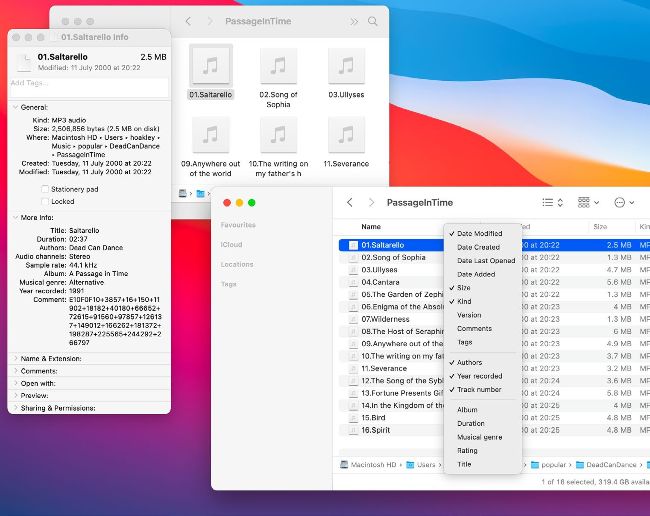
Some designated folders such as Music can show you additional information about files when seen in the Finder’s List view.

The Finder’s list views can be customized to show info about files in certain folders. To try this, open one of the specially designated folders in your Home folder, such as Movies, Music or Pictures, and show it as a list. Ctrl– click in the header bar of the window to see the column menu, and there are special properties shown below the divider, such as Dimensions and Duration. These are controlled in the Finder preferences file, and aren’t something you can readily customize. The Finder uses the folder name to determine which of several suites of properties to offer in that menu. For example, name a folder in Documents as Movies, and its list view properties will resemble those in your standard Movies folder. You can get this to stick even when that folder’s name changes again, and that’s one way of effectively adding properties to the lists elsewhere. This is different from the categories listed as Information below the thumbnail shown when a file’s selected in column view, which is determined by the file’s type and set in the same Finder prefs file.

Unlock this article and much more with
You can enjoy:
Enjoy this edition in full
Instant access to 600+ titles
Thousands of back issues
No contract or commitment
Try for $1.39
SUBSCRIBE NOW
30 day trial, then just $13.99 / month. Cancel anytime. New subscribers only.


Learn more
Pocketmags Plus
Pocketmags Plus

This article is from...


View Issues
Mac|Life
November 2021
VIEW IN STORE

Other Articles in this Issue


START
ANOTHER CLOSE CALL
I really am starting to sound like a
>>>THE TEAM
Matt Lochrie Art Editor Has been drawing Tonics
Stay up to date with the latest Apple news
LETTER OF THE MONTH
I’m writing in response to your latest editorial
Watch this space
BOB SCUTELLARO CARY, NORTH CAROLINA I call this
The bigger picture
Thank you for the article on iPhone photography
Epic Games antitrust trial verdict
Apple must loosen its grip on payments, but App Store passes antitrust test
News in brief
A bite of the Apple
> THE SHIFT
MATT BOLTON IS wondering what’s supposed to fill the AirPods and HomePod– shaped hole in Apple’s current feature list…
SPOT LIGHT
UP CLOSE AND PERSONAL WITH…
CRAVE
THE GEAR WE’RE LUSTING AFTER
Mac Life
57 WAYS TO FIX YOUR MAC
Fix your Mac fast with our in–depth guide
Getting started
What to do when you’re struggling to do anything at all
How to Use Activity Monitor
1 Open the app Activity Monitor lets you
Files and backup
Find files and fix Finder > Where are
More serious problems
When a restart isn’t the answer
macOS Recovery
Bringing your Mac back
Networking issues
Troublesome Wi–Fi and shaky Safari
All about iCloud
How to handle your files stored in the cloud
Other problems
Battery safety and scary failures
Professional repair options
What to do when all else fails
BOOST YOUR BATTERY LIFE
Discover how to improve the performance of your MacBook, iPhone, iPad, and Apple Watch batteries — plus maintain their health
The best battery boosters
Give your battery some juice while on the road with these accessories
Mac power banks
MaxOak K3 Power Bank $135.99 From maxoak.net
REVIEWS
TOUGH TESTING, TRUSTED RATINGS
How to edit movies in iMovie
Apple’s free video editor makes it easy to create your own home movies and trailers to promote them
Create a home movie
Let’s get started with just dragging and dropping the elements into place
Go deeper with iMovie
Once you’ve grasped the basics, there’s a whole lot more you can do
REVIEWS
Elgato Facecam
A neat webcam that doesn’t quite justify its price tag
Zendure SuperMini Lightning
Quick and easy fast charging on the go
OWC Envoy Pro SX
A very rugged drive for speed–hungry professionals
Nikon Z fc
Retro looks and handling, with the best in modern kicks
BOSS CUBE Street II
A feature–packed mobile performance amplifier
Logitech Ergo K860
This ergonomic “split” keyboard helps reduce wrist–strain
The best mice for good desk health
Work better and avoid injury by using an ergonomic mouse
Vissles V84 (2.0) Mechanical Keyboard
A Mac–friendly typing experience — and then some
Incase Hipsack w/BIONIC
Secure your valuables on the move
Paperlike screen protector
Enhance your iPad drawing
Weather Strip
Scroll to see a daily forecast
LumaFusion 3
Professional video editing for iOS
Flocks
The wisdom of crowds?
Art Text 4.1
A deceptively fun way to create textured graphics
Carrot Weather
Outlook: sunny — and snarky
FitnessView
An app that’s fit for the best
GROUP TEST
ON TEST... > CyberGhost VPN > ExpressVPN >
THE WINNER
NORDVPN
6 apps to... improve yourself
Achieve your goals and create a new you
Best of the best
Can’t find the hardware or app you’re looking for in our reviews section? Then check in here — we’ve highlighted the best in every major category, as voted for by us
CREATE
Make a copy of your Mac
Create a one–off copy or scheduled backup using Carbon Copy Cloner
Crop smarter in Pixelmator Pro
How to quickly improve composition and counteract perceptive distortion
Screen Time on Mac
Use Apple’s macOS tool to stay focused and get more done
Put your music online
Share your musical masterpieces with the whole world — and sell them too!
Free up storage space
Need more room on your iOS device to update to iOS 15? Follow our tips
Get directions anywhere
Find and be found with this reliable mapping utility
Master drag and drop
You don’t have to wait until iPadOS 15 to drag and drop files on your iPad
Plan your day on iOS
Get on top of your tasks with Hour Blocks’ daily schedule
Lossless audio on Apple Music
Better late than never — Apple Music finally provides CD–quality audio
RAM
Apple IIGS heralds breakthroughs in color and sound
Charlotte Henry reflects on the Apple IIGS computer
Chat
X
Pocketmags Support