DITCH YOUR OLD TV HABITS
Enhance your streaming and downloads by embracing the latest innovations in TV viewing. Robert Irvine reveals amazing new ways to watch anything, anytime and anywhere
Our television-viewing habits have evolved considerably over the past 20 years. Gone are the days when the whole family tuned in every night to watch the same BBC and ITV programmes as 10 million other viewers. An Ofcom survey last year found that most young people (aged 16 to 24) don’t watch live TV at all (www. snipca.com/53780), but prefer video-sharing services such as YouTube.
WHAT YOU CAN DO
• Download entire series of TV shows to watch offline
• Play videos in picture-in-picture mode on your mobile device
• Unlock new Freeview channels by retuning your TV
• Stream hundreds of free channels showing classic shows
• Skip annoying ad breaks at the touch of a button
• Watch live and on-demand TV without an aerial
These changes in how, when and what we watch have led to speculation that the Government will scrap the TV licence fee, or – as we explained in Issue 703 (page 10) – extend it to cover streaming services including Netflix and Amazon Prime Video.
Whatever happens, you shouldn’t feel overwhelmed by the huge choice of viewing that’s now available, but adapt your personal TV habits to embrace the latest innovations.
Here, we reveal the most exciting and entertaining developments in television over the past eight months (since our previous TV-themed cover feature: www.snipca.com/53128). These include useful new features from your favourite TV services, brilliant new channels you can watch for free and the best ways to save money by switching your streaming plan.
We also highlight the latest improvements to TV hardware and recommend the best devices to buy. However you currently watch TV, you’re certain to benefit from updating your viewing habits.
BEST NEW FEATURES ON STREAMING SERVICES
Download entire Netflix seasons to watch offline
Netflix finally lets you download entire series of TV shows to your iPhone or iPad with a single tap. The ‘Season Download’ feature has long been available on Android devices and lets you save every episode of a ‘season’ to watch offline, rather than downloading them individually.
This is particularly useful for binge-watching TV series when you can’t get a reliable internet connection, such as while you’re travelling. It also allows you to download whole seasons over Wi-Fi rather than streaming them on 4G or 5G and using up your monthly data allowance. To use the option in the Netflix app for Android (www.snipca.com/53783) or iOS (www.snipca.com/53784), simply tap the ‘Download Season [number]’ button (see screenshot below) when viewing the details of a show. The selected season will be saved to the Downloads section of the My Netflix tab, where you’ll have 30 days to watch the lot. You can still download individual episodes to your phone or tablet in the same way.
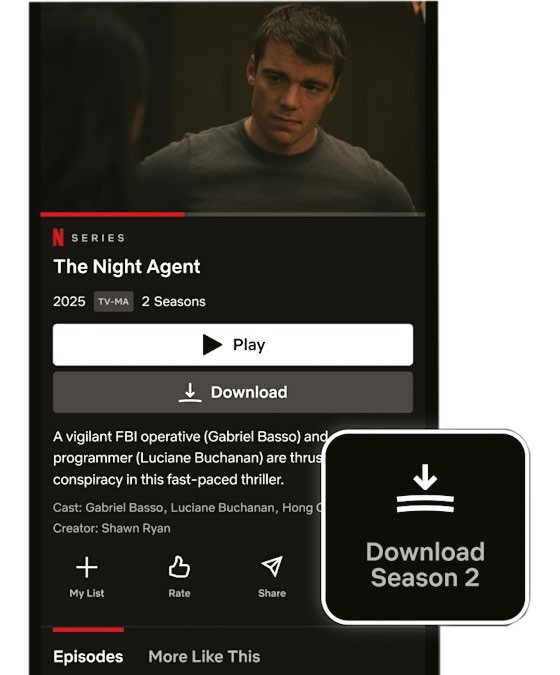
Download entire series of TV shows to watch offline on the go
Watch Apple TV+ and other services on Prime Video
If you’ve watched everything you want to on Prime Video, but are reluctant to install yet another TV app, you can subscribe to other streaming services as add-on channels. Last summer, Amazon redesigned the Prime Video website and app to make it much easier to browse and watch TV shows and films on third-party services.
Channels include Paramount+, MGM+, BFI Player and Discovery+, and last December Apple TV+ was added to the roster. This means you can stream acclaimed shows such as Shrinking, Slow Horses and Severance without installing the Apple TV+ app.
To see which channels are available through Prime Video, go to www.snipca. com/53732 in your browser, or select Subscriptions in the Prime Video app. Choose a channel, click ‘Get started’ and sign up. You’ll need to pay for a subscription on top of your Prime membership, but most services – including Apple TV+ (see screenshot above) – offer a free trial and you can cancel at any time.
Since the redesign, Amazon displays the logos of channels in the bottom-right corner of content thumbnails so you can instantly see which service the show or film is available to stream on. It also uses a yellow shopping-bag icon to indicate which titles require extra payment, either as a channel subscription or as a rental or purchase from the Prime Video store.