WATCH TV ANYWHERE!
Take your favourite TV shows with you wherever you go in the UK and abroad. Robert Irvine explains the best ways to beat restrictions on watching TV while you travel
You don’t go on holiday to watch TV, but it can certainly come in useful. When you’re confined to a hotel room, holiday cottage or caravan due to bad weather, tiredness or illness, or enduring a long train or plane journey, a bit of entertaining telly helps you pass the time and relax.
WHAT YOU CAN DO
• Stream live and on-demand TV in the UK and abroad
• Download TV shows to watch offline while travelling
• Carry your favourite programmes on a portable drive
• Set up a media server to watch TV shows remotely
• Access UK-only streaming services when overseas
• Plug your streaming stick into TVs when you’re away from home
Although most holiday accommodation provides a TV set, the choice of channels will depend on the country you’re visiting and may be limited, in a foreign language or mostly rubbish. You may even get a smart TV, but may not feel comfortable signing into your streaming accounts on a set you don’t own. If you forget to sign out, the next guests will have full access to your data – unless a private ‘guest mode’ has been set up.
Thankfully, there are lots of ways to keep watching your favourite shows while you’re away from home, whether you’re travelling in the UK or abroad. It obviously isn’t practical to cram a 42in TV into your suitcase, but other devices and services will give you instant access to your preferred entertainment for the duration of your break.
Here, we recommend the best options for watching TV wherever you go. Some are free while others require a subscription or one-off payment. We’ve included their prices along with details of any caveats to be aware of before you head off.
WATCH TV ON STREAMING SERVICES
Stream TV in the UK using broadcasters’ apps
All the main providers of free TV in the UK – BBC, ITV, Channel 4, Channel 5 and U (formerly UK TV) – have their own mobile apps (plus STV Player for Scottish viewers), so you can watch their shows live and on-demand on your phone or tablet. If you take your laptop on holiday, you can stream these services through their websites in your browser.
Provided you have a Wi-Fi connection, or a strong 4G/5G signal (and generous data plan), you’ll be able to enjoy your favourite programmes from most Freeview channels wherever you go in the UK. For channels you only get with a subscription, you can use your TV provider’s app or web player to stream shows, films and sport while you’re away from home.
Sky customers should download the Sky Go app (www.snipca.com/54990), which is included with all Sky subscriptions and also available for Windows. Tap its TV Guide tab (see screenshot above) to stream what’s on now, or tap Browse to play shows on-demand.
Virgin Media viewers can install the Virgin TV Go app (www.snipca.com/54993) or sign into the service in their browsers (www.snipca.com/54991). And BT/EE customers can use the EE TV app and Web Player (www.snipca.com/54994).
All these services give you access to live channels and catch-up content, including box sets of popular series. Your account may limit how many devices you can watch on, so ensure the one you’re taking on holiday is included.
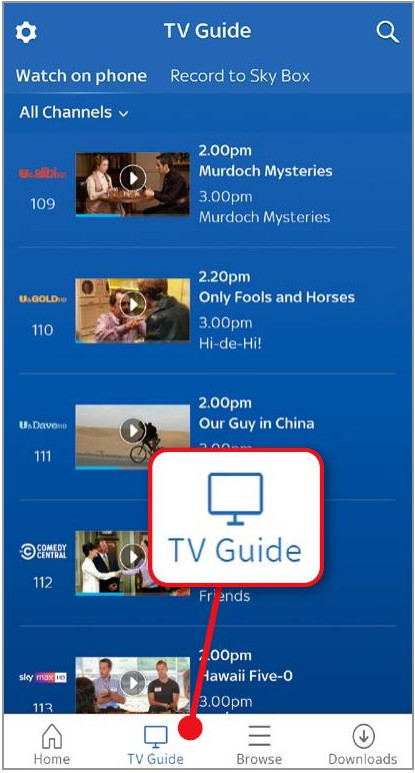
Sky Go lets you stream live and on-demand TV when you’re away from home
Watch global streaming services while on holiday
When travelling abroad, you won’t be able to stream UK TV channels without using a VPN or other workaround (see page 55). This is due to content-licensing restrictions, and the BBC, ITV and other broadcasters will automatically detect and block your device’s IP address when you try to access them from another country.
In contrast, global streaming services including Netflix, Disney+ and Prime Video allow you to keep watching when you travel abroad.
However, their choice of TV shows and films will update automatically according to the country you’re visiting. So if, for example, you’re in Majorca, you’ll see the Netflix catalogue for Spain but not series that are exclusive to its UK library. You’ll still have plenty to choose from, but because British and American shows will be dubbed into a foreign language, you’ll need to tweak Netflix’s settings to switch to the English audio track or subtitles.