Sie sehen gerade die Germany Version der Website.
Möchten Sie zu Ihrer lokalen Seite wechseln?
6 MIN LESEZEIT

Part 1

Master Accessibility on Mac

Here’s how to use VoiceOver and zoom and hover on your Mac
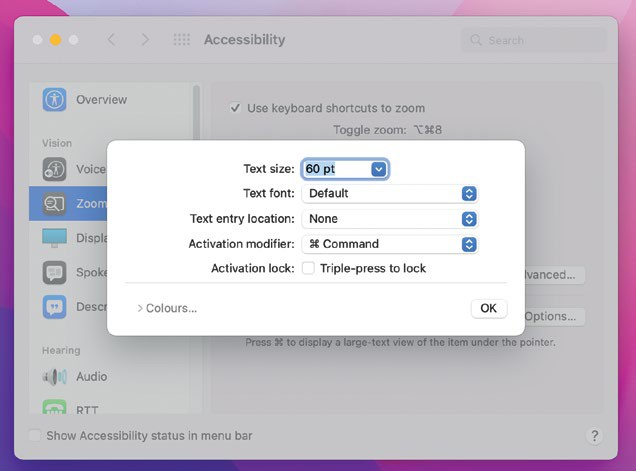
You can fine tune the settings for hover and zoom, and choose the text size and font.

Accessibility settings on the Mac are controlled from the Accessibility pane in System Preferences. It is split into four sections to make it easier to find the setting you need – Vision, Hearing, Motor, and General. You can also choose to show Accessibility status in your Mac’s menu bar. If you choose that option, the Accessibility icon –a human figure inside a circle – will appear in the menu bar. If you click it, you will be able to choose any Accessibility setting.

In addition, if you tap the Touch ID button (on Macs that have one) three times in quick succession, you will see a menu of Accessibility items that you can specify. Press † to move from one to the next and the Spacebar to select one. Your Mac will read them to you as you select them.

It’s important to note that Accessibility controls can be useful for lots of people, beyond those with physical limitations in their ability to interact with their Mac. For example, anyone who suffers from motion sickness will benefit from the ‘Reduce motion’ option (Accessibility > Display).

Schalten Sie diesen Artikel und vieles mehr frei mit
Sie können genießen:
Genießen Sie diese Ausgabe in voller Länge
Sofortiger Zugang zu mehr als 600 Titeln
Tausende von früheren Ausgaben
Kein Vertrag und keine Verpflichtung
Versuch für €1.09
JETZT ABONNIEREN
30 Tage Zugang, dann einfach €11,99 / Monat. Jederzeit kündbar. Nur für neue Abonnenten.


Mehr erfahren
Pocketmags Plus
Pocketmags Plus

Dieser Artikel stammt aus...


View Issues
MacFormat
March 2022
ANSICHT IM LAGER

Andere Artikel in dieser Ausgabe


Mac FORMAT
Hello (again)
iCloud is such a fundamental part of the
APPLE CORE
Apple’s powerful MR headset
Dual-chip set-up, three lenses and more rumours
Crave
THE GEAR WE’RE LUSTING AFTER
APPLE PARK
Apple’s circular HQ celebrates its fifth birthday this year, but what’s so special about it? Let’s look at the facts
CONTACTS
Have your say on all things Apple!
MATT BOLTON…
THINKS THAT IF APPLE’S VR/ AR HEADSET IS AIMED AT THE MAINSTREAM, IT’LL HAVE TO DO BETTER THAN THE ‘METAVERSE’
Gaming on the Mac
For years, the Mac has been dismissed as a gaming platform. Charlotte Henry looks at why that might be changing
Do more with iCloud+
iCloud brings all your Apple devices together in beautiful harmony. Here’s how to make the most of it
APPLE SKILLS
Design dynamic wallpaper
Discover how to create your own ever-changing desktop wallpaper
What’s new in Photoshop
Make multiple selections and enhance landscapes with AI Neural filters
Premiere Elements 2022
Put the app’s latest tools through their paces to create eye-catching videos
Clean up your Music library
Fill in missing album artwork and metadata and create Smart Playlists
Make music with Groovebox
This music maker is brilliant fun for beginners and experienced alike
Start new habits and stick to them
Tune up your life with the Fabulous-Daily Routine Planner
Use Quick Notes on an iPad
Quick Notes is an invaluable tool for grabbing text, images or links on iPad
Set up Account Recovery
Apple has tools to help access devices where you don’t know the passcode
Mesh networking
If your Wi-Fi can’t cope, a mesh system could be the ideal solution
GENIUS TIPS
EXPERT ADVICE Our resident genius solves your Mac
iOS software
Swipe away your touchscreen troubles and rekindle your love of Apple’s mobile devices
Mac hardware
We help to solve your hardware hassles, from interrupted upgrades to running diagnostics
macOS >
Shine a spotlight on the solutions to your most irritating Mac problems
MAKE YOUR MAC MORE ACCESSIBLE
(ANDYOUROTHERDEVICESTOO)
Master Accessibility on Mac
Control your Mac with your voice or type to ask Siri
Master Accessibility on iPhone and iPad
Here’s a rundown of the accessibility features in iOS and iPadOS
Power up your passwords
Just how secure are your online accounts? Join us as we reveal the tips and techniques you need to protect your personal data from hackers
Manage passwords on Mac
Step one is to find the best way to strengthen – and securely store – passwords on your computer with a master password
Manage passwords on iPhone, iPad, Watch
Make password management simpler by ensuring you can securely access your vault on your mobile devices
APPLE CHOICE
Beats Fit Pro
Beats’ best ever earbuds go toe to toe with AirPods Pro
Logitech MX Keys Mini
The keyboard that the Magic Keyboard should be aspiring to
Nanoleaf Lines Starter Kit
Add more colour to your life with these backlit smart lights
Loupedeck CT
Take control of your Mac with this compact, powerful gadget
AOC I1601P
A handy second screen
Joby GripTight Gorilla Pod for MagSafe
MagSafe-friendly version of Joby’s acclaimed tripod
THE BEST DACS TO IMPROVE AUDIO QUALITY
A good DAC can really boost the audio quality on your Apple devices
EMAIL APPS FOR MAC Reclaim your inbox
Group test
THE WINNER Spark
Thoughtful design with nearly everything you could want
ACDSee Photo Studio for Mac 8
Organise, edit and share shots with this comprehensive app
1Password 8
Look after your data as you would your deepest secrets
Kaleidoscope 3
Advanced file versioning
Usage: System Activity Monitor
System stats at your fingertips
6 apps for manual photo and video apps
Take control of your iPhone camera, and capture or edit pro-level images
STORE GUIDE
Your complete guide to the best Apple hardware and third-party accessories
Apple iPod earbuds
Former MacFormat Editor Graham Barlow recalls Apple’s original white earbuds that shipped with the iPod in 2021
Chat
X
Pocketmags Unterstützung