Sie sehen gerade die Germany Version der Website.
Möchten Sie zu Ihrer lokalen Seite wechseln?
20 MIN LESEZEIT

iPad VS Mac

Do you need a laptop or a tablet? We help you discover which Apple device is best suited for your needs

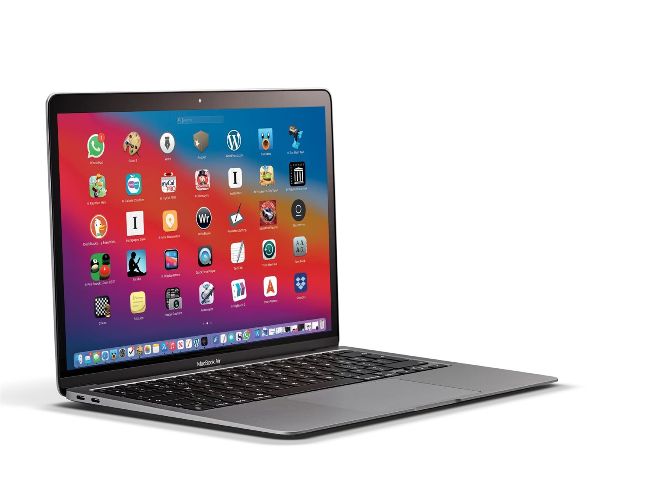
IT USED TO be the case that choosing between a MacBook and an iPad was easy, but Apple has started to blur the lines between the two in ways that few of us could have expected. In terms of power, we have now reached parity thanks to the new iPad Pro which uses the same M1 chip as the MacBook Air, and when you start to look at the storage onboard the comparisons become even closer. For example, you can buy a 12.9–inch iPad Pro for only $200 more than the equivalent 256GB MacBook Air, but if you opt for the 11–inch iPad Pro then you can pay only $100 more than the 256GB MacBook Air for 512GB of storage. This makes the cost analysis almost moot, which is then exacerbated by the fact that the M1 chipped MacBooks can run most iOS apps and games as well. With so many titles now available on macOS it can come down to how each will work for you in terms of the physical forms. We’ll try to help you decide which device will be best for you, but there’s little doubt that Apple is making this a tricky question to answer.

QUICK LOOK The flat iPad keyboard

Many people will quite rightly presume that a physical keyboard is best for long periods of typing and data entry, and in many ways this assumption makes sense — but there is more to the story. A software keyboard like the one on the iPad can be customized to work in specific ways, which can make it as efficient as real keys.

A HALF A SCREEN

The main disadvantage of using the iPad software keyboard is that it takes up half the screen, which lessens how much text you can view. However, you will be working on a much smaller and more portable device while typing.

B APP KEYBOARDS

Many apps will customize the keyboard and allow specific functionality just above the keys. This will speed up your data input and could be likened to the hardware touch bar that was added to some MacBooks.

C FORGET THE

KEYBOARD There’s a good argument for using voice dictation for data entry, whether you’re using a MacBook or an iPad. The software tech is the same in both, so the end results will be identical.

D FLICK TO CHANGE

The ability to insert numbers and punctuation with a simple gesture is a big advantage on the iPad side. Not only is it very efficient, it will likely reduce the strain on your fingers and wrists as well.

PRO iPAD APPS

You no longer need a “proper” computer when performing many professional tasks

1 ADOBE PHOTOSHOP

Most people are aware of Photoshop, but are likely less aware of just how powerful the iPad version is. You can now undertake complex image manipulation wherever.

2 GARAGEBAND

Apple makes GarageBand, and has not scrimped on features when it comes to the iPad. In this app the Apple Pencil arguably gives you greater control than on the Mac.

3 AFFINITY PHOTO

Whether you need unlimited layers, brushes or smart object importing, Affinity Photo offers it all on the iPad. Again, the Apple Pencil offers near perfect control.

4 CODE EDITOR

If you have a data input system you are happy with, either an external keyboard or the iPad screen, Code Editor gives you every coding tool you could possibly need.

5 LUMA FUSION

Video editing on an iPad? Yes indeed. With the later iPads and the Pro models you will notice little difference in performance compared to a Mac. A big leap forward.

Schalten Sie diesen Artikel und vieles mehr frei mit
Sie können genießen:
Genießen Sie diese Ausgabe in voller Länge
Sofortiger Zugang zu mehr als 600 Titeln
Tausende von früheren Ausgaben
Kein Vertrag und keine Verpflichtung
Versuch für €1.09
JETZT ABONNIEREN
30 Tage Zugang, dann einfach €11,99 / Monat. Jederzeit kündbar. Nur für neue Abonnenten.


Mehr erfahren
Pocketmags Plus
Pocketmags Plus

Dieser Artikel stammt aus...


View Issues
Mac|Life
September 2021
ANSICHT IM LAGER

Andere Artikel in dieser Ausgabe


START
DIFFICULT DECISIONS
We face some pretty difficult choices in life.
LETTER OF THE MONTH
I wanted to share an issue I had
Apple acts to address supply shortages
Screens and chips in short supply, but Apple’s working on it
> Apple–1 manuals re–created
Not a copy, but a meticulous remake
News in brief
Apple news in bite–sized chunks
> THE SHIFT
MATT BOLTON thinks the new iMac is beautiful, so why is Apple forcing him to add an ugly peripheral?
SPOT LIGHT
UP CLOSE AND PERSONAL WITH…
CRAVE
THE GEAR WE’RE LUSTING AFTER
Mac Life
Watch tips
The Apple Watch can do so much more than just tell the time. Here’s our pick of essential tips for unlocking the potential of watchOS!
Faces and complications
Your Apple Watch has many faces. Here’s how to find the right one
Health and Fitness
The Apple Watch can track a wide range of workouts, lock out water, and motivate you
Maps, Translations, and more
Going somewhere? Your Apple Watch can get you there
REVIEWS
TOUGH TESTING, TRUSTED RATINGS
APP LIFE
Beats Studio Buds
Capable and affordable alternative to the AirPods Pro
Astell & Kern USB–C Dual DAC Cable
Better Mac audio quality on the move $149
Kingston Nucleum USB–C Hub
A compact, affordable dock
Carbon Copy Cloner 6
A sleek new look and faster copying make the latest version of this disk–cloning tool a significant upgrade
Halide MkII Pro Camera
Pro iPhone camera app — now on iPad
WALTR PRO
Convert and copy any file from Mac to iOS
Baba Is You
Wordplay puzzling is simply amazing
CardioBot
Your heart health explained
MindNode 7
Calm the storm in your brain
BEST SECURE SAFARI ALTERNATIVES
You don’t need to wait for iCloud+ to surf more securely
FIREFOX
Still one of the most secure browsers around
Cardhop 2
Now even more potent for power users
Inked
A hand–drawn work of art
Sunblaze
Prepare to die… a lot
F-Secure TOTAL
Can this security app compete with the big boys?
Screenflow 10
An overhaul and more speed for this screen recorder
6 apps... To finally nail your finances
File taxes, erase debt, and start saving
Best of the best
Can’t find the hardware or app you’re looking for in our reviews section? Then check in here — we’ve highlighted the best in every major category, as voted for by us
GEAR UP
Roku Express 4K
One of the most affordable options for streaming 4K video
THE BEST FIND MY–COMPATIBLE TRACKING TAGS
Check out p92 to get started with AirTags
Belkin SoundForm Connect
Add AirPlay 2 streaming to your favorite wired speakers
Brydge iTrack
Standalone desktop trackpad for iPad
Twelve South HoverBar Duo
A dock for creative types
VIEWSONIC M2E
A versatile, useful home projector with Wi–Fi and AirPlay support
Beginner’s Guides: Introducing Pages
How to create spreadsheets in Numbers
Numbers is a versatile and capable tool for creating budgets, lists, invoices, and more
Create a spreadsheet in Numbers
Pages excels when it comes to making documents that really grab your attention
Table, charts, and functions
Tables and charts are the heart of any spreadsheet. Here’s how they work
ASK
> Unable to update external drive
I often start my M1 Mac mini up from a Thunderbolt SSD, but since updating its internal drive to macOS 11.3.1, I’ve been unable to update that external disk. How can I do that?
CREATE
CREATE
HOW TO DO ANYTHING ON YOUR MAC, iPHONE & iPAD
Find and delete duplicate files and photos
Save space with Find Duplicates in Parallels Toolbox
Capture text with TextSniper
Recipes, presentations, PDFs… TextSniper captures text from anything
Get creative with CorelDRAW
Use its shortcuts to save repetition when creating symmetrical objects
How to make music remotely
Use the cloud to collaborate with your musical buddies
Use Microsoft Teams
Chat, schedule meetings, and share your screen with friends and family
Get started with AirTag
Keep track of your stuff with Apple’s new Find My accessory
Protect accounts with 2FA
Add a secondary layer of security to your online accounts and services
The periscope lens
How submarine tech could mean better iPhone photos
RAM
I Got the Power(Book)
Charlotte Henry looks back at the PowerBook, the groundbreaking product that launched Apple into the laptop market
Chat
X
Pocketmags Unterstützung