GB
  
You are currently viewing the United Kingdom version of the site.
Would you like to switch to your local site?
10 MIN READ TIME

Photo Answers

Fazed by focal lengths? Puzzled by pincushion? Send your technique and camera questions to digitalcamera@futurenet.com
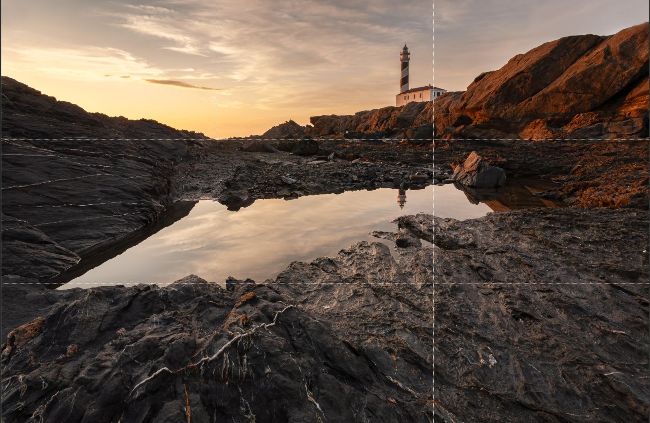
If you want to see a rule-of-thirds composition grid even when you’re not cropping your image, there’s a simple Photoshop trick.
Andrew James

Andrew James

Andrew is a highly experienced writer and photographer – if you have a problem, he is here to help.

Visible thirds

Does Photoshop have a rule-ofthirds grid I can keep visible all the time?

Most editing software, including Lightroom, Camera Raw and Photoshop, will allow you to have a rule-of-thirds grid visible on the image when you are using the Crop Tool as a compositional aid. In Lightroom you can change this to a different overlay (such as the golden spiral) really easily by pressing the letter O while using the Crop Tool; but like you Caroline, I find the rule-of-thirds grid most helpful.

If you are shooting raw and using Camera Raw to edit, you’ll know the Crop and Rotate Tool has a rule-of-thirds grid visible when you use it, and that’s the same in Photoshop itself when you select the Crop Tool.

However, if you want to have the rule-ofthirds grid visible on an image even when the Crop Tool isn’t selected, you need to set it up via Preferences and the Guides, Grid & Slices options.

Here’s how to do it:

1 In Photoshop, press Cmd+K (in macOS) or Ctrl+K (in Windows) to open Preferences.

2 Click on Guides, Grid & Slices. 3 Where it says Grid in the dialog box, change the settings as follows.

Colour: Light Gray (you can choose any colour you want, but I like this) Gridline Every: 100 Percent Subdivisions: 3

4 Click OK.

Once you’ve done this, a simple grid that divides the image into thirds both horizontally and vertically can be switched on and off at will. To turn it on, press Cmd+’ (apostrophe) in macOS or Ctrl+’ in Windows. You can use the same keyboard shortcut to switch it off, too. Now you’ve got full control over your composition!

Unlock this article and much more with
You can enjoy:
Enjoy this edition in full
Instant access to 600+ titles
Thousands of back issues
No contract or commitment
Try for 99p
SUBSCRIBE NOW
30 day trial, then just £9.99 / month. Cancel anytime. New subscribers only.


Learn more
Pocketmags Plus
Pocketmags Plus

This article is from...


View Issues
Digital Camera Magazine
March 2021
VIEW IN STORE

Other Articles in this Issue


Digital Camera World
Welcome
W ith its long nights and short days,
This month’s contributors
Chloe Dewe Mathews Photographic artist After working in
Your gifts
Download your gifts via digitalcameraworld.com/dc239
Your digital content
We’ve changed the way we deliver digital gifts – please read these instructions
Photo skills
Björn Persson
The acclaimed wildlife photographer talks to Graeme Green about creativity, conservation and connection
Photo Active
10 things to shoot, edit or create this month, including sci-fi composites, mono magic and linescapes
STAY AT HOME PHOTOGRAPHY
Keep calm and camera on with our guide to projects you can complete indoors
HOW TO SHOOT IN LOW LIGHT
James Abbott reveals the secrets behind capturing awe-inspiring landscape and city images in low-light and night-time conditions
Camera College
The complete guide to modern photography
Perfect tones with Gradient Maps
Tint your images and recreate retro toning effects with this Affinity Photo essential
Regulars
The art of seeing
Benedict Brain uses on-camera flash to create an otherworldly winter landscape
Shot of the month
Ron Timehin explores mystical cityscapes as part of his book London Fog
Hotshots
Selected images from the SINWP Living World Competition
Perimeter
Quintin Lake hangs up his walking boots as his epic photo walk round the UK ends
Add pretty starburst effects to your shots
Use this issue’s brush kit to pep up low-light shots, or create your own starburst effects
Bring some Clarity to your photos
Master one of the best detail-enhancing tools on offer in Photoshop and Lightroom
Add vintage style to your photos
Give your images a time-worn look with Lightroom or Camera Raw
Embrace blur for maximum creativity
Adding blur to pin-sharp images may sound counter-intuitive, but it’s a sure bet for achieving highly creative effects…
In Focus
The latest photography news from around the globe
Behind the lens
SELENE MAGNOLIA Documentary photographer and animal rights activist seleneenamagnolia.com
Scanning ahead...
Jon Devo reveals why medium-format could be the progressive photographer’s choice in the not-so-distant future
Chloe Dewe Mathews
This photographer’s latest book reveals a new side to the Thames. Niall Hampton dives in
What the f-stop?
How much do you really know about photography? Test yourself to the max every issue with our tricky trivia quiz!
Gear & tests
KitZone
New gear, buying tips and the world’s toughest tests
Nikon Z 7II
£2,999/$2,997
GoPro Hero9 Black
£429/$449
Capture One 21 Pro
£299/$299
Canon RF 50mm f/1.8 STM
£219/$199
Fujinon XF 16-80mm f/4 R OIS WR
£699/$799
70-200mm f/2.8 zooms
We put the latest and greatest fast 70-200mm zooms to the test – so which one is the best?
Canon EF 70-200mm f/2.8L IS III USM
£2,149/$2,099
Canon RF 70-200mm f/2.8L IS USM
£2,659/$2,699
Nikkor AF-S 70-200mm f/2.8E FL ED VR
£1,999/$2,347
Nikkor Z 70-200mm f/2.8 VR S
£2,399/$2,597
Panasonic Lumix S Pro 70-200mm f/2.8 OIS
£2,599/$2,598
Sigma 70-200mm f/2.8 DG OS HSM | S
£1,179/$1,379
Sony FE 70-200mm f/2.8 GM OSS
£2,149/$2,398
Tamron SP 70-200mm f/2.8 Di VC USD G2
£1,249/$1,299
Sporty Sigma is our winner
You can’t beat the Sigma 70-200mm f/2.8 DG OS HSM | Sports for quality and value
Chat
X
Pocketmags Support