Photo Active
10 things you can shoot, edit or create this month, from snowy landscapes and snails to abstract reflections
1 | CREATIVE
Create shadow art
Kim Bunermann
explains how to expand your creativity and skills by shooting everyday objects with artificial lighting
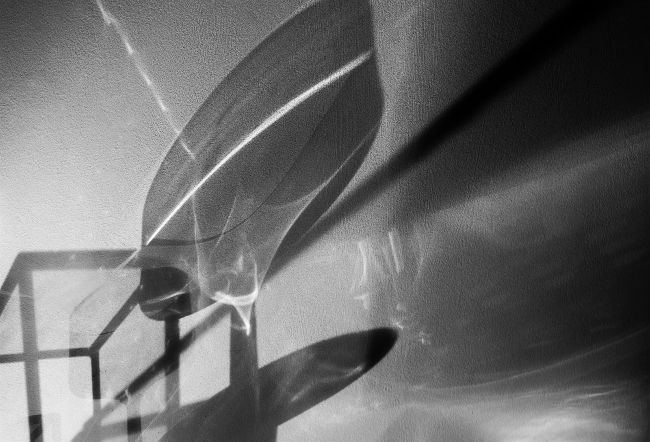
The interaction between the light and the material of each object creates abstract shapes within the frame.
Kim Bunermann
TIP CARDS
Take them on location This project features in this month’s bonus tips cards. For a handy guide to capturing photos like this, take your tips cards out with you.
In the early days of photography, the medium tended to consist of nothing more than accurate replications of real-life scenes. However, the Golden Twenties era in Germany (1924-29) ignited the New Vision movement, transforming photography into a vibrant art form. This movement embraced the limitless potential of photography, sparking a new spirit of experimentation with light and perspective.
This photography project harks back to that pioneering spirit, aiming to create images that transform everyday views and objects into radically different visual experiences. By using artificial light sources indoors, you can produce photographic art that challenges the viewer’s perception while also honing your photographic skills.
During the Golden Twenties, colour photography was still on the horizon and black and white images dominated the medium. The monochromatic tones accentuate the subject’s form and shadows, showcasing the geometric qualities of everyday scenes.
While today’s digital photography allows for a multitude of creative avenues, working with monochromatic tones is still best for this project. This is because the absence of colour intensifies contrast and sharpens the focus on geometric shapes, ultimately leading to interesting abstraction. For this project, you will need a tripod, a selection of translucent or reflective objects and a light source that can easily be moved around.
1
Set the scene
To create shadows with impact, gather items with distinctive shapes. Objects made from translucent materials that allow light to shine through, like glass, are effective and help layer the image elements. Place a table against a white wall; this will allow the objects to be displayed on the table while their shadows are projected onto the wall.
2
Direct the light
To understand how light interacts with materials, start by holding the light source and moving it around the objects. This allows you to see the shadows being created and adjust the light’s position as needed. To create the best visual effect, rearrange the objects too. Once you achieve your desired outcome, secure the light source in place.
3
Keep focus
Mount your camera on a tripod. Close the curtains of the room to intensify shadows. Shoot in Manual mode and select an aperture of f/8 for front-to-back detail in the frame. Enhance clarity by working with an ISO of 100. Then, balance the exposure by lengthening the shutter speed. Manually focus on the subject and press the shutter.
How to take it further
This photographic approach requires us to elevate our creativity, unlocking endless opportunities to perceive reality from new angles, so trust your photographic instincts. One effective method is to capture not only the shadows of objects but also to incorporate some of the objects into your composition. To achieve this, it is better to shoot from above rather than from the front, because this angle will allow you to create abstract compositions, where the objects and shadows merge. Additionally, don’t overlook the potential of post-processing techniques to enhance your frame. Layer multiple shots and experiment with layer transparency and masks. Inverting the frame to resemble a negative can also add a compelling dimension to your work.
Visualise in black and white
When working with coloured glass or merging objects and shadows, viewing the scene in black and white is crucial, as it highlights differences in the luminosity. To achieve this, shoot in raw format and preview your frames by using your camera’s Monochrome Creative Style or Picture Styles/Controls, accessed via the shooting menu.
2 | MACRO
Shooting at snail’s pace
Wendy Evans
opts for the slow life, taking her camera out into the garden on the trail of gastropods