Photo Answers
Perplexed by a photographic problem? Caught up in camera confusion? Send your technique and camera questions to digitalcamera@futurenet.com
Andrew James

A vertical frame and a healthy amount of overlap lead to great panoramas.
Andrew James
Andrew is a highly experienced writer and photographer – if you have a problem, he is here to help.
Overlapping images
QI know I can stitch several images together easily in Lightroom to make a panorama, but by how much should I overlap each image at the shooting stage?
George Bolan
AThe technique you describe can be used to create a 360-degree or 180-degree view of a big scene, or simply a largerresolution file of an image that could normally be achieved with a wide-angle lens and a single frame. Over the years I’ve used the technique for both reasons, and I have usually shot each frame with the camera in a vertical orientation. That’s not because the technique doesn’t work with the camera in a horizontal position, but because shooting vertically gives you more room in the post-processing stage to crop the top and bottom, hopefully resulting in a better and larger finished file.
The amount by which you overlap depends on the lens you use, but as a rule of thumb stick with overlaps of around 25-35%, and you won’t go far wrong. While Lightroom is very good at stitching images together, you can help it out by keeping the camera turning through a relatively tight arc when taking each individual frame.
Setting up on a tripod and using a panoramic head is obviously ideal, but it’s quite possible to use a normal ball head or even handhold the camera, and still get a decent result. If you are handholding, keep your arms locked close together and move the camera around in as small an arc as possible for each shot in the sequence.
Tech Check Image noise
Remove the restrictions on how long your shooting exposures last
What is image noise?
What we call image noise is nothing more than a degradation in image quality, signified by blotches of colour or ugly variations in tonal brightness. It’s often more obvious in the darker tones of an image.
What is it caused by?
Noise is an inherent issue with any electrical device. In the case of a digital camera, there is a signal-to-noise ratio – the signal being the light that is hitting the sensor of the camera. The higher the sensitivity of the sensor (defined through the camera’s ISO setting), the more image noise is generated.
How do I prevent it?
Camera sensors have hugely improved over the years. A modern camera’s ability to limit noise means that even at relatively high sensitivities, noise is less of a factor – but it can still be an issue. The best way to minimise image noise is to always shoot at the lowest ISO possible.
Can I control image noise in post‐processing?
Yes, post-processing software is now very adept at controlling image-degrading qualities of noise. If you shoot raw, you can process a great deal of noise out of a file easily either using the built-in tools provided by software such as Camera Raw and Lightroom, or by using additional plug-ins such as Topaz DeNoise.
Does noise actually matter?
That’s a question for each photographer to decide for themselves, but a lot of noise can certainly ‘soften’ a photo’s sharpness. However, if a small amount of noise isn’t dramatically affecting image sharpness or severely degrading the quality of the overall image, it shouldn’t be something you should lose sleep over.
Ultimately, if unsightly colour or luminance noise is kept to a minimum, its presence inevitably worries the photographer more than the person looking at their photo.
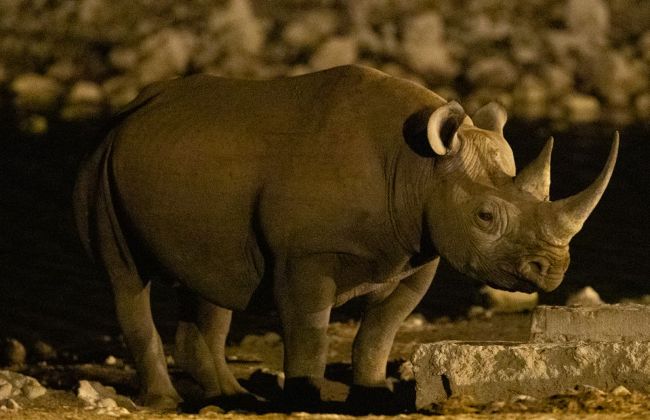
Taken at night at an eye-watering ISO 32,000, the noise and softening of the image is clearly visible.
ISO 32,000
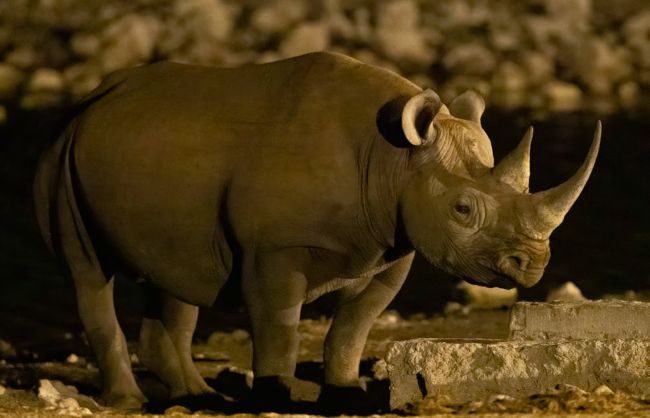
Some of the noise has been removed, but it’s not possible to get the image critically sharp.
Smoothed out