Problems Solved
Our experts solve all your tech problems
PROBLEM OF THE FORTNIGHT
How do I regain control of my USB stick?
Q I have a 128GB Kingston USB memory stick. Before upgrading my PC from Windows 10 to 11, I copied some files to the stick to ensure they were safe during the process. I also encrypted them somehow, but I didn’t make a note of the method I used or the password, and now the stick seems unusable. I’m not too bothered about losing the contents, but I’d like to be able to reuse the stick. I’ve tried several methods suggested by AI, but an error message tells me the drive is write protected. As a long-time reader of your excellent magazine, I can solve most of my computer problems but not this one. C an you help?
Stuart Bowld
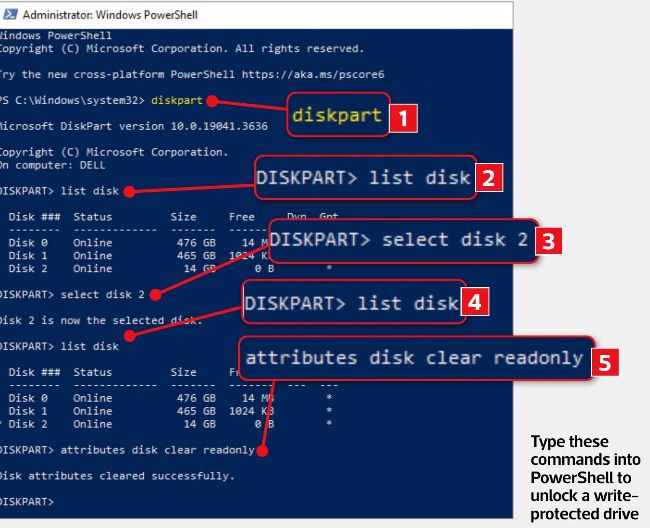
Type these commands into PowerShell to unlock a writeprotected drive
A Let’s start with your files. Even if you knew the encryption method, they’d probably still be impossible to access without the password, and you don’t know that either. So, unless you remember it, you’ll have to write off your data.