IT
  
Attualmente si sta visualizzando la versione Italy del sito.
Volete passare al vostro sito locale?
19 TEMPO DI LETTURA MIN

ro producer’s guide to digital audio

DIGITAL AUDIO

The Pro Producer’s Guide To

If you want to achieve the best mixed and mastered tracks within your DAW, an understanding of how digital audio works is essential. Let’s find out exactly what’s going on ‘inside the box’ as we go back to first principles
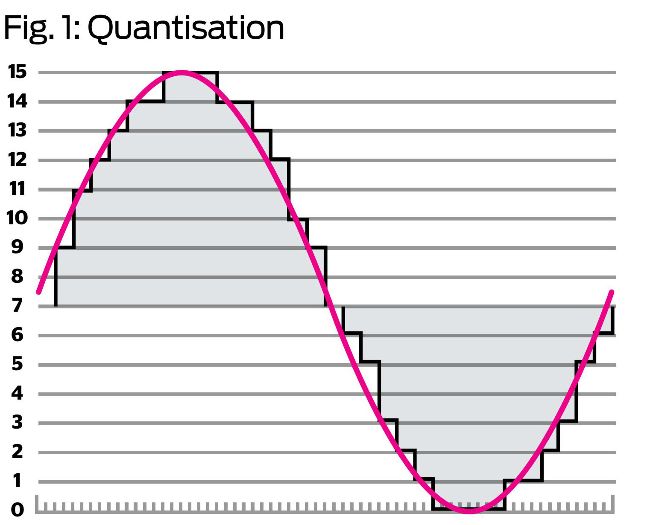
The smooth sine curve is the original analogue waveform; the squared version is the quantised digital waveform

It’s entirely possible to make music on a computer without having the faintest idea of how digital audio works, but a little knowledge can go a long way when it comes to pushing the medium to its limits.

For those unfamiliar with the basics of how sound works, let’s start at square one. Some of the following explanations might seem a little abstract out of the context of actual mixing, but introducing these ideas now is important, as they’ll be referenced when we get more handson later in the issue.

Sound is the oscillation (that is, waves) of pressure through a medium – air, for example. When these waves hit our tympanic membranes (eardrums), the air vibration is converted to a vibration in the fluid that fills the channels of the inner ear. These channels also host cells with microscopic ‘hairs’ (called stereocilia) that release chemical neurotransmitters when pushed hard enough by the vibrations in the fluid. It’s these neurotransmitters that tell our brain what we’re listening to.

The process of recording audio works by converting the pressure waves in the air into an electrical signal. For example, when we (used to) record using a microphone feeding into a tape recorder, the transducer in the mic converts the pressure oscillation in the air into an electrical signal, which is fed to the tape head, which polarises the magnetic particles on the tape running over it in direct proportion to the signal. The movement of sound through air – and, indeed, the signal recorded to tape – is what we’d call an analogue signal. That means that it’s continuous – it moves smoothly from one ‘value’ to the next without ‘stepping’, even under the most microscopic of scrutiny.

By the numbers

Computers are, for the most part, digital, which means they read and write information as discrete values – that is, a string of numbers. So, how do computers turn a smooth waveform of infinite resolution into a series of numbers that they can understand?

The answer is a method called pulse code modulation (PCM), which is the main system employed when working with digital audio information. It starts with the process of analogue-to-digital conversion (ADC), which involves measuring the value of the continuous signal at regular intervals and creating a facsimile of the original waveform. The higher the frequency at which the signal is referenced – or ‘sampled’ – and the greater the precision of the value that’s recorded, the closer to the original waveform the digital recording will be (see Fig. 1).

The number of samples taken per second is called the sampling rate. CD-quality audio is at a sampling rate of 44.1kHz, meaning that the audio signal is sampled a whopping 44,100 times per second. This gives us a pretty smooth representation of even high frequencies – the higher the frequency we want to measure accurately, the higher the sampling rate required. That figure – 44.1kHz – is pretty specific, and there’s a reason for that: the highest frequency that can be represented by PCM audio is exactly half of the sample rate, and the human ear can hear frequencies from around 20Hz to 20kHz, so at the top end that’s 20,000 oscillations (or cycles) per second. This is where we encounter the Nyquist–Shannon sampling theorem, which deals with how often a sample of a signal needs to be taken for it to be reconstructed accurately. The theorem states that the sampling rate needs to be double the highest frequency, lest what’s known as aliasing occurs (see Fig. 2). Aliasing causes unmusical artefacts in the sound, as frequencies higher than the sample rate will be “reflected” around the Nyquist frequency, which is half the sample rate. So at 44.1kHz, Nyquist is 22,050Hz, and if we try to sample, say, 25,050Hz (22,050Hz plus 3000Hz), we’ll instead get 19,050Hz (22,050Hz minus 3000Hz). As frequencies above 20kHz or so can’t be perceived by the human ear, they’re not massively useful anyway.

Sbloccate questo articolo e molto altro con
Si può godere di:
Godetevi questa edizione per intero
Accesso immediato a oltre 600 titoli
Migliaia di numeri arretrati
Nessun contratto o impegno
Prova per €1.09
ABBONATI ORA
30 giorni di accesso, poi solo €11,99 / mese. Disdetta in qualsiasi momento. Solo per i nuovi abbonati.


Per saperne di più
Pocketmags Plus
Pocketmags Plus

Questo articolo è...


View Issues
Computer Music
August 2022
VISUALIZZA IN NEGOZIO

Altri articoli in questo numero


Editoril
welcome
See page 87 to find out how to download this issue’s exclusive content
Essentials
Kilohearts update ecosystem to v2
NEW RELEASES • COMMENT • INDUSTRY HAPPENINGS
App watch
We report on the latest developments in phone and tablet music making
Next issue
It’s time to get dirty
Computer Music
Get with the programmers
JMG Audio have provided us with a superb update to Hyperspace CM this issue, so it’s time to catch up with the company’s Jason Gibbins…
Orchestral Tools’ big string things
Berlin-based Orchestral Tools have announced a new set
Ins & outs
UNCOMPRESSED TO IMPRESS? We’ve had noodly rock supergroups
GET GREAT VOCALS
(WITHOUT BEING A GREAT VOCALIST)
How to make a bad vocal good
vocals
Vocal microphones
vocals
Pitch correction software
vocals
Processing your vocal
vocals
Sing sang sung
vocals
Vocal multi-effect plugins
vocals
Vocal mixing plugins
vocals
Mixing your vocals
Though you can correct the pitch, tuning and vibrato of your voice in software, as well as contort it into all manner of extraordinary sonic shapes and characters, it’s all for naught if you can’t actually hear your vocal in the mix
Choirmaster
While lead vocals and supplemental vocal chops and
Best interfaces for vocal mics
Universal Audio Apollo Twin Mk II Mac/PC From
Vocal booths and accessories
Aston Halo £205 A portable vocal isolation booth
JMG AUDIO HYPERSPACE CM2
Are you a reverb lover with control freak tendencies? You’ll love this newly updated CM Suite plugin
ULTIMATE VOCALS
Ultimate vocal samples
FOLEY FACTORY
FOLEY FACTORY For the first of our classic
TOP-LOOP GROOVES
Our second classic pack is a treasure trove
15 Questions With…
Jimi Jules
If you haven’t yet heard Jimi Jules’ irreverent dance music, his latest album should serve as a fitting introduction to his extraordinary sound. Packed with personality, + is an eclectic collection that brings to mind the synth-laced extroversion of artists like DJ Koze and Modeselektor, serving up productions with a wink, a nudge and a wry smile
Zany Bass Sounds
Bass ALTERNATIV ES
Bass doesn’t have to be… well, bass! Pretty much any sound can be pressed into low-end service, as we’re about to demonstrate
Expert Guides
Aphex modulation pad
Pads can do far more than fill out chords. This month we create a set of Aphex Twin-inspired modulating pads
Wobble bass
In this tutorial you’ll learn how to create a wobble bass from scratch using the ES2 synth
Reviews
Toontrack EZdrummer 3 €165
As night follows day, so does this much anticipated update from Toontrack, but does the magic follow the number? We find out!
Tracktion Waveform Pro 12
With multiple new features, now could be a good time to try this impressive and competitively priced DAW
Baby Audio Crystalline $99
Baby Audio are on a roll with their releases, but can they crystallise their reputation with their latest algorithmic reverb? The answer’s crystal clear
Spitfire Heirloom £199
Get your hankie ready as Spitfire’s latest toolkit promises quick-fire access to devastatingly affecting instrumental flavours. But are Heirloom’s emotion-tickling samples worth your money?
ListenHub £59
Monitor controllers that mimic the capabilities of a console’s master section are increasingly popular. But in software? Listen up…
Best vocal processing plugins
It’s our vocals special, so if you want that Auto-Tune effect, or need to make a bad vocal great, then these vocal processing plugins will help turn bad singing into perfect vocals, whatever music you make
Antares Autotune Pro £288
TYPE: Automatic tuning plugin | KEY FEATURES: Real-time
Celemony Melodyne 5 €99 - €699
TYPE: Automatic tuning plugin | PRICING: Melodyne 5
Oeksound Soothe 2 €199/£169
TYPE: Dynamic EQ/resonance suppressor for removing harsh frequencies
Synchro Arts VocAlign Ultra £285
TYPE: Pitch and timing alignment software | KEY
FabFilter Pro-Q 3 £134
TYPE: EQ plugin with up to 24 bands
Computer Music choice
If you have tuning issues or want that
iZotope Nectar 3 Plus $129 - $249
TYPE: Full vocal editing suite of modules |
Waves Vocal Bender £110
TYPE: Vocal processor plugin | KEY FEATURES: Real-time
Soundtoys Little Alter Boy $99
TYPE: Vocal pitch and format editor | KEY
HOWIEB DROPS SOME TRIP HOP
Loopmasters Howie B Drops Some Trip Hop £24.95
Chat
X
Supporto Pocketmags