IT
  
Attualmente si sta visualizzando la versione Italy del sito.
Volete passare al vostro sito locale?
15 TEMPO DI LETTURA MIN

BBC BASIC

Relive your BBC Basic days!

Turn your home system into a BBC Micro by following David Bolton’s advice to download BBC Basic and write programs just like it’s 1982.

Credit: www.bbcbasic.co.uk/bbcsdl

OUR EXPERT

David Bolton learnt to program in Basic back in the dark ages, which helped him get an O Level in computer science long before personal computers were even a thing.

The BBC Micro was launched 42 years ago, in 1981. Like other home computers of that era, T such as the TRS-80 and CBM Vic-20, it came with a built-in Basic interpreter. Unlike most other home computers, this wasn’t created by Microsoft but was one that Acorn had created.

A former BBC engineer, Richard T Russell, who was involved with the BBC Micro development, has developed an excellent open source version of BBC Basic. You can find the source code on GitHub (https://github.com/rtrussell/BBCSDL). It’s cross-platform and comes in two versions: BBC Basic for SDL 2.0 and BBC Basic Console Mode edition. It’s available on platforms such as Linux, Windows, Android and Raspberry Pi. We’re using a Pi but you can follow along on PCs, too.

After you’ve installed it, take a look at some of the example games and programs that come with it. All include source code and are pretty good. If you’ve ever wondered how to program a sudoku game including the generator and solver, it’s all there. The Aliens demo shows moving rotating objects at a high frame rate, achieving 60fps for 80 objects on a Raspberry PI 4B.
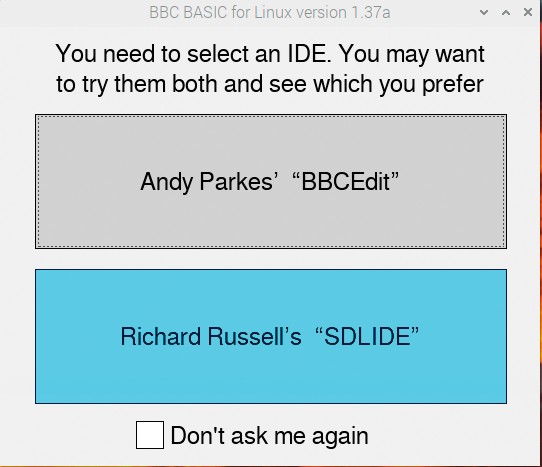
The two IDES that you are offered when you start BBC Basic.

The two IDES

When you click the BBC Basic icon, you are offered two different IDEs: BBCEdit or SDLIDE. After trying both, if you decide you want to stay with your favourite, just tick the Don’t Ask Me Again checkbox. However,

INSTALLING BBC BASIC SDL

There are two versions of BBC Basic, the console version and the SDL version, which has better graphics. In a browser visit www.bbcbasic.co.uk/bbcsdl. Scroll about halfway down the page and you’ll see a table with downloads for different platforms. Select the one appropriate for your system, usually 64-bit x86; we’re going with 64-bit Raspberry Pi. If you’re not sure, use the terminal command uname -m and it should show aarch64 on 64-bit Pis (x86-64 for PCs) or armv7l for 32-bit Pis (x86 on 32-bit PCs).

After the ZIP file has downloaded, in File Manager open the Downloads folder, then right-click and on the pop-up menu click Extract To. Pick a folder (your home folder is fine) and it creates a bbcrpi64 folder (on 64-bit or bbc-rpi on 32-bit). In that folder, you should see an examples folder, a lib folder and some other files. Find the install-rpi.txt file and right-click to open it in a text editor. Now copy the six lines that start sudo apt-get install including the two chmods and paste them into a terminal, then press Enter. You may find it already has some of the SDL files installed, but don’t worry.

Sbloccate questo articolo e molto altro con
Si può godere di:
Godetevi questa edizione per intero
Accesso immediato a oltre 600 titoli
Migliaia di numeri arretrati
Nessun contratto o impegno
Prova per €1.09
ABBONATI ORA
30 giorni di accesso, poi solo €11,99 / mese. Disdetta in qualsiasi momento. Solo per i nuovi abbonati.


Per saperne di più
Pocketmags Plus
Pocketmags Plus

Questo articolo è...


View Issues
Linux Format
January 2024
VISUALIZZA IN NEGOZIO

Altri articoli in questo numero


WELCOME
MEET THE TEAM
We’re trying to entice people to learn to
Fresh start
As we dive into 2024 and a whole
REGULARS AT A GLANCE
Newsdesk
THIS ISSUE: Valve console Steams ahead Foundations laid for HPSF Canonical cloud creation
High Performance Software Foundation announced
The HPSF is to inspire HPC innovation and “make life easier for high performance software developers”.
Canonical launches MicroCloud
The Ubuntu publisher releases new cloud software.
WHAT’S IN A NAME?
Italo Vignoli is one of the founders of
CLOSING THE DOOR
Joe Brockmeier is head of community, Percona. Another
Blender 4.0 released
Latest stable version has overhauled UI and improved support for OneAPI.
Foundation gets €1 million from Germany
Gnome recognised as public interest infrastructure.
Itanium heading for scrapheap
The end of an era: Will the Linux kernel drop support for ia64 architecture?
Distro watch
What’s behind the free software sofa?
DRIVER’S TEST
Faith Ekstrand is an engineering fellow at Collabora.
GETTING TOGETHER
Jon Masters is a kernel hacker who’s been
Kernel Watch
Jon Masters keeps up with all the latest happenings in the Linux kernel, so you don’t have to.
ONGOING DE VELOPMENT
There continue to be significant developments on the
Answers
Got a burning question about open source or the kernel? Whatever your level, email it to answers@linuxformat.com
Mailserver
WRITE TO US Do you have a burning
HotPicks
THE BEST NEW OPEN SOURCE SOFT WARE ON THE PL ANET
REVIEWS
Intel Core i9 14900K
Fast, powerful and a bit boring is not how to describe Jacob Ridley…
OSGeoLive 16.0
Uncharted no more – Nate Drake maps out the array of geospatial tools on offer in the specialist distro OSGeoLive.
GhostBSD 23.10.1
Roll over Slimer. Nate Drake explores the latest GhostBSD and finds that, like Casper, it’s extremely friendly and easy to manage.
Kubuntu 23.10
Nate Drake explores the lavish new Plasma desktop in the latest Kubuntu. Is this the greatest KDE-based distro to date?
Counter-Strike 2
It’s CS:GO Jim, but not as we know it, says Rich Stanton, as he takes the long-standing esport stalwart’s successor for a spin.
ROUNDUP
Live distributions
Michael Reed checks out five distros that you could carry around on your keychain to give you Linux goodness at a moment’s notice.
LEARN LINUX!
Finally had enough of your Windows PC? Nick Peers reveals how to fully road-test – then switch to – a user-friendly Linux distro.
Pi USER
Arm buys a slice of Pi
The deal effectively cements the Raspberry Pi to the Arm ISA for an undisclosed sum.
Pi OS Bookworm
Les Pounder has a Raspberry Pi 5 and isn’t afraid to use it, now that he has the latest Raspberry Pi OS.
Creality K1 Max
A big fan of fancy, Denise Bertacchi has taken to the K1’s bigger brother.
Take your Pi 5 to the next level!
Les Pounder has got his hands on a Raspberry Pi 5 and wants to show you how to get the best from it.
IN DEPTH
Tall Tails
Nate Drake explores how to configure the latest version of Tails for maximum security and convenience.
TUTORIALS
Safeguard your secrets
Shashank Sharma gets a taste for 007’s life by reading fiction and occasionally sending encrypted messages to his unsuspecting brother.
Dump your paper docs with perfect OCR
Nick Peers reveals how to extract editable text from images and printed materials with the help of optical character recognition software.
WordPress security, events and users
Michael Reed concludes his overview of setting up and maintaining a WordPress site with some finishing touches and a look at plugins.
Make your own pointand-click adventure
Nate Drake invites you to relive the glory days of Scumm-style point-and-click adventure games by creating your very own.
ADMINISTERIA
Massively improve your SSH login security
Passwords are so last century proclaims Stuart Burns! Using public keys and a couple of tweaks makes for a far more secure login.
Learning the way of the Docker
Docker is designed for an easy sysadmin life. Here are some top tips for using it.
Oxylabs
Mayank Sharma finds this proxy service to be a breath of fresh air.
Private Internet Access
A high-value VPN with a pile of interesting features that’s keeping the nefarious Mike Williams out of trouble.
No Ethernet, I expect you to die!
More stubborn than an anachronistic spy stereotype and just as reliable, Darien GrahamSmith uncrosses the network twisted pair.
CODING ACADEMY
Write a Linux shell from scratch
Never one to shy away from the difficult, Ferenc Deak takes us by the hand and helps us code a shell – from scratch.
Build a smart-home data application
Matt Holder investigates how to take data from an API and display it in a GUI for fun and possibly profit!
Chat
X
Supporto Pocketmags