PYTHON
Update and improve old blackjack code
Updating old projects can be fun and educational. Andrew Smith ensures that your cards are dealt correctly at any resolution.
Credit: https://github.com/bashkirtsevich-llc/PyBlackJack
OUR EXPERT
Andrew Smith is a software developer at NHS Digital, and has qualifications in software engineering and computer networks.
QUICK TIP
When choosing names for classes, functions or variables, make them meaningful so that someone else reading the code can see what they’re intended for
We’re going to take a look at an old Blackjack project and see how we can update and modify it. Blackjack is a card game where the aim is to get a value total of 21 (or closest to 21) across the cards you’re given, to win a round of the game.
The original project contains some interactive features that we can experiment with, such as buttons and events, along with some pleasing visual resources that we’ll look at in this tutorial. The original project that this tutorial is based on was created by Allan Lavell, and the original source code can be retrieved from https://github.com/bashkirtsevich-llc/PyBlackJack.
During this tutorial we’ll cover how the game program works and what resources are included for the project to work. We’ll then look at positioning elements on the screen in relation to the screen resolution that the program is running in. We’ll also add a button to the program, which will be used to exit the game.
Shuffling your cards
For this tutorial we’ll install and set up the latest version of Python (3.10). For those that have Python/PyGame already installed, Python 3.8+ should be fine. Type the following code to install Python 3.10 and PyGame.
sudo apt-get install python3.10
sudo apt-get install python3-pip
python3.10 -m pip install pygame
Check both the Python and PyGame versions. Next, git clone from repository.
git clone https://github.com/asmith1979/lxf289_ blackjack/
The project has been put into a folder called PythonProjects, which was created before downloading the project. Alternatively the source code and project can be retrieved from the LXF289 archives at https:// linuxformat.com/archives.
This tutorial will focus on the source code located in the lxf289_blackjack folder. Type cd lxf289_blackjack to open the folder and gain access to the Python source code. You’ll see two Python source code files: blackjack. py and lxf289ans.py. The Python file blackjack.pyis the Python script file that you’ll be editing and lxf289ans.pycontains the full tutorial code.
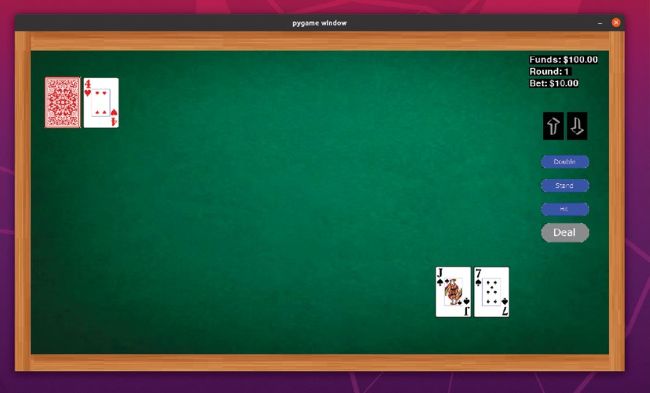
A new game of Blackjack. The dealer’s hand is shown at the top half of the screen, while the player’s hand is at the bottom half of the screen.