IT
  
Attualmente si sta visualizzando la versione Italy del sito.
Volete passare al vostro sito locale?
14 TEMPO DI LETTURA MIN

CZKAWKA

Quickly track down & delete unwanted files

Nick Peers takes a deep dive into this fast-evolving and brilliant tool for finding and removing redundant files from your PC.

OUR EXPERT

Nick Peers was unsurprised–but still unnerved–by the thousands of potentially redundant files that Czkakwa has found on his hard drives.

Keeping your hard drive clean can feel like an uphill struggle as it fills up with detritus. Weeding through your files by hand is a painstaking task, and this is where a search-and-delete tool like Czkawka comes riding to the rescue.

Czkawka can do so much more than find duplicated files. It can also track down similar images and videos, music duplicates, broken files (and symlinks), empty files and folders, and more. It’s written in Rust, uses caches to speed up follow-up scans, and is available both via the Linux desktop and as a CLI application.

Gettingt started

Czkawka can be installed in various ways: via snap, Flatpak (https://flathub.org/apps/details/com.github. qarmin.czkawka) or you can download the AppImage (https://github.com/qarmin/czkawka/releases). If you install it through snap, you’ll need to give Czkawka access to all your drives:

TERMINAL USE

If you’d like to incorporate Czkawka into batch scripts, or run it from the Terminal, you’ll first need to install the czkawka_cli command-line tool, which requires compiling and installing separately:

$ sudo apt install -y curl git build-essential

$ curl --proto ‘=https’ --tlsv1.2 -sSf https://sh.rustup.rs | sh

$ sudo apt install -y libgtk-3-dev

$ git clone https://github.com/qarmin/czkawka.git && cd czkawka

$ cargo run --release --bin czkawka_cli

Once done, you’ll be able to use czkawka_cli by following the standard syntax:

$ czkawka_cli tool -flag options

The CLI version supports 12 tools, comprising all the functionality of the main program: big for large files, dup for duplicates, image for finding similar images, and so on.

The CLI doesn’t offer any interactivity, so by default each tool will simply perform the required scan, then display the results of its findings in the Terminal window. You’ll need to re-run the command using the -D flag to remove files (for example, -D AEN would delete all files except the newest version). You can also save the results to a file using the -F flag (so -F ) for reviewing more carefully before making any firm decisions.
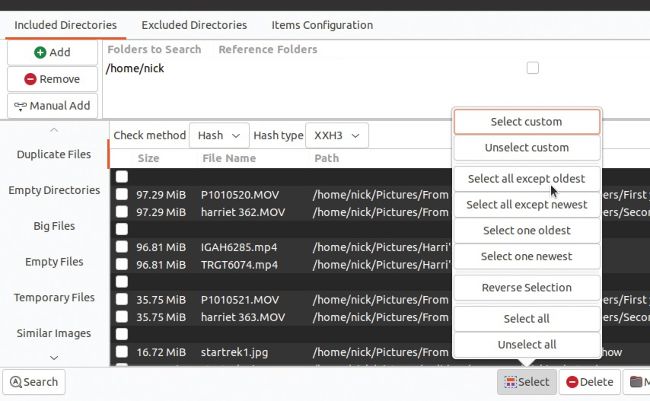
Manually selecting files by hand can be time-consuming. Let Czkawka’s automated select tool lend a hand.

$ sudo apt update && sudo snap install czkawka

$ sudo snap connect czkawka:removable-media

If you plan to use Czkawka’s Similar Videos tool, you’ll also need ffmpeg. If you get a warning when you attempt to use the tool, simply install it thus:

Sbloccate questo articolo e molto altro con
Si può godere di:
Godetevi questa edizione per intero
Accesso immediato a oltre 600 titoli
Migliaia di numeri arretrati
Nessun contratto o impegno
Prova per €1.09
ABBONATI ORA
30 giorni di accesso, poi solo €11,99 / mese. Disdetta in qualsiasi momento. Solo per i nuovi abbonati.


Per saperne di più
Pocketmags Plus
Pocketmags Plus

Questo articolo è...


View Issues
Linux Format
June 2022
VISUALIZZA IN NEGOZIO

Altri articoli in questo numero


WELCOME
Jammy upgrades
It’s LTS time again! If you’re down with
MEET THE TEAM
With this issue’s focus on the latest LTS release of Ubuntu, will you be upgrading to version 22.04 Jammy Jellyfish? If not, what are you installing instead?
REGULARS AT A GLANCE
Newsdesk
FOSS community stands up to Russian atrocities
VisionFive V1 RISC-V SBC on sale
After the cancellation of the BeagleV StarFive, a new SBC based on a RISC-V processor is now on sale
Linux comes to the Apple M1
The first Asahi Linux Alpha release is very promising
OPINION
FILESYSTEM MONITORING Gabriel Krisman Bertazix is a senior
Rolling Rhino announced
A new community remix of Ubuntu turns the popular distro into a rolling-release project
Fedora drops 32-bit app support
Others are likely to follow the mainstream distro’s actions
Drawing 1.0.0 released
The open-source MS Paint alternative hits a milestone
Distro watch
What’s down the side of the free software sofa?
KERNEL WATCH
Jon Masters summarises the latest happenings in the Linux kernel, because someone has to…
Answers
Got a burning question about open source or the kernel? Whatever your level, email it to lxf.answers@futurenet.com
Mailserver
WRITE TO US Do you have a burning
FireDM
DOWNLOAD MANAGER
Mplayer
Version: 1.5 Web: http://mplayerhq.hu R ecently there’s
Rnote
Version: 0.3.5 Web: https://github.com/flxzt/rnote R unning Linux
Mailspring
Version: 1.10 Web: https://github.com/foundry376/mailspring M ailspring is
AirSane
Version: 0.3.2 Web: https://github.com/simulpiscator/airsane A irSane is
Fbcat
Version: 0.5.2 Web: https://github.com/jwilk/fbcat T he Linux
Topgrade
Version: 8.2.0 Web: https://github.com/r-darwish/topgrade O ne of
Superdux
Version: GIT Web: https://github.com/snowymouse/superdux S uperdux is
Winterapples
Version: GIT Web: https://gitlab.com/darkforce/winterapples M any of
Casper-fs
Version: 0.2 Web: https://github.com/CoolerVoid/casper-fs N ormally, you’d
Xplora
Version: GIT Web: https://github.com/hicodersofficial/xplora T his isn’t
REVIEWS
REVIEWS
Seagate EXOS 20TB
HostGator
A basic website hosing option for small and medium businesses that Shashank Sharma thinks should be on your short list
Linux Mint DE 5
Whenever there’s a new LMDE release, Mayank Sharma can’t help but think of the old adage: “It’s the thought that counts.”
Fedora 36
Mayank Sharma calls the latest Fedora release just as boring as its predecessors. But is that a bad thing?
Ubuntu 22.04 LTS
If there’s one thing Mayank Sharma likes even less than Ubuntu, it’s Ubuntu LTS releases, which are notably stable but not notable generally
A Musical Story
Fun, folk and funk are three things that Management hate with a passion, so Tom Sykes has turned down his speakers
The Last Cube
Management isn’t keen on sentient anything, it’s bad for productivity, so Neil Mohr keeps the thinking to a minimum which isn’t helping here at all…
ROUNDUP
Roundup
Open source app stores
First-launch experience
Do the stores load quickly, so that you’re not left watching the clock?
App description
How much useful information is in each product card?
Variety of app sources
Do these stores give you enough choice?
System upgrade capability
Can our stores upgrade not just single programs, but the whole OS?
Task queueing
Can you tell your software store to batch-install new programs?
Reliability
How stable are the software stores that you want to rely on?
Extra features
What else can each store do and make you want to use it?
The Verdict
Open source app stores
BULLET-PROOF
UBUNTU 22.O4
Of jams and jellies
It’s Ubuntu LTS time, so let’s see what will be the shape of Ubuntu for the next few years…
Escape Windows
Whether you’re a complete novice or Windows has driven you to seek out other operating systems, Ubuntu can help
Customise Ubuntu
Discover new software. Change settings. Install a new desktop (or three)
Tweaking and rewiring
Some final edits to perfect your installation, plus a little Ubuntu nostalgia
Pi USER
BITTEN BY THE FOSS BUG
Has worked in IT for 15 years, with
Consumers last in the queue for Pi resupplies
After warnings early in 2022, stock remains a challenge for the Raspberry Pi Foundation
Arm powered
Not that sort!
It’s another SBC
New Portenta X8 board
Armbian 22.02 Jammy XFCE
Les Pounder takes a look at a distro that supports 64 different Linux single board computers, and now he has to buy them all
Arducam Auto-focus 16MP Camera module
Quick-off-the-draw Les Pounder can’t shoot shots faster than this camera
Build a Python-based reaction game
Les Pounder goes back to the early days of the Raspberry Pi to look at a board that made a big difference to his career
TOP OF THE FOSS
GET PACKING!
Keen to give back to the FOSS community, but don’t know where to start? Mike McCallister shows you one way to do a good deed
TUTORIALS
Bringing stories to the command line
Shashank Sharma knows that the Linux CLI, once seen as the domain of the uber geek, also serves as the pathway to the myriad worlds of stories
Emulate the classic Amstrad PCW
Les Pounder goes back to school, a time when his form room was full of Z80 computers and noisy dot matrix printers
Make your home as smart as possible
Exploring NFC tags, energy monitoring and the Wireguard VPN to add further capabilities to your smart home with Matthew Holder.
Get more from Wine and Windows
Michael Reed teaches you everything you need to know about using Microsoft Windows compatibility system WINE with some handy tips
Take full control over your email
David Rutland does the impossible and sets up a VPS-based email server and a webmail front-end, then writes a tutorial about it – all in one afternoon
Easily create instant virtual machines
Stuart Burns helps you to master Multipass, the virtualisation platform that runs on any desktop platform
IN-DEPTH
ALL HANDS ON DECK
Jonni Bidwell pries Valve’s Steam Deck from PC Gamer’s cold, anthropomorphised hands and gets his game on
CODING ACADEMY
Develop Linux filesystem tools in Rust
Mihalis Tsoukalos explains how to manipulate and examine files and directories in Rust so you can write filesystem tools
Update and improve old blackjack code
Updating old projects can be fun and educational. Andrew Smith ensures that your cards are dealt correctly at any resolution
Chat
X
Supporto Pocketmags