ASK
TECH SUPPORT & TECHSPLANATIONS
Email Mac|Life at ask@maclife.com
Hot topics right now
Make sure you check out these important support articles on Apple’s website to better understand the latest features.
iMAC CAMERA NOT WORKING PROPERLY?
There are several reasons why your iMac’s built-in camera might not be working, whether it’s something to do with Screen Time or simply resetting the SMC. Find out more here:
bit.ly/ml180ask1.
CORRECT A REINSTALL ERROR FOR M1 MACS
Some owners of M1 Macs are experiencing an error during reinstallation of macOS about failing to personalize the software update. If that sounds familiar head here:
bit.ly/ml180ask2.
HOW TO USE THE NEW LG ULTRAFINE 5K WITH YOUR MAC OR iPAD
Find out what you need to run this epic monitor, and how to use it, on your Mac or iPad at this link:
bit.ly/ml180ask3.
> Starting with a clean M1
When I get a new Mac, I like to start it from an external disk, wipe its internal storage, and install macOS afresh. How can I go about doing that with my new M1 Mac mini?
Enter the M1’s 1 True Recovery mode by continuing to press its Power button when starting up until it’s loading. Then click Options and use Disk Utility to erase its System and Data volumes before installing a fresh copy of macOS.
That isn’t a complete wipe and install, though. To do that, you need to put your mini into DFU mode and connect it to another Mac running the latest version of Apple Configurator 2, as detailed at bit.ly/ mac363config2. This erases the entire internal SSD and installs your M1’s firmware and system software from an IPSW image file, which Configurator downloads for you. Installation should take less than 15 minutes.
Neither of these should be necessary. Thanks to Big Sur’s new Sealed System Volume, it will only start up macOS if the entire system passes its integrity check, which relies on a tree of cryptographic “hashes” to ensure that every single byte is correct. It then compares the overall “seal” with that specified by Apple. If they don’t match, your Mac invites you to reinstall macOS before it will start up.
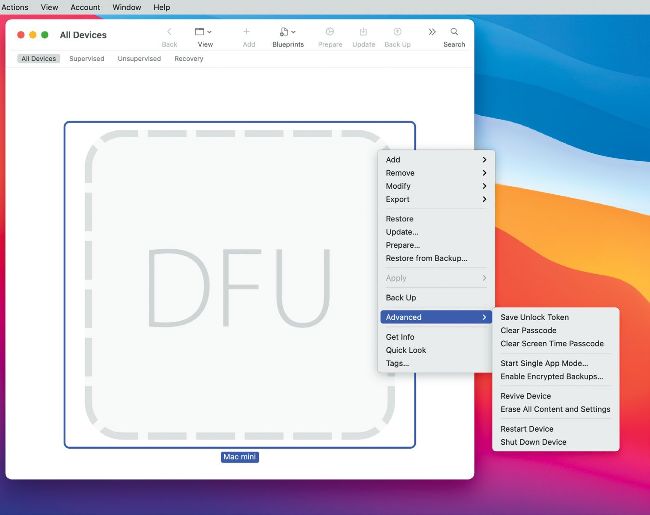
Connecting an M1 Mac in DFU mode to Configurator lets you wipe internal storage and restore a fresh image of firmware and macOS.
Get official documentation at support.apple.com|
> iPhone rings when sending mail
Whenever I send an email from it, my iPhone rings, although there’s no incoming call. What’s wrong with it?
This most commonly results from having the wrong sound selected for the action of sending email. Correcting that is quick and simple. In Settings, tap Sounds & Haptics (or just Sounds on some models), and check that your Ringtone is set to Presto or your preferred alternative. Then check that Sent Mail is set to a different sound, normally named Swoosh. While you’re there, look through the other sound settings to ensure that nothing else is likely to cause such confusion.