TUTORIALS GPIO interfaces
Control real-world hardware on your PC
Mike Bedford shows PC users how to add GPIO interfaces to their computers, just like those Raspberry Pi and Arduino users are familiar with.
uiCredit: www.adafruit.com
GPIO
OUR EXPERT
Mike Bedford built his first PC with a soldering iron and parts. He still has that love for combining electronics and computing.
QUICK TIP
The FT2332H board’s name probably refers to the RS-232 serial interfacing standard.
Now largely superseded by USB, it’s still used in some applications, for example if you need to exceed USB’s maximum lead length of 5m. If you have any equipment with an RS-232 interface, the FT232H enables you to interface it to your PC.
U sers of Raspberry Pi and Arduino SBCs are familiar with these boards’ GPIO (general purpose input/output) ports that enable them to interface to real-world electronic devices. PCs are devoid of GPIOs, but boards are available that provide that facility and connect to the PC via a USB port. Two such devices are the FT232H and the MCP2221, both from Adafruit, and here we see how to use them.
Our main emphasis is on hardware because we expect a lot of PC users who’ll be interested in this topic probably won’t have dabbled with SBCs and so won’t have learned much about electronics. Having said that, we provide some Python code to get you started and show you how to learn more.
These two boards differ in their number of various types of GPIO pins. The FT232H (£14.10 from Pimoroni) has 12 digital in/outs but no analogue in/outs, while the MCP2221 (£6.30 from Pimoroni) adds three analogue inputs, one of which can be used as an analogue output, but only has four digital in/outs, and three of these share pins with the analogue in/outs. Note that these boards have USB C sockets, so to connect them to your PC you’ll need either a USB C to USB A lead or, to use a common micro-USB to USB A lead, you’ll need an adapter, as you’ll see in our photos.
Installation and testing
We’ll be using Python to work with these boards. Although this will already be installed on your system, there are supporting elements you’ll need to install.
Since installation instructions are provided for the FT232H at https://learn.adafruit.com/circuitpythonon-any-computer-with-ft232h/setup and for the MCP221 at https://learn.adafruit.com/circuitpythonlibraries-on-any-computer-with-mcp2221/setup we aren’t repeating that information here. Although you’ll only see a Windows link, click it and then at the bottom of that page click Mac OSX and then the Linux link.
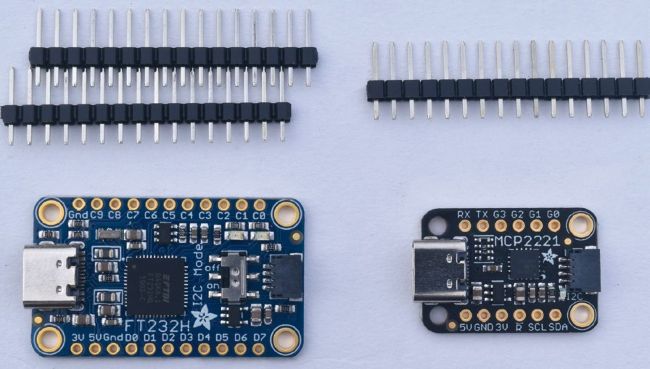
The FT232H and the MCP2221 provide a good selection of digital and analogue inputs and outputs along with several serial interfaces.
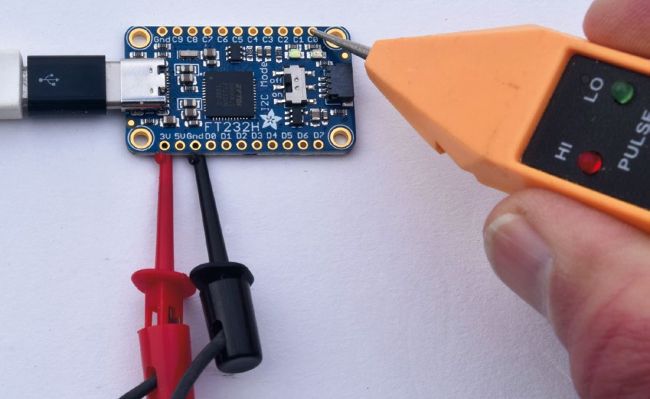
If you have a logic probe, you can try out some simple code on the FT232H without having to build a circuit on a breadboard.
Despite seeing a few unfavourable reports, we experienced no difficulties at all under Ubuntu 20.04 LTS and were able to see both boards working in just a few minutes. Note that if you’ve already used the FT232H and move on to the MCP221 or vice versa, you won’t have to follow all the installation instructions because you’ll already have installed most of what you need. After installation, click the Post Install Test link and carry out those tests, then click Pinout, then Examples and finally GPIO.