TUTORIALS Altair 8800
Emulating the classic Altair 8800
EMUL ATION
Launched in 1975, the Altair 8800 is considered to be the first computer aimed at enthusiasts. Mike Bedford shows you how to experience it.
OUR EXPERT
Mike Bedford can’t claim to have used an Altair 8800, but some time later he did own a nottoo-dissimilar computer that he had to solder together himself.
QUICK TIP
You might recall the 3.5-inch floppy disks (which had a hard outercasing so only the disk inside was actually floppy) that could be read by PCs until a few years ago.
Before that were five-inch floppy disks, which were genuinely floppy, but the Altair 8800 used the even earlier eightinch floppy disk.
Having delved into various emulators of longgone computers in recent issues, we’ve become accustomed to how primitive some of these early machines really were. Even so, we suspect that the specification of the computer we’re looking at here will still be quite an eye-opener. That machine is the MITS Altair 8800 from Micro Instrumentation and Telemetry Systems (MITS), and its claim to fame is that it was the first personal computer to be aimed at enthusiasts, as opposed to business users. The first most people had heard of it was when it featured on the front cover of Popular Electronics magazine in January 1975. Compared to the home computers of the early 80s, like the ZX80 or the BBC Micro, you didn’t get a lot of computer for your money.
The processor was an eight-bit Intel 8080 that was clocked at 2MHz, and the memory capacity was just 256 bytes. What’s more, that RAM wasn’t augmented by a non-volatile ROM containing a primitive operating system or the BASIC language, it didn’t have a keyboard, there was no way of attaching a screen, not even a lowresolution TV, and there was no storage such as a cassette recorder, let alone a floppy or hard disk. Yet it cost $439 as a kit, or $621 ready built – prices being today’s equivalents of $2,200 and $3,100 respectively.
It would be understandable, when presented with a list of everything the Altair 8800 didn’t have, that you might wonder how it was possible to do anything at all. As we’re about to see, though, it did enable those who bought it to enter and execute their own programs and learn a lot more about the inner workings of computers than would be gleamed by using a modern PC.
Assembler code only
To see what it was like to operate we’re going to use the online simulator at https://s2js.com/altair/sim.html. You’ll notice that it looks like the Altair 8800’s front panel which, since it couldn’t be connected to a keyboard or display screen, provided the sole user interface. In particular, user input was provided via the switches and output was through the various LEDs.
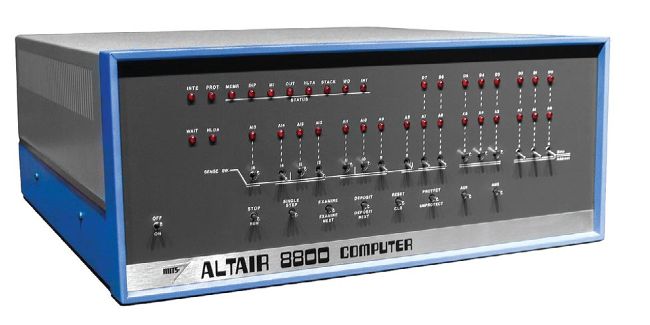
It might look primitive today, but appearances are deceptive: in 1975 the Altair 8800 was truly ground-breaking.
Ed Uthman,
CC BY-SA 2.0, https://c ommons.wikimedia.org/ wiki/File:Altair_8800,_Smithsonian_Museum_(white_background).jpg
Start by turning on the simulator by clicking the on/ off switch. This is a locking toggle switch so it’ll move down to the on position and remain in that position, various status LEDs will illuminate, and you’ll even hear the fan start up. Because there’s no non-volatile memory, and therefore there’s no software to run when you first turn on the Altair 8800, the first job at poweron will always be to enter some code into memory. This is done using the switches and LEDs which, because of the lack of any software at power-on, are connected pretty much directly to various pins on the processor.