GB
  
You are currently viewing the United Kingdom version of the site.
Would you like to switch to your local site?
17 MIN READ TIME

FALSTAD

Emulate an analogue computer digitally

Today, computers are nearly always digital, but analogue computers also had their place, as Mike Bedford discovers through emulation.

OUR EXPERT Mike Bedford is interested in both software and hardware, so recreating analogue computers is an ideal excursion for him.

Part One!

Don’t miss next issue, subscribe on page 16!
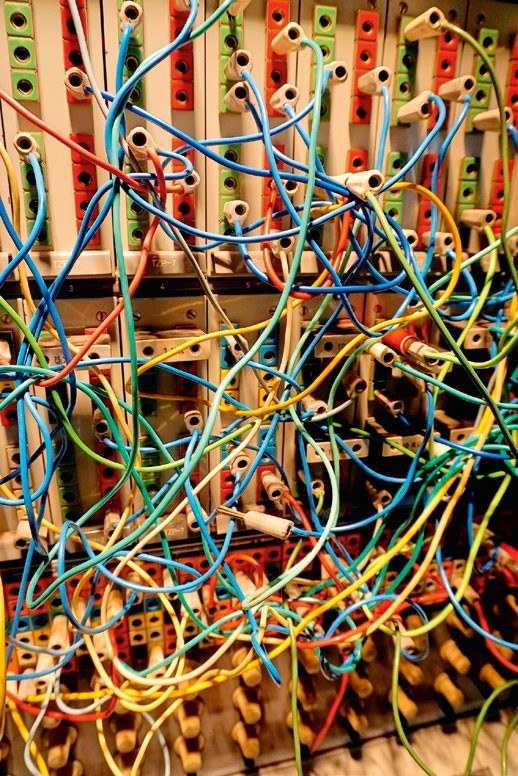
We’re in two minds as to whether debugging a patching error is more difficult than spotting a typo in digital code, but it certainly requires a different mindset.

From the pioneering machines of the ’40s to the home computers of the ’80s, we’ve put F some fascinating computers through their paces via emulation in LXF. But they were all digital, and this ignores an important part of computing’s heritage. The electronic analogue computer was important for scientific applications until the early ’80s. To give these intriguing computers the recognition they deserve, we’re turning to emulation to reveal their secrets.

In this first of two articles, we emulate a very simple machine, then move on to a more sophisticated one next month. We’re not looking at a specific analogue computer, though – we’re emulating a generic one, as models didn’t differ as much as in the digital world. So, forget about bits and logic gates, and get your hands dirty with voltages and operational amplifiers.

Digital vs analogue

Digital and analogue computers differ in two main respects. First, the former represents values that differ in discrete steps, while the latter’s values vary continuously. Second, in digital computers, changes only occur at specific times related to the clock, but in analogue computers, changes happen continuously.

These aren’t the only differences, though, and most importantly, the concept of programming is very different. There’s no such thing as an instruction, so a program isn’t a sequential list of instructions. Instead, it’s a definition of how the analogue computer’s functional units are configured and connected together. Physically, this takes the form of adjusting the value of potentiometers and plugging patch leads into a patch panel.

Analogue and digital computers coexisted for several decades, and we might wonder why, since history rather suggests that digital technology won because it was superior. The answer is tied up with analogue computer applications. Unlike digital computers, analogue machines aren’t universal – they can’t solve all computable problems. Their particular niche – albeit a very important one – is solving sets of differential equations, as required for simulation exercises in science, maths and engineering. On digital computers, this is computationally intensive, as evidenced by the hugely expensive supercomputers used for this sort of application today.
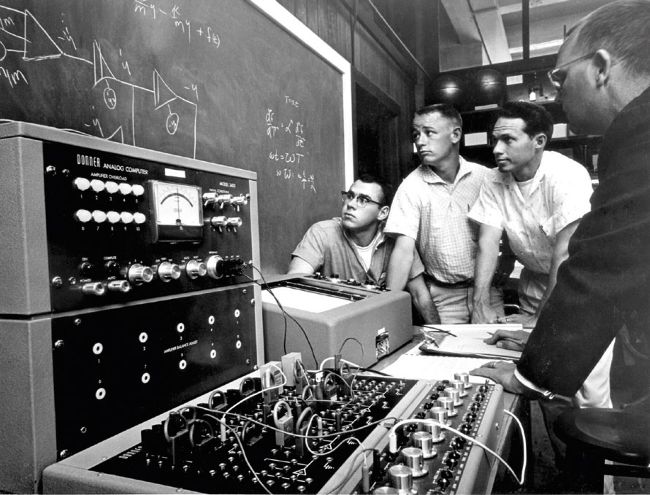
In contrast to the large analogue computers used in industry, desktop machines, like this one from the ’60s, were used in education.

With the digital computers of the ’50s, ’60s and ’70s, this could be a show-stopper, but analogue computers were much quicker. What’s more, the time taken to solve a problem doesn’t increase with the number of equations, a far cry from the situation with digital computers. It wasn’t all one way, though, because analogue computers had drawbacks, too. Programming was often more time consuming, and accuracy was limited because of electrical noise. As a result, digital computers gained the upper hand as their performance improved, even though analogue computers clung on until the early ’80s for the most demanding applications.

Unlock this article and much more with
You can enjoy:
Enjoy this edition in full
Instant access to 600+ titles
Thousands of back issues
No contract or commitment
Try for 99p
SUBSCRIBE NOW
30 day trial, then just £9.99 / month. Cancel anytime. New subscribers only.


Learn more
Pocketmags Plus
Pocketmags Plus

This article is from...


View Issues
Linux Format
February 2024
VIEW IN STORE

Other Articles in this Issue


WELCOME
MEET THE TE AM
We’re all about taking back control this issue, implementing Pi-hole protection. What open source tools do you use to help bring control back to your life?
Corporate takeover
Who said history repeats itself? First there was
REGULARS AT A GLANCE
Google steps up arms race against ad blockers
EXTENSIONS
X.Org being phased out
For four decades, the X Window System has endured despite competition, but major OSes are bowing out.
Road map to GIMP 3
Latest version of GIMP finally has a release schedule.
ALL AI HYPE
My crystal ball is only slightly better than
ALL IN THE PIPE!
PipeWire 1.0 was released late November (see right),
PipeWire turns 1.0
The audio/video bus designed to replace PulseAudio, JACK and other systems has now reached version 1.0.
More Linux-first laptops
Linux come preinstalled on more and more machines.
Open firmware doing very well
100 million firmware updates supplied by the LVFS.
Distro watch
What’s behind the free software sofa?
NEW YEAR! NEW LIBRE!
Like every year, there will be two new
UPSTREAM FUNK
A recent data corrupting bug in the ext4
Kernel Watch
Jon Masters keeps up with all the latest happenings in the Linux kernel, so you don’t have to.
Answers
Got a burning question about open source or the kernel? Whatever your level, email it to answers@linuxformat.com
Mailserver
I think we’ve misplaced the PDP-1 in the
HotPicks
Recoll »Polybar »Curtail »Betterbird »Bleach» Bit FileZilla» JDownloader
LINUX FORMAT
The #1 open source mag Future Publishing Limited,
REVIEWS
Intel Core i5 14600K
No one calls Jacob Ridley mid-range!
EndeavourOS 11-2023
Nate Drake endeavours to discover all that is great about this Arch-based Linux distro, created by former Antergos developers.
SysLinuxOS 12.2
Nate Drake dives into SysLinuxOS to find whether its reputation as the dream OS for system administrators is well deserved.
OpenMandriva Lx 5.0
Nate Drake relives Mandriva Linux’s heyday with its programmer and community-developed successor. Plasma has never looked so good.
Ultramarine Linux 39
Nate Drake decides to take this Thai Fedora-based distro for a spin and finds it fast, simple and surprisingly customisable.
Steam Deck OLED
Management is overjoyed: “Take an old product and slap a new badge on for more money?” Tyler Colp likes his job too much to correct them.
ROUNDUP
File managers
Dolphin Krusader Midnight Commander Nemo Thunar
STAY SAFE ONLINE!
Eat unwanted online nasties by sending packets to the Pi-hole. David Rutland helps you protect your browsing data with the ultimate in a paranoid’s delight!
Pi USER
Coolest Projects 2024 remote and in person
Start your Raspberry Pis! The coolest digital creators competition is ready to open in 2024.
Ubuntu 23.10 for Pi
The ever dapper Les Pounder has been using Ubuntu since Dapper Drake and has been looking forward to sampling this Pi-based iteration.
Bambu Lab A1 Mini
Good things come in small packages is something Denise Bertacchi never says – now she’s eating her delicious words.
Build a Pi Pico electronic piano
Les Pounder is trying his best to make his mum proud by not taking apart an electronic piano!
Torrent your slice of Pi
Torrenting isn’t all about taking – Christian Cawley helps you use a Raspberry Pi to serve open source ISOs on the BitTorrent P2P network.
IN DEPTH
The rise and fall (and rise again) of Basic
We plot the symbolic milestones of the most basic of allpurpose code with the instruction of Mike Bedford.
Roll out the Rhino!
In an increasingly crowded marketplace, Nick Peers discovers why this new Ubuntu derivative might be a barrel of fun!
TUTORIALS
Total shell recall
Too busy running around shouting, “Get your ass to Mars,” Shashank Sharma thinks a strong shell history can be a real life saver.
Build your own home CCTV system
Nick Peers reveals how to bypass expensive (and insecure) cloud security systems to create your own using a variety of cameras.
Create and use inventory objects
Nate Drake invites you to relive the glory days of point-and-click adventure games by creating your very own.
ADMINISTERIA
Manage network downloads locally
Find out how to apply some admin knowledge to network downloads.
Farewell, Docker; hello, Rancher Desktop
Introducing yet another – better – way to manage your containers.
LINUX L APTOPS
Stuart Burns is a Linux administrator for a
HDDs up, this is a RAID!
Handy admin tips for locating those many drives in your redundant arrays.
AccuWeb Hosting
Power-packed web hosting for all levels of user, including the ever-so-picky Mike Williams.
Smartproxy
Sead Fadilpašić tests a versatile and fairly affordable proxy service.
Green PC Machines
The world’s biggest PC maker says it can achieve net zero by 2050. Barry Collins visits its US headquarters to get his hands on plant-based PCs, bamboo packaging and vegan leatherstyle covers.
CODING ACADEMY
Write your own Android application
Matt Holder investigates how to create cross-platform applications using a combination of Python and the Kivy framework.
It’s all redirection!
LXF SHELL
Chat
X
Pocketmags Support