FEATURE Amazing iPhone hacks
Camera, Photos & AR
Get even more from your iPhone’s amazing cameras
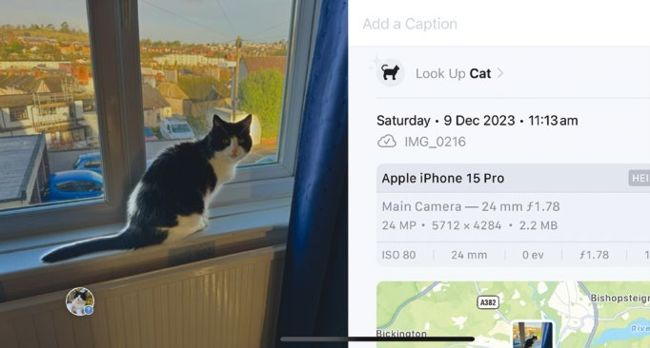
The Photos app’s Visual Look Up feature now covers dogs, cats, landmarks, plants and more.
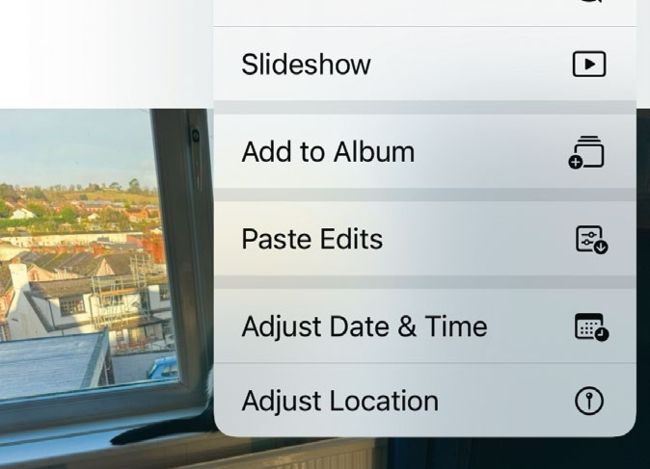
Instead of editing a series of photos one by one, you can copy and paste the edits.
The Camera and Photos apps have some useful advanced features, and there are some great apps out there to make use of your iPhone’s augmented and mixed reality capabilities.
In Photos, Visual Look Up gives instant access to information about things in your photograph. This includes landmarks, pets, flowers, books, works of art and more. It’s easy to use. Open a photograph in the Photos app. At the foot of the screen there’s an ‘i’ in a circle icon, which gives information about the photo. If this icon is augmented by a star, or changes shape to resemble something in the photo, Visual Look Up is available. Tap the icon, and at the top of the panel that pops up is an option marked ‘Look Up [Object]’. Tap this option for information, links, similar pictures and more.