> Unable to update external drive
I often start my M1 Mac mini up from a Thunderbolt SSD, but since updating its internal drive to macOS 11.3.1, I’ve been unable to update that external disk. How can I do that?
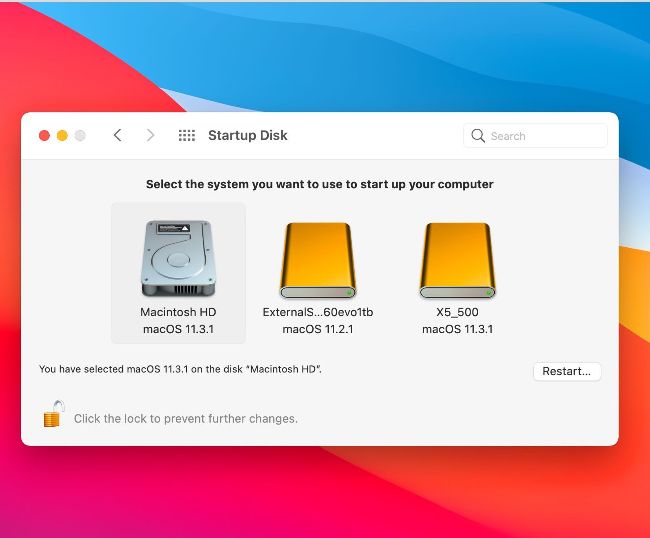
Setting a startup volume to Reduced Security lets you run older versions of Big Sur on M1 Macs.
Using external startup drives with M1 Macs is tricky. To ensure success, you need to change security boot policy for the external drive in Recovery Mode.
Start your Mac up in Recovery by holding the Power button until the Options icon appears. Select Options, and click Continue to open the Recovery Assistant. There, select the user you know the password for, and click Next. Enter the password to see the Recovery window. In the Utilities menu, select Startup Security Utility. In its window, select the external disk with the old version of macOS on it and click Security Policy… Set the policy to Reduced Security and click OK, then restart your Mac using the Apple menu.
When your Mac restarts, open the Startup Disk pane and switch to your external drive. That should start up, and you can update it to the current release using the Software Update panel. Once that’s done, start up in Recovery Mode again and set boot policy for that drive back to Full Security, using Startup Security Utility to ensure your Mac is fully secure.
Big Sur’s missing updaters
UNTIL APPLE RELEASED Big Sur, it had always provided standalone installer packages for macOS updates and Security Updates. While those continue for Mojave and Catalina, Big Sur’s new Sealed System Volume requires a different kind of installer. The choice now is Software Update when it’s available and works, or the full installer app.
If you just want to update macOS and preserve your existing Data volume, that seems a gamble. In early releases of Catalina, full installers had a habit of trashing or duplicating any existing Data volume — do you remember getting ‘Macintosh HD — Data
—Data volumes’?
Thankfully, Big Sur’s installers are behaving better, but they’re still less friendly than standalone updaters. Maybe Apple will bring back updaters.
> Do AirTags drain the battery?
My partner and I updated our iPhones to iOS 14.5 to use AirTags. Now, when we track them in the Find My app, both phones use a lot of battery power. Is that normal?