GB
  
You are currently viewing the United Kingdom version of the site.
Would you like to switch to your local site?
8 MIN READ TIME

GET STARTED WITH

Calendar

Take the stress out of having to remember appointments by using Calendar

THE CALENDAR APP has been around on the Mac in one form or another for decades. And it’s been part of iOS and iPadOS for as long as they’ve existed. It gets more powerful and useful every year, yet it remains underused and underappreciated. Using it habitually and sharing calendars with friends and family members really will help you be better organized and less stressed as a result.

At the heart of Calendar is iCal. Once the name for the app itself, iCal is the format and behind–the– scenes service that enables you to sync, share and subscribe to calendars. You can download any file with an .ics extension and add it to Calendar just by double–clicking it.

Perhaps the real power of Calendar lies in its integration with other Apple services such as Maps, Contacts, and even Siri. For example, if you book tickets for an event and receive a confirmation email, Siri can create a calendar event from the details in the email and suggest it to you. With one click, you can add that event to your Calendar. When you open a Calendar event with address details in it, you will see a map of the location and, if it’s available, a Look Around preview. Tapping on that takes you to the Maps app. There’s so much you can do with Calendar, so let’s get started.
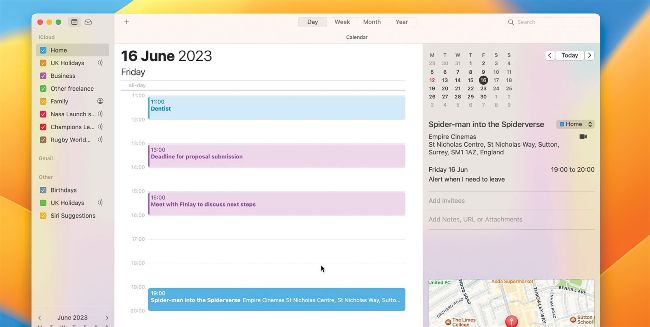
If you add a location to an event, you can see a map of it in the information window.
Unlock this article and much more with
You can enjoy:
Enjoy this edition in full
Instant access to 750+ titles
Thousands of back issues
No contract or commitment
Try for 99p
SUBSCRIBE NOW
30 day trial, then just £9.99 / month. Cancel anytime. New subscribers only.


Learn more
Pocketmags Plus
Pocketmags Plus

This article is from...


View Issues
Mac|Life
September 2023
VIEW IN STORE

Other Articles in this Issue


START
UPGRADE YOUR DOCUMENTS
AFTER THE VISION Pro bonanza over the last
Threads launches
THE LATEST NEWS FROM THE WORLD OF APPLE
News in brief
A bite of the Apple
Apple TV+ and the battle of the streamers
The latest news from the world of Apple
> THE SHIFT
MATT BOLTON wonders whether the collapse of the social web means it’s iMessage’s time to truly shine
LETTER OF THE MONTH
Commentary for consideration
FEATURES
MAKE AMAZING DOCUMENTS
Create top–quality documents with Apple’s brilliant iWork apps: Pages, Numbers, and Keynote
28 HIDDEN iPHONE FEATURES YOU NEED TO KNOW ABOUT
Your iPhone is packed with tools to help you get the most out of it. Here we celebrate the best of the lesser–known iOS tips and tricks
CREATE
Master Quick Actions
Make your Mac life even easier with the power of Actions
Manage your email like a pro with Outlook
Outlook is now free for all Mac users. Here’s how to get the most from it
Discover live music near you
Find out who’s playing and where with help from Apple Music and Maps
Find anything on a web page
Use The Magic Highlighter to find online search terms fast
Get fit with SmartGym
Work out better with AI-made routines
Play music using LockPod
Use a widget to control musical playback even when your iPhone is locked
Remove objects from photos
This app’s content-aware Erase tool quickly cleans up your snaps
Master Shortcuts on Watch
Unlock the power of task automation by accessing shortcuts from your wrist
Solid-state drives for Mac
They are faster and more reliable, but think carefully before spending
ASK
ASK
TECH SUPPORT & TECHSPLANATIONS
Mac Software
Resolving riddles and restrictions with what you want to run on your Mac
macOS
Shine a spotlight on the solutions to your most irritating Mac problems
REVIEWS
Satechi Thunderbolt 4 Multimedia Pro Dock
A powerful dock for legacy devices
Q Acoustics 5010
Serious hi–fi speakers that look and sound amazing
Folder Colorizer PRO
Can this folder icon editor brighten up your desktop?
Asustor Flashstor 6 FS6706T NAS
SSD network storage and more
Quad Lock Motorcycle Kit
Sophisticated solution for mounting your iPhone
Sid Meier’s Railroads
You won’t need a ticket for this ride
Monduo 16 Pro Duo Display
The two additional screens can match your MacBook Pro’s display settings
Typinator 9.0
Powerful text–expander app that speeds up repetitive docs
Best of the best
Can’t find the hardware or app you’re looking for in our reviews section? Then check in here — we’ve highlighted the best in every major category, as voted for by us
Chat
X
Pocketmags Support