DOCTOR
> Win11 CPU upgrade
> Crash on wake
> Free up Gmail
Upgrade CPU for Windows 11
I have a self-built desktop based around an MSI X370 Gaming Plus motherboard and AMD Ryzen 7 1700 processor, with 32GB RAM plus a 500GB Samsung EVO M.2 NVMe boot drive and two additional 1TB SATA SSDs as storage. TPM 2.0 and Secure Boot are supported, and I successfully upgraded through the Microsoft Dev Channel to Windows 11 Pro.
I don’t game, the system runs well and I’m happy with its performance. I enjoy using Windows 11 and would love to continue using it once it’s released. The problem is that my system doesn’t meet the system requirements of Windows 11, due to the firstgen Ryzen processor.
To pre-empt any problems that may crop up with the public release of Windows 11, I’ve ordered a Ryzen 7 3700x processor. I’ve already verified that my motherboard supports this processor and that I have the correct BIOS installed to support the processor.
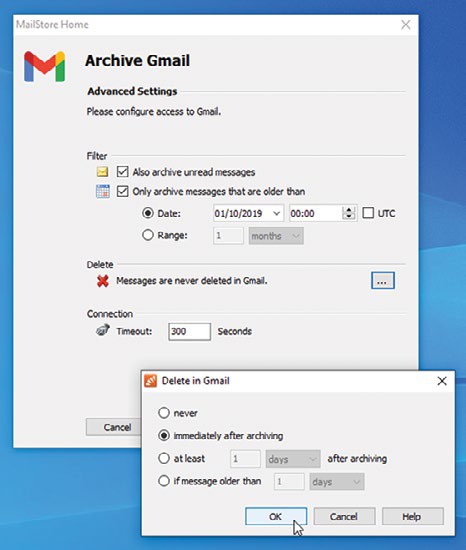
Free up online storage by archiving emails to MailStore.
© MICROSOFT
My question is this: if I replace the processor, will that cause problems with my current OS installation? I’m not averse to having to do a clean install but would rather not if I don’t have to. My system is completely stable, performs well, and even though I did an in-place upgrade through Windows Update, I see no compelling reason to do a clean install.
So, will a processor upgrade cause any issues that I should be aware of?
—Bobby Sledge
THE DOCTOR RESPONDS: Strictly speaking, swapping out your processor is much less disruptive than replacing your motherboard. In most cases, you should find your system happily accepts the Ryzen 3700x, but there’s a small risk it could introduce some stability issues you can’t easily resolve.