THE SLICK AND SUBTLE 4090 RIG
Building with the best for less
MORE OFTEN than not, we try to use our head, rather than following our heart. Last issue, we blew the budget on an RTX 4090 build, but this issue, we’re keeping that GPU and pairing it with much better value components. That includes an Intel i5-13600K CPU, a much cheaper CPU than its top-end i9-13900K cousin, but not one we’re expecting to hobble the Nvidia GPU in any games. We’ve also tried to keep costs down in other areas—the idea being you can get up and running with the best GPU currently available, and still be able to upgrade your rig down the line.
Using the NZXT H7 case and without RGB (except a little splash on the GPU), this system is a minimalist approach to an RTX 4090 build— certainly not the typical showboat PC you’d expect when including the current top GPU monster. We’re not knocking the overall design and aesthetic here, though, as the H7 case from NZXT is a reputable and strong chassis to use for such a PC.
Because we’re using a top-end GPU, this build will still be in the mid-range price bracket. But it’s considerably cheaper than a most other RTX 4090 builds. We haven’t chosen a fancy cooling solution, instead opting for the stock Intel cooler. We’ve also used five NZXT stock fans to keep the temperature down, and made the decision to incorporate a Z690 motherboard to save money over using a newer Z790 variant. Based off our tests last issue, there shouldn’t be a performance hit.
We’ll be putting this build head-tohead with the aforementioned machine, and we’re excited to see what differences there are. Let’s get cracking with the build!
–SAM LEWIS
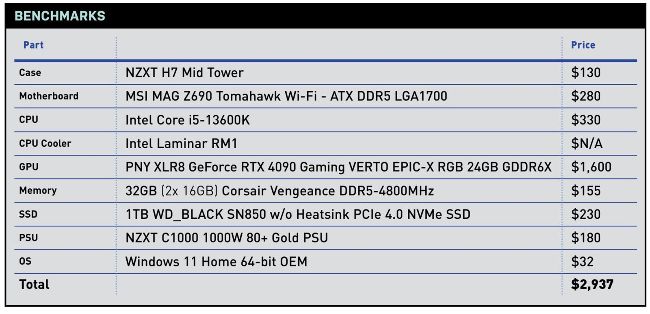
PRICES CORRECT AT THE TIME OF PRINTING
BUILD IT!
Step-by-step guide to assembling this PC PG. 22
WHAT’S IN THE BOX
CPU
Intel Core i5-13600K
The 12600K from the last generation was an impressive chip for the price. So with the release of the 13600K, we had high expectations for the Raptor Lake variant. It packs 14 cores using a hybrid architecture splitting the cores into six performance foreground task cores and
eight efficiency cores for things behind the scene. It’s a speedy CPU with enough power to tackle the majority of tasks you throw at it with a max turbo frequency of 5.10GHz too. This should be a CPU that has enough grunt to keep up with the RTX 4090, but on a budget.
Price: $300, www.intel.com
MOTHERBOARD
MSI MAG Z690 Tomahawk Wi-Fi
Sure, we could have opted for a cheaper motherboard here to keep costs down further, and there’s even a DDR4 variant of the same mobo. Yet, when we were deciding on where to spend our budget wisely, in terms of longevity, we picked a board with great compatibility for the next generation of components.
We’ve chosen the DDR5 option for this reason and also to accommodate our Corsair Vengeance sticks. However, we have stuck with the Z690 chipset instead of the latest Z790 to save some extra bucks too as the Z690 chipset is still a great platform to build on.
Price: $280, www.msi.com
CPU COOLER
Intel Laminar RM1
To cut costs but keep our CPU cool, we decided to steer away from an AIO. Although that option would make for a much better cooling solution and look more striking in the build, the stock cooler still performs well, although we wouldn’t use it on a higherperforming more resourcehungry CPU such as the i9-13900K. Intel’s latest stock coolers also have visually improved to be on a par with AMD’s alternative offerings. For a while, Intel’s looked outdated.
To fill the gap of an AIO CPU cooler, we’ve introduced three NZXT Aer
F 120mm fans found in some spare NZXT cases we had in our studio. These are around $18 each and will pull in plenty of air sitting at the front of the case.
Price: $N/A,
www.intel.com
BUILDIT!
Step-by-step guide to assembling this PC PG. 22
CASE
NZXT H7
We’ll be building this rig in the minimal-looking NZXT H7 case. As we’ve mentioned before, this is our least favorite of the three H7 case variants. The H7 Airflow offers the best airflow (unsurprisingly) and the H7 Elite is the showstopper of the selection with its RGB and glass front paneling.
However, the minimalist style suits our system the best and it’s still a well-built clean design. The build quality is superb, exactly what you’d expect from NZXT, and there are plenty of great cable channeling options to keep things nice and organized.
Price: $130, www.nzxt.com
PSU
NZXT C1000 1000W 80+ Gold PSU
For this system to run properly, it’s recommended to use a PSU of at least 1,000W. After all, if you’re spending that much money on the GPU, it’s better to be safe than sorry. As we said earlier, our GPU is powerhungry, requiring either three or four individual PCIe cables per graphics card. We’ll touch on this later as it was a slight inconvenience but the bottom line is this
C1000 has enough capability to safely manage this power and was a necessity for the build. Plus it’s rated at 80 Plus Gold efficiency.
Price: $180, www.nzxt.com