EPAPER EVERYWHERE
Low-power screens are appearing in all manner of devices. Barry Collins plots the rise of ePaper
Unlike its fibrous counterpart, ePaper is a slow burner. Although Amazon’s Kindle and other ebook devices have been with us for almost 20 years, the ePaper technology has largely been confined to such readers – at least until the past couple of years.
Suddenly, ePaper is everywhere. In smartphones, tablets, laptops, monitors, smartwatches and other displays. And now that colour ePaper has entered mainstream production, it’s likely we’re going to see the technology further spread its wings.
There are many advantages that ePaper (often incorrectly referred to as E Ink, which is an ePaper brand) has over conventional LCD displays. It’s low power, much easier to read in sunlight and relatively inexpensive. It has its drawbacks, too, of course. Snail-like refresh rates, ghosting and a lack of vibrancy when it comes to colour mean that it’s only suitable for particular applications. Nobody in their right mind is watching YouTube videos on an ePaper tablet, for example.
Here, we’re going to discover the different device categories that ePaper has wormed its way into and explore how it’s changed the way people use such devices.
SMARTPHONES
Given that doomscrolling has reached a new peak in 2025, you can see why people might be tempted by a smartphone that’s not brilliantly responsive, that isn’t ideal for watching TikToks or YouTube videos.
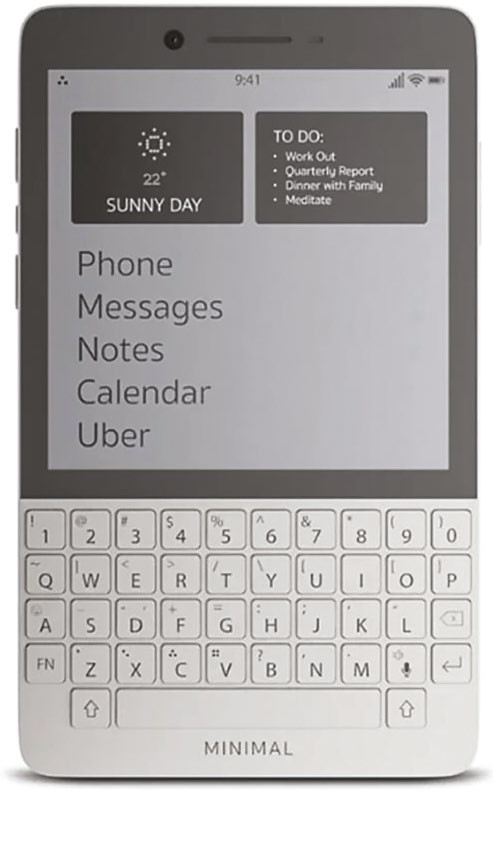
The Minimal phone is designed to keep distractions to an absolute minimum
At the truly Spartan end of the scale you’ve got devices such as the Minimal phone – a device that sets out to be “distraction-free”. It has a 4.3in 3:4 ePaper display with a 230ppi resolution (the standard Kindle offers 300ppi, for reference). It also has a BlackBerry-like QWERTY keyboard at the bottom, to reinforce its retroness.
There are no icons or notifications to prod on the homescreen, just a stark list of functions, such as Book, Calendar, Music and Phone. It’s not entirely divorced from 21st century communications, though, with Email and Messages among the options, as well a link to hail an Uber. And it has access to the Play Store, so you can install anything you can’t live without.