PYTHON
Code a multiplayer shoot-em up game
In the first of a two-part series, Andrew Smith takes you though coding a multi-player shooter in good old Python.
Part One!
Don’t miss next issue, subscribe on page 26!
OUR EXPERT
Andrew Smith is a software developer for NHS Digital, has a bachelors degree in software engineering and a master’s degree in computer networks.
The merciless forces of Hell have launched a deadly invasion in our region of deep space, and you have been recruited to repel this attack. Mankind is depending on you! Yes, this month we’re going to look at Star Fighter, a video game created by Francis Michael Tayag. Star Fighter has been written as a classic spaceship shoot-em up style arcade game, which is played as a single player taking on computergenerated opponents.
The video game project consists of game music, sound effects, animations, bullets shooting from the spaceship and enemy characters with associated attack patterns, not to mention a fully implemented menu system to configure game options. A player can also enter their name on a scoreboard at the end, which is saved. Many of these features will be covered in this month’s instalment. To get started we need a few things: Python, PyGame and the Star Fighter source code.
Installation and setup
To install Python, open a terminal window (Ctr+Alt+T) and type sudo apt-get python3 followed by sudo aptget install pip3 . Then install the PyGame module by typing pip3 install pygame . To make sure that you’re using PyGame version 2.0 (because Star Fighter does use a fairly recent version of PyGame), type python3 -m pip install pygame==2.0.0 . You should now have version 2.0 of PyGame installed.
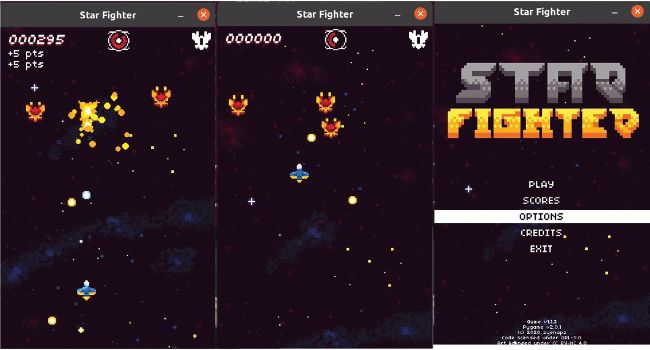
Star-Fighter in-game shots from its hot Galaxian-style shooting action.
Finally grab a copy of the Star Fighter project source code by cloning the GitHub repository. Before typing the following to clone (copy) the GitHub repository, move into a folder on your system that you would like the project to be copied to. git clone http://github.com/zyenapz/Star-Fighter
You should now see a folder structure shown in the screenshot (see facing page, above right). Navigate into the SOURCE folder where you’ll find the main python file for the game, game.py. To experience playing the game, type the following: python3 ./game.py
Before continuing, take some time to learn what’s available to use in the game, such as the menu system which has been implemented, what the game controls are (mainly the cursor keys and Z key for firing) and in general how the game plays…. oh and of course, enjoy blasting the nefarious agents of Hell back to where they came from, before moving on with this tutorial.