Answers
Got a burning question about open source or the kernel? Whatever your level, email it to lxf.answers@futurenet.com

Neil Bothwick
tickles the toes of Tux to trigger the tears of torment!
Q Disappearing drives
Since updating to Ubuntu 22.04 LTS, when I connect a USB external hard drive to my computer I don’t get a symbol icon in the Dock to indicate that the drive is mounted. Is this behaviour different to 20.04?
Bryan Mitchell
A There are a couple of possibilities here. The dock in 22.04 is “busier” than 20.04. With a smaller screen (1,368x768) we found that the icon was appearing, but below the bottom of the screen. It was only visible if we scrolled the dock down.
An alternative explanation is that the setting to show devices has been disabled. You can check in a terminal with the following command:
$ gsettings get org.gnome.shell. extensions.dash-to-dock show-mounts
This should return true if devices are to be shown, but if it comes back as false then you can change it with:
$ gsettings set org.gnome.shell. extensions.dash-to-dock show-mounts true
Note the difference between the commands. The first uses get while the second uses set . It’s only one letter, but it makes a big difference! You can also view and change this setting with dconf-editor, following the same path: org>shell> and so on. This program isn’t installed by default, so it’s up to you whether you want to install it just to change one setting. You could say that it depends on whether you’re a shellophile or shellophobe.
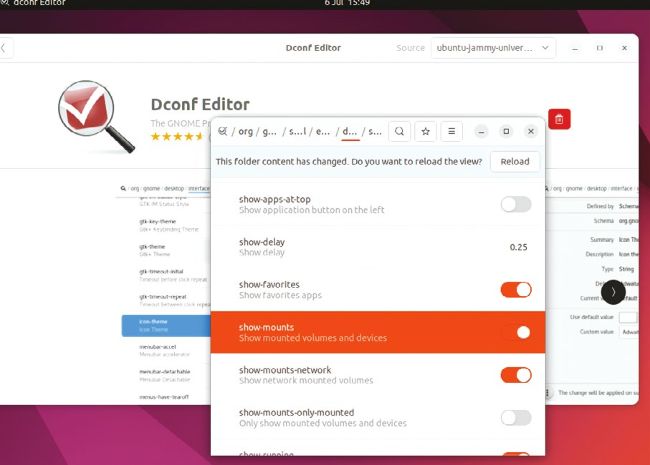
You can change GNOME’s hidden settings from the command line, or install dconf-editor for a point and click approach.
Q Too many to count
I have a folder potentially containing tens of millions of files. I want to empty this folder out and delete all the files inside it. It’s on the root filesystem, so reformatting isn’t a solution. Running:
$ rm -rf *
inside
the
folder
fails
after
about
24
hours.
rm
starts
consuming
all
RAM
in
the
machine
and
gets
killed.
Neither
does
$ rm -rf directory
fare
any
better,
because
after
24
hours
it
gets
killed
as
it
started
consuming
all
the
RAM
in
the
machine.
This
is
for
a
CentOS
6
machine
with
a
Core
2
Duo
Intel
CPU
and
8GB
of
RAM.
Also, after 24 hours
rm
hasn’t started deleting even one file from this folder, because the disc is 100 per cent full before the delete is commenced upon, but it stays at 100 per cent even after 12 hours of running rm -rf on or inside the folder. I cannot pull an ls either – it also gets killed after about 20 hours of attempting to list the complete contents of the directory.