Está atualmente a visualizar o Portugal versão do sítio.
Gostaria de mudar para o seu sítio local?
15 TEMPO DE LEITURA MIN

Filesystem

Navigate your way around the filesystem

LINUX BASICS

Nick Peers explains the basics of using the Linux filesystem, from managing your files to learning about permissions.

Part Five!

Don’t miss next issue, subscribe on page 16!

OUR EXPERT

Nick Peers has spent enough time around computers to know the importance of a good file manager.

Files play a crucial role in any operating system, but they’re especially important in Linux thanks to the way its ext4 filesystem is structured. In this tutorial, we’ll take you through the art of navigating the Linux filesystem (FS) on your PC. We kick off with a quick tour of your desktop’s file manager, based on the Files app found in the latest version of the Cinnamon desktop in Mint 22. We’ll then delve into the key aspects of working with files. You’ll get an overview of the ext4 FS itself, including how to mount additional drives so they’re easily accessible.

We’ll then take you on a quick tour of Linux’s key directories and what you can expect to find inside, before tackling a key aspect of Linux files: permissions and file ownership. You’ll discover how permissions are applied, what effect they have and how to change them. Get more from the Files app with the help of our walkthrough (page 54), which will help you with the day-to-day tasks of navigating, editing and managing files. And if you find all that a little dry, check out thes box (page 55) on setting up a shared folder so you can easily transfer files over your network.

Not a Mint user? Not a problem – most of what we cover is easily translatable to your choice of distro.
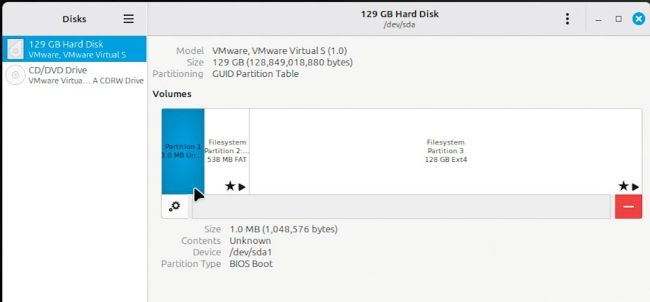
You can find out which file refers to which partition by examining the item’s Device entry in the Disks utility.

QUICK TIPS

Expand the Nemo file manager’s capabilities with plugins. Add rotate and resize options to the context menu when you right-click an image with sudo apt install nemo-imageconverter or type sudo apt install nemocompare to add options for comparing files.

Access Files

As you’d expect, access to Files is baked directly into the Cinnamon desktop – simply click the folder icon on the taskbar to open a window that should be familiar to all PC users, including Mac OS and Windows switchers. Files takes the classic two-pane approach, with shortcuts on the left and a view of the selected folder, which defaults to your personal home folder. There are few surprises – the annotation (right) reveals the key elements of Files, and anyone familiar with the Windows File Explorer will find it’s a simple transition.

You can easily access any part of your filesystem in Files, but its main use is for managing your own files in your personal home folder. Before exploring further, let’s sidestep to examine the structure of Linux’s FS.

Desbloqueie este artigo e muito mais com
Pode desfrutar:
Desfrute desta edição na íntegra
Acesso instantâneo a mais de 600 títulos
Milhares de edições anteriores
Sem contrato ou compromisso
INSCREVA-SE AGORA
30 dias de teste, depois apenas €11,99 / mês. Cancelar em qualquer altura. Apenas para novos subscritores.


Saiba mais
Pocketmags Plus
Pocketmags Plus

Este artigo é de...


View Issues
Linux Format
September 2024
VER NA LOJA

Outros artigos desta edição


LINUX FORMAT
LINUX FORMAT
The #1 open source mag Future Publishing Limited,
WELCOME
MEET THE TEAM
This issue, we’re introducing readers to Linux Mint 22 and its Cinnamon desktop; in the name of open source choice, what other desktop should people try and why?
Lightning strikes
Linux isn’t a magic bullet. It still has
REGULARS AT A GLANCE
CrowdStrike issues hit Microsoft and Linux
Microsoft wasn’t the only victim of faulty CrowdStrike updates. Weeks before the worldwide outage, Debian and RHEL were also hit.
Nvidia officially goes open source
The R560 driver marks Nvidia’s full transition to open source GPU kernel modules.
Google backs down on cookies
Chrome will allow users to make “informed choices”.
SUITE PRIVACY
Italo Vignoli is one of the founders of
EARLY ADOPTER
David Stokes is a technology evangelist at Percona.
Jellyfish devs say help others
Lead developer Joshua Boniface has asked users to support clients instead.
Switzerland is open source
New law requires all government apps to be open source.
Ext4 gets faster
The latest Linux 6.11 comes with performance optimisation for ext4.
Distro watch
What’s behind the free software sofa?
ATOMIC STEAM
Ludovico de Nittis is a software engineer at
FILTER TIPS
Jon Masters is a kernel hacker who’s been
Kernel Watch
Jon Masters summarises the latest happenings in the Linux kernel, so that you don’t have to.
Answers
Got a burning question about open source or the kernel? Whatever your level, email it to answers@linuxformat.com
Mailserver
WRITE TO US Do you have a burning
HotPicks
THE BEST NEW OPEN SOURCE SOFTWARE ON THE PLANET
THE LINUX SMART HOME
We aim to keep the lights on the smarter way with Home Assistant, Zigbee and low-cost IKEA kit.
REVIEWS
HighPoint Rocket 1608A
For when Shane Downing really needs 56GB/s of storage speed.
Q4OS 5.5
Nate Drake is on cue to explore the latest Q4OS and comes away amazed at its speed and simple setup.
Pardus 23.2
Nate Drake offers readers a chunk of Turkish Delight as he tours this Debian-based distro, coded with full government approval.
Nobara Project 40
Nate Drake delves into this modified Fedora distro. Is this the ultimate in Linux gaming or should you say “no Nobara”?
Mabox Linux 24.07
A spin of Manjaro, which is a spin of Arch, is leaving the normally centred Nate Drake in a right tizzy.
Men of War 2
Often found wondering what war is good for, Jake Tucker is reminded by The Management that it looks after his pay cheque and pension fund.
ROUNDUP
Remote desktops
Ever wish you had the desktop of another computer right in front of you? Michael Reed checks out five applications that can do this and more.
The verdict Remote desktops
We’ve ended up with five options that can
FRESH MINT 22!
Fresh Mint 22!
Linux Mint is in season and Jonni Bidwell has been sniffing it voraciously. Join him on a fragrant voyage of discovery.
Mint is for its users
Discover why Linux Mint is your new favourite Linux flavour.
How to install Mint
Get Mint booted, explore the live environment, then get this herbaceous powerhouse installed forthwith.
Getting to know Mint
Explore the freshest of fresh installs and tweak it to perfection.
X marks the apps
Perfect your install and discover the new apps on the block.
Pi USER
Pi Foundation releases AI teaching guidance
Worry no more about how to teach about ethical generative AI – the Pi Foundation has you covered.
Fritzing 1.0.3
Les Pounder spends most of his work hours looking at circuit diagrams, then carries on doing the same thing after work.
Sovol SV08
Big, super-fast and open source, it looks as though Denise Bertacchi has found her perfect printer!
Simulate your Pi Pico projects with Wokwi
Claiming he’s saving resources, Les Pounder simulates an electronics project because he is too lazy to get up and build it for real.
IN DEPTH
PIPEWIRE
Matt Holder delves into the depths of our audio stack to learn about PipeWire and what came before it.
TUTORIALS
Try a tiny text editor
Shashank Sharma lives by the try-it-before-you-dismiss-it code. That’s how he finds new tools. It’s also how he discovered a fondness for kimchi.
Geek out with NixOS
Mats Tage Axelsson shows you how easy it is to use NixOS and the challenges of installing new applications. All 100,000 packages.
Expand your storage with high-speed SSDs
RAID
Upgrade it: Solid-state drives
RAID
Take local control of multiple AI models
OLL AMA
Record your games on the Steam Deck
STEAM DECK
ADMINISTERIA
Get to grips with crontabs on Linux
Ever the busy boy, Stuart Burns needs things to run on time, so he’s here to show you how to set up schedules.
AngelVPN
Always a good boy, Sam Dawson thinks he’s rather smitten with this devilishly good service.
PureDome VPN
A VPN service that’s aimed at business types like Mike Williams, who prefers to do his private business in private.
WHATEVER HAPPENED TO SYMBIAN?
The Symbian operating system had a lot going for it, and even dabbled with open source, so why did it fail? Mike Bedford investigates.
CODING ACADEMY
Code your own Wordle-like game
PYTHON
How to build a 6502 assembler
6502
Conversa
X
Suporte Pocketmags