US
10 MIN READ TIME

ASK

TECH SUPPORT & TECHSPLANATIONS

EXPERT ADVICE

Our resident genius solves your Mac and iOS problems

Email Mac|Life at ask@maclife.com

Best drive options?

WHEN IT COMES to external storage, Thunderbolt products come at premium cost, typically around twice the price of USB drives.What’s less apparent is the gap in performance; while Thunderbolt 3 SSDs readily exceed 1.5GB/s transfer speeds, and can reach 2.8GB/s, many USB equivalents struggle to reach 1GB/s, and some even fall below half that.

One reason is the confusion of opaque USB 3.x standards, against Thunderbolt’s minimum of two–lane PCIe 3.0, which guarantees at least 1.5GB/s. USB 3.x performance also varies more across different Mac models. Worryingly, some of the slowest are those with Apple’s latest M1 chips, with older Intel Macs often proving faster and more consistent in the face of USB connections.

For reliable speed and consistency, Thunderbolt is worth its premium.
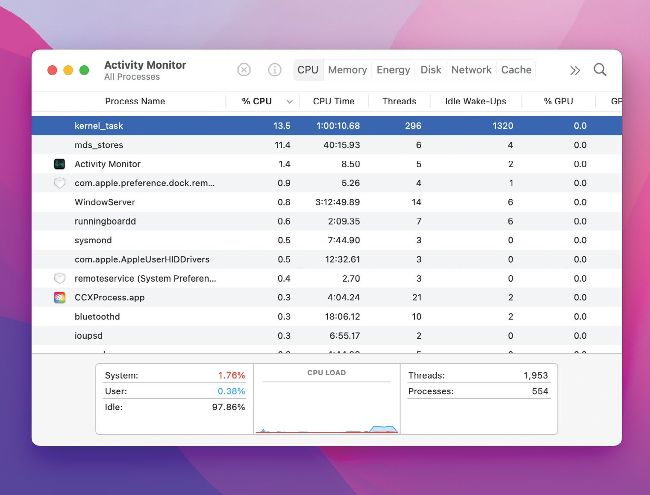
When you see kernel_task climbing in Activity Monitor’s CPU listing it’s a sign your Mac needs cooling down.

> Warning sign in Activity Monitor

Sometimes I see kernel_task hogging the CPU in Activity Monitor on my MacBook Pro 15–inch 2019. After restarting, it’s fine again for a while, but reappears later. Why is this?

High CPU % load for kernel_task is the best sign that your Mac is getting too hot and needs to cool down. Often misinterpreted as the cause of problems, it’s actually part of your Mac’s defenses to keep it cool under thermal stress, and a warning sign. macOS monitors thermal sensors inside components, and the load imposed on its processor. When it suspects temperatures will rise, or they have already started increasing, macOS takes measures to increase cooling, such as blowing air over sensitive components using fans, and kernel_task occupies processor cores to block any runaway processes.

Unlock this article and much more with
You can enjoy:
Enjoy this edition in full
Instant access to 600+ titles
Thousands of back issues
No contract or commitment
Try for 99c
SUBSCRIBE NOW
30 day trial, then just $9.99 / month. Cancel anytime. New subscribers only.


Learn more
Pocketmags Plus
Pocketmags Plus

This article is from...


View Issues
Mac|Life
September 2022
VIEW IN STORE

Other Articles in this Issue


START
NEW (ISH) MACBOOK PRO
This issue’s cover has to be one of
> THE SHIFT
MATT BOLTON believes that now is the time for us to say “Hey Siri, shape up or ship out,” and for Siri to be top of the AI league
LETTER OF THE MONTH
In response to your Rip/Mix/Burn article — your
Apple announces Lockdown Mode
New high–security mode for high-risk individuals
> M2 MBP falls short
THINKING OF BUYING the base– model M2 MacBook
> Steve Jobs honored
Image rights: Apple Inc. STEVE JOBS HAS been
Apple TV+ success
> APPLE TV+ HAS received 52 Emmy Award
CRAVE
THE GEAR WE’RE LUSTING AFTER
UPGRADE YOUR APPS
UPGRADE YOUR APPS
Choosing alternatives to Apple’s built–in apps and tools can take your Mac workflows to the next level. Whatever you’re planning on doing, our pick of the best will help get your projects done
EVOLUTION OF THE MACBOOK
Evolution MacBook of the MacBook
How Apple has changed the way we use computers — not just once, but again and again
From Portable to Pismo
From the first mobile Mac to one of Apple’s most–loved models
From TiBook to MacBook
The millennial Macs that introduced Apple’s metal years
From Touch Bar to M2
The end of the road for Intel and a whole new world of Macs
REVIEWS
TOUGH TESTING, TRUSTED RATINGS
REVIEWS
MacBook Pro 13–inch (2022)
Legendary laptop gets updated innards, but still feels out of time
Arlo Go 2
Versatile 1080p security camera with Wi–Fi and 4G LTE support
1More Piston Buds Pro
Affordable wireless earbuds with noise cancelling
622 Magnetic Battery
Portable charger with a kickstand
Aura Mason Luxe
Display all your memories
Sony WH–1000XM5
Sony’s new cans can block out the sound of a hurricane while delivering music to your ears
Logitech Lift
Reduce wrist–strain with Logitech’s latest ergonomic mouse
BoostCharge Pro Portable
MagSafe charger is ideal for travel
Ugreen Nexode 100W Charger
Charge four devices at once
Western Digital G–Drive 12TB
A spacious hard drive with Power Delivery
PORTABLE HARD DRIVE STORAGE
Slimline storage under $100 to pop in your bag and go
TOSHIBA CANVIO FLEX 2TB
An excellent all–rounder with the best performance of all
Penbook for iPad
Digital note–taking with a human touch
Writerly
Writing the book on creative Mac apps
Coppice
An app to harness great ideas and expand them
ReadKit 3.0
Catch up on your favorite news stories
Audio Hijack 4
Capture any audio streams on your Mac
Six apps to protect your privacy
Take control of your data once and for all
Best of the best
Can’t find the hardware or app you’re looking for in our reviews section? Then check in here — we’ve highlighted the best in every major category, as voted for by us
CREATE
CREATE
HOW TO DO ANYTHING ON YOUR MAC, iPHONE & iPAD
Go further in Luminar Neo
How to use AI–assisted tools to quickly enhance your people pictures
Take control of emails with Spark
Need an easy way to manage incoming emails? Try Spark
Spotlight and Siri tips
Spotlight and Siri make it easy to find anything on your Mac and beyond 
Kid–proof your devices
Protect your personal things from small people and party guests
Create an iOS sleep timer
Listen to soothing sounds without draining your iPhone battery
Translate on your device
Bad at languages? Don’t worry, your Apple kit can help you converse
Enjoy music on Apple Watch
How to get the perfect soundtrack wherever you are
iPhone sensors
The versatility of the iPhone depends on a powerful array of built–in sensors
BEGINNER’S GUIDES: MASTER MAPS
Get started with Maps
From turn–by–turn directions to curated travel guides, Apple’s Maps app has your back
Chat
X
Pocketmags Support