COVER FEATURE
Ditch Your LAPTOP
Tablets are bigger, better and more popular than ever, so why not replace your laptop with a more portable alternative? Robert Irvine recommends the best devices to buy
WHAT YOU CAN DO
• Browse the web more comfortably than on your phone
• View and edit photos and videos on a high-quality screen
• Work with documents and spreadsheets on the go
• Multitask by using several tablet apps simultaneously
• Choose the right specifications for your mobile computing needs
• Control your tablet using a keyboard and stylus
When the first Android tablets and iPads went on sale in 2010, some tech experts predicted they would replace PCs and laptops altogether. But as smartphones became larger and more powerful, attention was diverted from tablets and that prediction failed to come to fruition.
Things are changing, however, and we believe 2026 will be the year of the tablet. Not only are they becoming more popular – with sales up nine per cent on 2024 (www. snipca.com/57392) – but there are now more superb devices to choose from. These cater to all budgets and mobile computing requirements, and make replacing your laptop with a tablet a more viable prospect than ever before.
Tablets are no longer just big phones that can’t make calls, but portable PCs with high-quality screens, sophisticated operating systems and impressive specifications. In this feature, we review the best new devices that can serve as laptop alternatives.
We’ve chosen tablets that went on sale in the past 12 months. That rules out Amazon’s Fire HD range and Google’s Pixel tablet, which haven’t been updated since 2024. We also explain why you should ditch your laptop for a tablet, and recommend the best accessories to make it even easier and more comfortable to use. Don’t miss out on the year of the tablet – buy your dream device today.
WHY DITCH YOUR LAPTOP FOR A TABLET?
Lighter and more portable
Although their screens are getting larger, tablets are still much lighter and more easily portable than laptops. A 10-13in tablet typically weighs 450-700g, while laptops weigh 1.4-2.3kg – around three times heavier. Even the new Samsung Galaxy S11 Ultra tablet (www.snipca. com/57321, pictured below), which has a huge 14.6in screen, weighs only 694g.
Coupled with their slim builds, that lightness makes them easier than a laptop to slip into a bag and take on a train or plane – or to a coffee shop or pub. They’re also more comfortable to use while you’re lounging on the sofa or in bed.
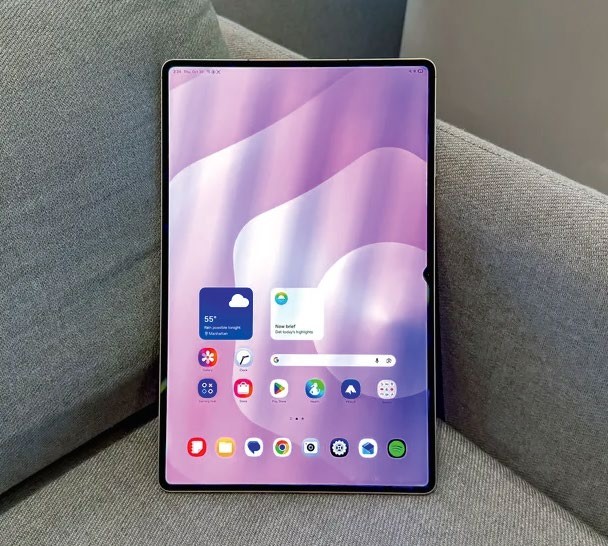
The Samsung Galaxy S11 Ultra has a huge screen but is still light
Cheaper than laptops
High-end tablets such as the iPad Pro may cost over £1,000, but – as we’ll explain – you can buy a powerful device for less than £500. That’s cheaper than most laptops with similar specifications. As we mentioned in our ‘Beat 2026’s price rises’ feature in Issue 725 (page 60), the soaring cost of RAM will increase laptop prices in 2026, but tablets – which generally use low-power DDR (LPDDR) memory – are less likely to be affected.
Longer battery life
With lighter operating systems and more energy-efficient processors, tablets last a lot longer between charges. The average battery life of a tablet is 10 to 14 hours, while for a laptop it’s six to 10.
Tablets use less power while on standby, and charge faster over USB-C. Some models, including the Plus versions of Amazon’s Fire HD tablets, even offer wireless charging – see picture (above right) of an Amazon Fire HD 8 Plus on an Angreat wireless-charging dock (£36 from www.snipca.com/57331).
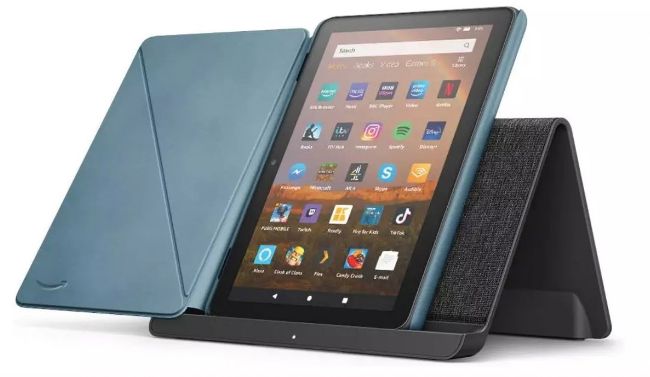
The Amazon Fire HD 8 Plus tablet offers wireless charging
Faster to load and use
Tablets boot in seconds rather than minutes, with no waiting for a BIOS or UEFI to load or background processes to complete. Mobile apps launch much more quickly than desktop programs, and you can navigate them faster by tapping and swiping, rather than clicking and scrolling.
Unlike laptops, tablets won’t slow down while background updates and antivirus scans consume RAM and processor power. And because they automatically manage app caches and temporary files, their performance isn’t affected by accumulated junk.
Easier to uninstall apps
Uninstalling an unwanted app from a tablet is as simple as long-pressing its icon on the homescreen and choosing Remove or Remove App (see screenshot below). On a laptop, you need to go through Windows Settings or use a dedicated uninstaller, and sometimes wait several minutes for the program to uninstall. You may even need to reboot your system to complete the process.